Area Hints
🟡 Updated this year⚠️ Install Order · 2 steps
Install in this order, then this mod last — most mods fail to load without their framework and dependencies in place.
🖼️ Gallery (5 images)


🔍 Analysis
- 👍 0.5% endorsement rate
- 🏆 #486 of 556 adventure mods in this game by downloads
📋 About This Mod
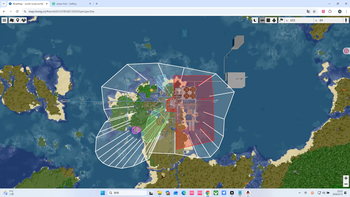
--- # 🏷️ Area Hints Mod **Add immersive area name popups to your Minecraft world!** When entering custom regions, elegant area titles appear at the top of your screen. Supports multi-level nesting, dimension default names, and easy creation tools—making exploration feel truly meaningful. --- ## 📖 Overview Areas Hint allows players to define regions (called “domains”) using polygons and display custom names upon entry. All calculations are handled client-side with multithreaded optimization, placing almost zero load on the server. Say goodbye to complex commands and use intuitive tools to mark your world with ease. --- ## ✨ Features * **Player Customization**: Freely name regions, define boundaries and height. * **High Performance**: Zero server load, with client-side optimization and multithreading. * **Automatic Area Titles**: Enter places like “Elven Forest” or “Dark Castle” and see smooth title animations appear on screen. * **Multi-level Regions**: Supports nested regions (e.g., “Kingdom” → “Throne Room”) with elegant transitions or combined displays. * **Dimension Default Names**: Displays the dimension name (e.g., “Wilderness Continent”) when outside all regions. * **Easy Creation Tool**: Use `/areahint easyadd` for an interactive setup—just walk and click to create areas. * **Fully Customizable**: Modify names, colors, heights, split or merge regions anytime. * **Beautiful & Smooth UI**: RPG-style title display (inspired by Genshin Impact), with adjustable styles and smooth animations. * **No Claim Restrictions**: Mark any place freely—explore without limits. --- ## 🎯 Why Choose Areas Hint? * **Player-Friendly**: No admin permissions required for creating area markers. * **Optimized Performance**: Client-side processing keeps multiplayer smooth. * **Plug and Play**: Install and start marking areas with simple commands. * **Highly Compatible**: Works seamlessly with minimaps, shaders, and optimization mods. --- ## 🛠️ Features Overview * Polygon-based region definition with multi-level domains (top-level / subdomains). * Ray-casting detection to determine player position. * Multiple rendering methods (CPU, OpenGL, Vulkan). * Rich subtitle style customization. * Full command system for configuration and management. * Interactive domain creation tool **EasyAdd**, designed for ease of use. --- ## 📋 Command System ### Basic Commands | Command | Description | Common Permission | |---|---|---| | `/areahint help` | Show all commands and usage | Everyone | | `/areahint reload` | Reload configuration and area files | Admin | | `/areahint on` | Enable client-side area hints | Everyone | | `/areahint off` | Disable client-side area hints | Everyone | ### Area Viewing & Management | Command | Description | Common Permission | |---|---|---| | `/areahint check` | List all joint areas | Everyone | | `/areahint check <joint area>` | View details of a specific joint area | Everyone | | `/areahint delete` | Start interactive area deletion | Everyone (usually only for areas you can operate) | | `/areahint tcp ` | Teleport to a safe location near the area's center | Teleport permission | | `/areahint udp ` | Teleport to a random safe location inside the area | Teleport permission | | `/areahint settp ` | Set the command prefix used for teleporting, e.g., `tp` or `minecraft:tp` | Teleport settings permission | ### Area Creation & Editing | Command | Description | Common Permission | |---|---|---| | `/areahint add <JSON>` | Add an area via JSON (kept for compatibility; `easyadd` recommended) | Admin | | `/areahint easyadd` | Start interactive area addition | Everyone | | `/areahint addarea` | Full alias for `easyadd`, supports the same interactive subcommands | Everyone | | `/areahint rename` | Start interactive area renaming | Everyone | | `/areahint addsignature` | Add an extended signature to an area | Admin or signature operators | | `/areahint deletesignature` | Delete an area's extended signature | Admin or signature operators | ### Area Geometry Editing | Command | Description | Common Permission | |---|---|---| | `/areahint expandarea` | Select an area from a list to expand | Everyone | | `/areahint expandarea <area>` | Directly specify an area to expand (recommended) | Everyone | | `/areahint shrinkarea` | Select an area from a list to shrink | Everyone | | `/areahint shrinkarea <area>` | Directly specify an area to shrink (recommended) | Everyone | | `/areahint dividearea` | Start interactive area division | Everyone | ### Single Vertex Editing | Command | Description | Common Permission | |---|---|---| | `/areahint addhint` | Start interactive vertex addition | Everyone | | `/areahint deletehint` | Start interactive vertex deletion | Everyone | ### Style & Display Settings | Command | Description | Common Permission | |---|---|---| | `/areahint recolor` | Start interactive area recoloring | Everyone | | `/areahint sethigh` | Start interactive area heigh
# 🏷️ Area Hints Mod
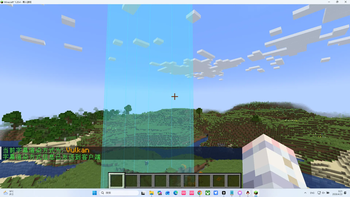
Add immersive area name popups to your Minecraft world! When entering custom regions, elegant area titles appear at the top of your screen. Supports multi-level nesting, dimension default names, and easy creation tools—making exploration feel truly meaningful.
## 📖 Overview
Areas Hint allows players to define regions (called “domains”) using polygons and display custom names upon entry. All calculations are handled client-side with multithreaded optimization, placing almost zero load on the server. Say goodbye to complex commands and use intuitive tools to mark your world with ease.
## ✨ Features
Player Customization: Freely name regions, define boundaries and height. High Performance: Zero server load, with client-side optimization and multithreading. Automatic Area Titles: Enter places like “Elven Forest” or “Dark Castle” and see smooth title animations appear on screen. Multi-level Regions: Supports nested regions (e.g., “Kingdom” → “Throne Room”) with elegant transitions or combined displays. Dimension Default Names: Displays the dimension name (e.g., “Wilderness Continent”) when outside all regions. Easy Creation Tool: Use `/areahint easyadd` for an interactive setup—just walk and click to create areas. Fully Customizable: Modify names, colors, heights, split or merge regions anytime. Beautiful & Smooth UI: RPG-style title display (inspired by Genshin Impact), with adjustable styles and smooth animations. No Claim Restrictions: Mark any place freely—explore without limits.
## 🎯 Why Choose Areas Hint?
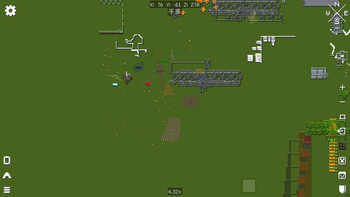
Player-Friendly: No admin permissions required for creating area markers. Optimized Performance: Client-side processing keeps multiplayer smooth. Plug and Play: Install and start marking areas with simple commands. Highly Compatible: Works seamlessly with minimaps, shaders, and optimization mods.
## 🛠️ Features Overview
Polygon-based region definition with multi-level domains (top-level / subdomains). Ray-casting detection to determine player position. Multiple rendering methods (CPU, OpenGL, Vulkan). Rich subtitle style customization. Full command system for configuration and management. * Interactive domain creation tool EasyAdd, designed for ease of use.
## 📋 Command System
### Basic Commands
| Command | Description | Common Permission | |---|---|---| | `/areahint help` | Show all commands and usage | Everyone | | `/areahint reload` | Reload configuration and area files | Admin | | `/areahint on` | Enable client-side area hints | Everyone | | `/areahint off` | Disable client-side area hints | Everyone |
### Area Viewing & Management
| Command | Description | Common Permission |
|---|---|---|
| `/areahint check` | List all joint areas | Everyone |
| `/areahint check
### Area Creation & Editing
| Command | Description | Common Permission |
|---|---|---|
| `/areahint add
### Area Geometry Editing
| Command | Description | Common Permission | |---|---|---| | `/areahint expandarea` | Select an area from a list to expand | Everyone | | `/areahint expandarea ` | Directly specify an area to expand (recommended) | Everyone | | `/areahint shrinkarea` | Select an area from a list to shrink | Everyone | | `/areahint shrinkarea ` | Directly specify an area to shrink (recommended) | Everyone | | `/areahint dividearea` | Start interactive area division | Everyone |
### Single Vertex Editing
| Command | Description | Common Permission | |---|---|---| | `/areahint addhint` | Start interactive vertex addition | Everyone | | `/areahint deletehint` | Start interactive vertex deletion | Everyone |
### Style & Display Settings
| Command | Description | Common Permission | |---|---|---| | `/areahint recolor` | Start interactive area recoloring | Everyone | | `/areahint sethigh` | Start interactive area heigh
📊 Mod Details
- Game
- Minecraft Mods
- Author
- IMSng
- Version
- 4.5.5
- Downloads
- 602
- Endorsements
- 3
- Category
- adventure
- Created
- 8/10/2025
- Updated
- 7/18/2026
- Game Versions
- 1.20.4
- Tags
- adventure, management, social
🔧 How to Install Minecraft Mods Mods
Download from Modrinth. Use Prism Launcher or drop into your mods folder.
📖 Full step-by-step install guide for Minecraft Mods →
Visit the official mod page for specific installation instructions for this mod.
🎮 Need cheat codes or console commands? Check ur gaming wiki for Minecraft Mods commands, item IDs, and more.
❓ Frequently Asked Questions
Which Minecraft Mods versions does Area Hints support?
The author lists 1.20.4. Other versions may work but are untested by the author.
What is the latest version of Area Hints?
Version 4.5.5, published 2026-07-18 with 602 downloads recorded at the source.
Keep browsing — more Minecraft Mods mods await