AquaGuard
🟡 Updated this year⚠️ Install Order · 2 steps
Install in this order, then this mod last — most mods fail to load without their framework and dependencies in place.
🖼️ Gallery (1 images)
🔍 Analysis
- 🏆 #224 of 372 forge mods in this game by downloads
📋 About This Mod
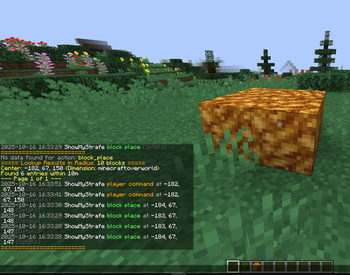
# AquaGuard AquaGuard is a powerful server administration mod for Minecraft Forge, designed to help server owners track and manage in-game activities with ease. It logs player actions, block changes, fluid placements, and more, while providing robust tools for inspection, rollback, and log pruning to maintain a fair and secure server environment. ## Features - **Comprehensive Logging**: Tracks block placements, breaks, fluid interactions, container access, player deaths, logins, logouts, chat, commands, and more. - **Inspect Tool**: Use a special stick to inspect block history with detailed logs (left/right-click blocks). - **Rollback & Restore**: Revert or restore changes by player or radius, supporting blocks and fluids, with customizable timeframes. - **Prune Logs**: Clean up old logs to keep your database lean and efficient. - **Customizable**: Enable or disable specific logging options via the config file. ## Commands - `/ag inspect` or `/ag i`: Toggle the inspect mode to view block history. - `/ag lookup <user/radius/position> ...`: Search logs by player, radius, or specific position. - `/ag rollback <user/radius> ...`: Revert changes made by a player or within a radius. - `/ag restore <user/radius> ...`: Restore changes to their original state. - `/ag prune <time>`: Remove logs older than the specified time (e.g., `7d` for 7 days). ## Installation 1. Ensure you have **Minecraft Forge** installed for your Minecraft version (e.g., 1.20.1). 2. Download the latest AquaGuard release from (https://modrinth.com/mod/aquaguard). 3. Place the `.jar` file in your server's `mods` folder. 4. Start the server to generate the `aquaguard` config folder in `config/`. 5. (Optional) Edit `config/aquaguard/aquaguard_logs.json` to customize logging settings. ## Requirements - **Minecraft**: 1.20.1 (or compatible version) - **Forge**: Latest for your Minecraft version - **Server-side**: Works on servers, no client mod required ## Support Dm me on (https://t.me/mysterylurking) for help, or report issues on (https://github.com/denfry/aquaguard). ## License AquaGuard is licensed under the MIT License. See (https://github.com/denfry/aquaguard) for details.
# AquaGuard
AquaGuard is a powerful server administration mod for Minecraft Forge, designed to help server owners track and manage in-game activities with ease. It logs player actions, block changes, fluid placements, and more, while providing robust tools for inspection, rollback, and log pruning to maintain a fair and secure server environment.
## Features - Comprehensive Logging: Tracks block placements, breaks, fluid interactions, container access, player deaths, logins, logouts, chat, commands, and more. - Inspect Tool: Use a special stick to inspect block history with detailed logs (left/right-click blocks). - Rollback & Restore: Revert or restore changes by player or radius, supporting blocks and fluids, with customizable timeframes. - Prune Logs: Clean up old logs to keep your database lean and efficient. - Customizable: Enable or disable specific logging options via the config file.
## Commands
- `/ag inspect` or `/ag i`: Toggle the inspect mode to view block history.
- `/ag lookup
## Installation 1. Ensure you have Minecraft Forge installed for your Minecraft version (e.g., 1. 20. 1). 2. Download the latest AquaGuard release from (https://modrinth.com/mod/aquaguard). 3. Place the `.jar` file in your server's `mods` folder. 4. Start the server to generate the `aquaguard` config folder in `config/`. 5. (Optional) Edit `config/aquaguard/aquaguard_logs.json` to customize logging settings.
## Requirements - Minecraft: 1. 20. 1 (or compatible version) - Forge: Latest for your Minecraft version - Server-side: Works on servers, no client mod required
## Support Dm me on (https://t.me/mysterylurking) for help, or report issues on (https://github.com/denfry/aquaguard).
## License AquaGuard is licensed under the MIT License. See (https://github.com/denfry/aquaguard) for details.
📊 Mod Details
- Game
- Minecraft Mods
- Author
- denfry
- Version
- 1.0
- Downloads
- 166
- Endorsements
- 0
- Category
- forge
- Created
- 10/19/2025
- Updated
- 10/16/2025
- Game Versions
- 1.20.1, 1.20.2, 1.20.3, 1.20.4, 1.20.5
- Tags
- game-mechanics, utility
🔧 How to Install Minecraft Mods Mods
Download from Modrinth. Use Prism Launcher or drop into your mods folder.
📖 Full step-by-step install guide for Minecraft Mods →
Visit the official mod page for specific installation instructions for this mod.
🎮 Need cheat codes or console commands? Check ur gaming wiki for Minecraft Mods commands, item IDs, and more.
❓ Frequently Asked Questions
Which Minecraft Mods versions does AquaGuard support?
The author lists 1.20.1, 1.20.2, 1.20.3, 1.20.4, 1.20.5, 1.20.6. Other versions may work but are untested by the author.
What is the latest version of AquaGuard?
Version 1.0, published 2025-10-16 with 166 downloads recorded at the source.
Keep browsing — more Minecraft Mods mods await