Apparition
🟠 Updated over a year ago⚠️ Install Order · 2 steps
Install in this order, then this mod last — most mods fail to load without their framework and dependencies in place.
🖼️ Gallery (5 images)
🔍 Analysis
- 👍 0.9% endorsement rate
- 🏆 #106 of 254 decoration mods in this game by downloads
📋 About This Mod
# **Apparition** Apparition is a mod about cleverly concealing things in plain sight, and maybe just a little violence. The mod includes features to suit building, technical contraptions, and pvp scenarios through several interesting features that are effective if used correctly. # **Features and Mechanics** ## **Total Abstraction** While totally abstracted, the player will gain true invisibility as long as they are abstracted. Additionally, the player will not be able to sprint, break blocks, use any right click function (some exceptions) or damage entities. If the player is damaged, actualizes, or cancels the effect, the player will no longer be totally abstracted. ## **Obtaining Items** ### **"Abstract" Blocks** To obtain any abstract block, just either craft it with the equivalent abstract materials used to craft it (if it needs any blocks), or craft the block with an Abstract Crystal. This will turn the block into an abstract block. ### **"Phantasmal" Blocks** To obtain any phantasmal block, just either craft it with the equivalent phantasmal materials used to craft it (if it needs any blocks), or craft the block with a Phantasmal Crystal. This will turn the block into a phantasmal block. ### **Abstract Crystal** To obtain abstract crystals, the player simply has to hold any amount of amethyst blocks in their offhand, and then right click with the apparitive eye. The amethyst will be turned into abstract crystals, the player will recieve molecular instability, and they will take some damage. ### **Phantasmal Crystal** To obtain phantasmal crystals, the player simply has to hold any amount of amethyst blocks in their offhand, and then right click with the unstable eye. The amethyst will be turned into phantasmal crystals, the player will recieve molecular instability, and they will take some damage. ### **Apparitive Eye** To obtain the apparitive eye, you craft the unstable eye together with two abstract crystals, two phantasmal crystals, and four end crystals. ### **Unstable Eye** To obtain the unstable eye, an eye of ender must be placed in an end portal frame, and then shift-right-clicked with an end crystal in the main hand, and a stack of amethyst blocks in the offhand. The unstable eye will then be in the frame for the player to collect by right clicking on the frame. ## **Items** ### **Apparitive Eye** When this item is used, the player will look through the eye and gain 1 minute of the "Abstraction" effect. The eye will go on cooldown for 1 minute when this happens. ### **Unstable Eye** When this item is used when the player is abstracted and they are sneaking, the player will become totally abstract. If the player isn't abstracted, right clicking the eye will result in the player gaining 1 minute of Molecular Instability ## **Effects** ### **Abstraction** When the player has the Abstraction effect applied, a few things happen. The player's block reach distance is increased, their body becomes more transparent, the player's gravity is lowered, the player's speed is increased, the player's damage absorption is lowered, and the player's scale is increased. ### **Molecular Instability** This effect is gained if the player tries to remove the "Abstraction" effect. This effect will make the player slower, weaker, and have a chance to not be knocked back by incoming damage. If the player tries to clear this effect by any means, they will instantly die and explode on death. ## **Blocks** ### **"Abstract" Blocks** Blocks that are abstract, or "Abstract" blocks, have special properties compared to normal blocks. Abstract blocks can "Abstract" or become completely transparent, uninteractable, and unable to be mined by any player without the "Abstraction" effect. If a player has this effect, the block will be able to be mined, and interacted with. The block will also be visible to any player with the Abstraction effect. Additionally, the player can also shift any abstract block to the opposite state by just holding shift and right-clicking on the block with an empty hand. Some more properties of abstract blocks include: - Abstracted blocks will **always** drop themselves upon mining them with the right tool. No matter if the block would normally drop something else. - You cannot place anything inside of an abstract block when it is abstracted. - All gravity blocks that have been abstracted will not fall, but instead be suspended mid-air until they are actualized. - Abstracted blocks dont affect light. The only exception to this is blocks that already emit light, they will keep their light-emitting properties when abstracted. (this setting is toggleable for each block that is abstracted. e.g. an abstracted torch will still emit a light level of 15 when toggled while abstracted, but if it is not toggled, it wont.) - Water will still interact with abstract blocks if they are abstracted. ### **"Phantasmal" Blocks** Blocks that are phantasmal, or "Phantasmal" blocks, are similar to abstract block
# Apparition Apparition is a mod about cleverly concealing things in plain sight, and maybe just a little violence. The mod includes features to suit building, technical contraptions, and pvp scenarios through several interesting features that are effective if used correctly.
# Features and Mechanics
## Total Abstraction While totally abstracted, the player will gain true invisibility as long as they are abstracted. Additionally, the player will not be able to sprint, break blocks, use any right click function (some exceptions) or damage entities. If the player is damaged, actualizes, or cancels the effect, the player will no longer be totally abstracted.
## Obtaining Items ### "Abstract" Blocks To obtain any abstract block, just either craft it with the equivalent abstract materials used to craft it (if it needs any blocks), or craft the block with an Abstract Crystal. This will turn the block into an abstract block.
### "Phantasmal" Blocks To obtain any phantasmal block, just either craft it with the equivalent phantasmal materials used to craft it (if it needs any blocks), or craft the block with a Phantasmal Crystal. This will turn the block into a phantasmal block.
### Abstract Crystal To obtain abstract crystals, the player simply has to hold any amount of amethyst blocks in their offhand, and then right click with the apparitive eye. The amethyst will be turned into abstract crystals, the player will recieve molecular instability, and they will take some damage.
### Phantasmal Crystal To obtain phantasmal crystals, the player simply has to hold any amount of amethyst blocks in their offhand, and then right click with the unstable eye. The amethyst will be turned into phantasmal crystals, the player will recieve molecular instability, and they will take some damage.
### Apparitive Eye To obtain the apparitive eye, you craft the unstable eye together with two abstract crystals, two phantasmal crystals, and four end crystals.
### Unstable Eye To obtain the unstable eye, an eye of ender must be placed in an end portal frame, and then shift-right-clicked with an end crystal in the main hand, and a stack of amethyst blocks in the offhand. The unstable eye will then be in the frame for the player to collect by right clicking on the frame.
## Items ### Apparitive Eye When this item is used, the player will look through the eye and gain 1 minute of the "Abstraction" effect. The eye will go on cooldown for 1 minute when this happens.
### Unstable Eye When this item is used when the player is abstracted and they are sneaking, the player will become totally abstract. If the player isn't abstracted, right clicking the eye will result in the player gaining 1 minute of Molecular Instability
## Effects ### Abstraction When the player has the Abstraction effect applied, a few things happen. The player's block reach distance is increased, their body becomes more transparent, the player's gravity is lowered, the player's speed is increased, the player's damage absorption is lowered, and the player's scale is increased.
### Molecular Instability This effect is gained if the player tries to remove the "Abstraction" effect. This effect will make the player slower, weaker, and have a chance to not be knocked back by incoming damage. If the player tries to clear this effect by any means, they will instantly die and explode on death.
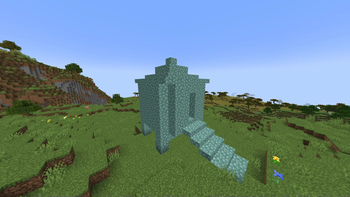
## Blocks ### "Abstract" Blocks Blocks that are abstract, or "Abstract" blocks, have special properties compared to normal blocks. Abstract blocks can "Abstract" or become completely transparent, uninteractable, and unable to be mined by any player without the "Abstraction" effect. If a player has this effect, the block will be able to be mined, and interacted with. The block will also be visible to any player with the Abstraction effect. Additionally, the player can also shift any abstract block to the opposite state by just holding shift and right-clicking on the block with an empty hand.
Some more properties of abstract blocks include: - Abstracted blocks will always drop themselves upon mining them with the right tool. No matter if the block would normally drop something else. - You cannot place anything inside of an abstract block when it is abstracted. - All gravity blocks that have been abstracted will not fall, but instead be suspended mid-air until they are actualized. - Abstracted blocks dont affect light. The only exception to this is blocks that already emit light, they will keep their light-emitting properties when abstracted. (this setting is toggleable for each block that is abstracted. e.g. an abstracted torch will still emit a light level of 15 when toggled while abstracted, but if it is not toggled, it wont.) - Water will still interact with abstract blocks if they are abstracted.
### "Phantasmal" Blocks Blocks that are phantasmal, or "Phantasmal" blocks, are similar to abstract block
📊 Mod Details
- Game
- Minecraft Mods
- Author
- Mrmrmrpizza
- Version
- 1.0.1
- Downloads
- 531
- Endorsements
- 5
- Category
- decoration
- Created
- 12/19/2024
- Updated
- 12/31/2024
- Game Versions
- 1.21
- Tags
- decoration, game-mechanics, utility
🔧 How to Install Minecraft Mods Mods
Download from Modrinth. Use Prism Launcher or drop into your mods folder.
📖 Full step-by-step install guide for Minecraft Mods →
Visit the official mod page for specific installation instructions for this mod.
🎮 Need cheat codes or console commands? Check ur gaming wiki for Minecraft Mods commands, item IDs, and more.
❓ Frequently Asked Questions
Which Minecraft Mods versions does Apparition support?
The author lists 1.21. Other versions may work but are untested by the author.
What is the latest version of Apparition?
Version 1.0.1, published 2024-12-31 with 531 downloads recorded at the source.
Keep browsing — more Minecraft Mods mods await