Anime Hologram
🟠 Updated over a year ago⚠️ Install Order · 2 steps
Install in this order, then this mod last — most mods fail to load without their framework and dependencies in place.
🖼️ Gallery (1 images)
🔍 Analysis
- 🏆 #129 of 222 decoration mods in this game by downloads
📋 About This Mod
Overview - Render 3D “holograms” inside tinted-glass cuboids and control them entirely with redstone. - Bring your own models and animations (none are bundled). - Powered by the BlazeRod rendering library. - Server play is currently not tested. Features - BlazeRod-based rendering, with a stable CPU transform path by default. - External VMD animation support for PMX/PMD models. Drop .vmd files next to the model. - Universal Edge Bus (UEB) redstone control: - Model code: 0–255 - Animation code: 0–255 (0 = rest pose) - Ctrl code: 0–15 (reserved for future use) - Param bus (scale/offsets), quantized 0–15 - Helpful commands to detect, map, watch, and manage cuboids. - Clickable TP coordinates in the /holo map output. Requirements - Minecraft: 1.21.8 - Fabric Loader - Fabric API - Fabric Language Kotlin How to use 1) Build a filled tinted-glass cuboid anywhere in the world. 2) Use /holo watch while looking at a tinted glass block (or let auto-watch pick it up). 3) Place your model content in your Minecraft run directory (not inside the mod jar): - Windows: %appdata%/.minecraft/hologram/models/ - Linux: ~/.minecraft/hologram/models/ 4) Select model/animation via redstone or commands. Content folder structure - One folder per model code (3-digit, zero-padded): - hologram/models/003/ - model.pmx (.pmd/.glb/.gltf/.vrm also supported) - Idle.vmd, Walk.vmd, etc. (optional; VMD for PMX/PMD) - manifest.json (optional) Optional manifest.json - Place next to your model: ```json { "file": "model.pmx", "scale": 1.0, "offset": , "defaultAnimation": 0 } ``` - file: picks a model file (otherwise the first supported file is used) - scale/offset: default transform applied to the hologram root - defaultAnimation: ignored when anim=0 (since anim=0 is rest pose) Supported formats - Models: .pmx, .pmd, .vrm, .glb, .gltf - Animations: .vmd (MMD; expects PMX/PMD rigs with matching bones) Redstone: Universal Edge Bus (UEB) - The mod reads redstone from the cuboid edges: - Bottom edges → Model bits (8) - Top edges → Anim bits (8) - Vertical edges (middle Y centers) → Ctrl bits (4) - If a bus can only fit a single port on a small cuboid, it falls back to an analog nibble (0..15) at that one position. - Use /holo map to print clickable coordinates for all bus ports and the param bus. Parameter bus (analog, middle face centers) - scaleQ: north face center - offXQ: east face center - offYQ: south face center - offZQ: west face center - Quantization: 0..15 (0 = inactive; use manifest defaults) - Client mapping: - Scale: 0.25 + (scaleQ / 15) * 1.75 (if scaleQ > 0), else 1.0 - Offsets: (Q − 8) / 8.0 (if Q > 0), else 0.0 Animation behavior - anim=0 → rest pose (no animation applied) - anim=1..N → clip indices 0..N−1 (wraps if out of range) - On clip change: the mod resets relative transforms and morphs for a clean start. Commands - /holo detect - Detect cuboid bounds/size for where you’re looking or a position. - /holo map - Print the bus layout (Model/Anim/Ctrl ports + Param ports). - Coordinates are clickable: - OP (permission ≥ 2): click to teleport. - Non‑OP: click to get a suggested /tp command in chat. - /holo codes - Print current Model/Anim/Ctrl codes for that cuboid. - /holo setcodes <model> <anim> <ctrl> - Set codes and broadcast instantly to clients. - Requires OP (permission level 2). - /holo watch - Start watching a cuboid (bus is read and broadcast). - /holo unwatch - Stop watching a cuboid. Tips - To play animation 10, set anim bus = 10: - Command: /holo setcodes <model> 10 <ctrl> (OP only) - Redstone: power anim bus ports that sum to 10, or feed strength 10 to the analog fallback. - To select model folder 003, set model bus = 3. Troubleshooting - Nothing renders: - Ensure you’re watching the cuboid (/holo watch). - Ensure your model folder exists and contains a supported model file. - VMD doesn’t play: - Use PMX/PMD models; ensure VMD files are next to the model file. - Check client log for “Loaded scene ... animations=K”; K=0 means no usable clips were found. - Weird pose when switching animations: - The mod resets pose on clip change. If issues persist, the rig or channel mapping may be unusual—please report the model format/rig. Content policy - No models are bundled with this mod. You must supply your own content. - The included screenshots/videos are for demonstration only and are not part of the mod jar. Credits - Rendering library: BlazeRod by Fifth Light (aka fifth_light). Thank you for the renderer and format loaders. - This project does not redistribute BlazeRod source; BlazeRod JARs are included jar‑in‑jar for convenience. License - This mod: GPLv3. - BlazeRod: LGPL 3.0. - Third‑party models/media remain the property of their authors and are subject to their own licenses.
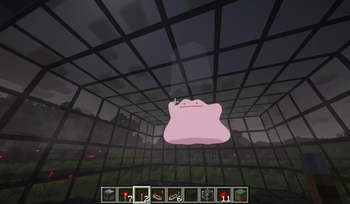
Overview - Render 3D “holograms” inside tinted-glass cuboids and control them entirely with redstone. - Bring your own models and animations (none are bundled). - Powered by the BlazeRod rendering library. - Server play is currently not tested.
Features - BlazeRod-based rendering, with a stable CPU transform path by default. - External VMD animation support for PMX/PMD models. Drop .vmd files next to the model. - Universal Edge Bus (UEB) redstone control: - Model code: 0–255 - Animation code: 0–255 (0 = rest pose) - Ctrl code: 0–15 (reserved for future use) - Param bus (scale/offsets), quantized 0–15 - Helpful commands to detect, map, watch, and manage cuboids. - Clickable TP coordinates in the /holo map output.
Requirements - Minecraft: 1. 21. 8 - Fabric Loader - Fabric API - Fabric Language Kotlin
How to use 1) Build a filled tinted-glass cuboid anywhere in the world. 2) Use /holo watch while looking at a tinted glass block (or let auto-watch pick it up). 3) Place your model content in your Minecraft run directory (not inside the mod jar): - Windows: %appdata%/.minecraft/hologram/models/ - Linux: ~/.minecraft/hologram/models/ 4) Select model/animation via redstone or commands.
Content folder structure - One folder per model code (3-digit, zero-padded): - hologram/models/003/ - model.pmx (.pmd/.glb/.gltf/.vrm also supported) - Idle.vmd, Walk.vmd, etc. (optional; VMD for PMX/PMD) - manifest.json (optional)
Optional manifest.json - Place next to your model: ```json { "file": "model.pmx", "scale": 1. 0, "offset": , "defaultAnimation": 0 } ``` - file: picks a model file (otherwise the first supported file is used) - scale/offset: default transform applied to the hologram root - defaultAnimation: ignored when anim=0 (since anim=0 is rest pose)
Supported formats - Models: .pmx, .pmd, .vrm, .glb, .gltf - Animations: .vmd (MMD; expects PMX/PMD rigs with matching bones)
Redstone: Universal Edge Bus (UEB) - The mod reads redstone from the cuboid edges: - Bottom edges → Model bits (8) - Top edges → Anim bits (8) - Vertical edges (middle Y centers) → Ctrl bits (4) - If a bus can only fit a single port on a small cuboid, it falls back to an analog nibble (0.. 15) at that one position. - Use /holo map to print clickable coordinates for all bus ports and the param bus.
Parameter bus (analog, middle face centers) - scaleQ: north face center - offXQ: east face center - offYQ: south face center - offZQ: west face center - Quantization: 0.. 15 (0 = inactive; use manifest defaults) - Client mapping: - Scale: 0. 25 + (scaleQ / 15) * 1. 75 (if scaleQ > 0), else 1. 0 - Offsets: (Q − 8) / 8. 0 (if Q > 0), else 0. 0
Animation behavior - anim=0 → rest pose (no animation applied) - anim=1.. N → clip indices 0.. N−1 (wraps if out of range) - On clip change: the mod resets relative transforms and morphs for a clean start.
Commands
- /holo detect
- Detect cuboid bounds/size for where you’re looking or a position.
- /holo map
- Print the bus layout (Model/Anim/Ctrl ports + Param ports).
- Coordinates are clickable:
- OP (permission ≥ 2): click to teleport.
- Non‑OP: click to get a suggested /tp command in chat.
- /holo codes
- Print current Model/Anim/Ctrl codes for that cuboid.
- /holo setcodes
Tips
- To play animation 10, set anim bus = 10:
- Command: /holo setcodes
Troubleshooting - Nothing renders: - Ensure you’re watching the cuboid (/holo watch). - Ensure your model folder exists and contains a supported model file. - VMD doesn’t play: - Use PMX/PMD models; ensure VMD files are next to the model file. - Check client log for “Loaded scene ... animations=K”; K=0 means no usable clips were found. - Weird pose when switching animations: - The mod resets pose on clip change. If issues persist, the rig or channel mapping may be unusual—please report the model format/rig.
Content policy - No models are bundled with this mod. You must supply your own content. - The included screenshots/videos are for demonstration only and are not part of the mod jar.
Credits - Rendering library: BlazeRod by Fifth Light (aka fifth_light). Thank you for the renderer and format loaders. - This project does not redistribute BlazeRod source; BlazeRod JARs are included jar‑in‑jar for convenience.
License - This mod: GPLv3. - BlazeRod: LGPL 3. 0. - Third‑party models/media remain the property of their authors and are subject to their own licenses.
📊 Mod Details
- Game
- Minecraft Mods
- Author
- Sylsatra
- Version
- 1.0.0
- Downloads
- 166
- Endorsements
- 7
- Category
- decoration
- Created
- 9/21/2025
- Updated
- 9/18/2025
- Game Versions
- 1.21.8
- Tags
- decoration, utility
🔧 How to Install Minecraft Mods Mods
Download from Modrinth. Use Prism Launcher or drop into your mods folder.
📖 Full step-by-step install guide for Minecraft Mods →
Visit the official mod page for specific installation instructions for this mod.
🎮 Need cheat codes or console commands? Check ur gaming wiki for Minecraft Mods commands, item IDs, and more.
❓ Frequently Asked Questions
Which Minecraft Mods versions does Anime Hologram support?
The author lists 1.21.8. Other versions may work but are untested by the author.
What is the latest version of Anime Hologram?
Version 1.0.0, published 2025-09-18 with 166 downloads recorded at the source.
Keep browsing — more Minecraft Mods mods await