AngleSnap
🟠 Updated over a year ago⚠️ Install Order · 2 steps
Install in this order, then this mod last — most mods fail to load without their framework and dependencies in place.
🖼️ Gallery (3 images)
🔍 Analysis
- 👍 0.5% endorsement rate
- 🏆 #324 of 901 fabric mods in this game by downloads
📋 About This Mod
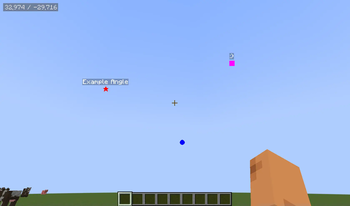
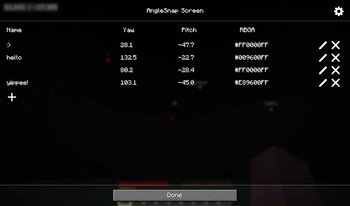
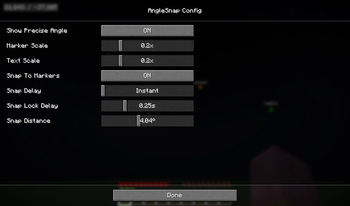
## Summary This mod adds a UI to save precise viewing angles and camera positions to help with the use of redstone contraptions like the (https://youtu.be/FnUE-ZaALLw?si=Dq0zoWGYzYx3mohB) and the (https://youtu.be/7qrt8sM7CZc?si=rLZUpYcBUyPkC058). ## Usage Pressing F6 while in a world will open the AngleSnap menu, where precise angles can be added, edited or removed. Clicking on an angle without pressing the edit button first will close the screen and snap the players crosshair to that angle. Pressing F7 will toggle the AngleSnap overlay, which will render icons at the saved angles, allowing easy visualization. Pressing F8 will open the CameraSnap menu, where camera positions can be added, edited or removed. Clicking on a camera position will move the camera to that position, while movement and viewing angle are still synced with the actual player. ## Configuration The config can be opened through modmenu or by pressing the gear icon in either the AngleSnap or CameraSnap menus. It allows configuring the overlay to your liking and can be used to enable "Snap To Markers", which will snap your crosshair to precise angles when hovering near them with the overlay enabled.
This mod adds a UI to save precise viewing angles and camera positions to help with the use of redstone contraptions like the (https://youtu.be/FnUE-ZaALLw?si=Dq0zoWGYzYx3mohB) and the (https://youtu.be/7qrt8sM7CZc?si=rLZUpYcBUyPkC058).
Pressing F6 while in a world will open the AngleSnap menu, where precise angles can be added, edited or removed. Clicking on an angle without pressing the edit button first will close the screen and snap the players crosshair to that angle.
Pressing F7 will toggle the AngleSnap overlay, which will render icons at the saved angles, allowing easy visualization.
Pressing F8 will open the CameraSnap menu, where camera positions can be added, edited or removed. Clicking on a camera position will move the camera to that position, while movement and viewing angle are still synced with the actual player.
## Configuration
The config can be opened through modmenu or by pressing the gear icon in either the AngleSnap or CameraSnap menus. It allows configuring the overlay to your liking and can be used to enable "Snap To Markers", which will snap your crosshair to precise angles when hovering near them with the overlay enabled.
📊 Mod Details
- Game
- Minecraft Mods
- Author
- contaria
- Version
- 0.8.0+mc1.21.6-1.21.8
- Downloads
- 13,416
- Endorsements
- 72
- Category
- fabric
- Created
- 4/14/2025
- Updated
- 7/30/2025
- Game Versions
- 1.21.6, 1.21.7, 1.21.8
- Tags
- utility
🔧 How to Install Minecraft Mods Mods
Download from Modrinth. Use Prism Launcher or drop into your mods folder.
📖 Full step-by-step install guide for Minecraft Mods →
Visit the official mod page for specific installation instructions for this mod.
🎮 Need cheat codes or console commands? Check ur gaming wiki for Minecraft Mods commands, item IDs, and more.
❓ Frequently Asked Questions
Which Minecraft Mods versions does AngleSnap support?
The author lists 1.21.6, 1.21.7, 1.21.8. Other versions may work but are untested by the author.
What is the latest version of AngleSnap?
Version 0.8.0+mc1.21.6-1.21.8, published 2025-07-30 with 13,416 downloads recorded at the source.
Keep browsing — more Minecraft Mods mods await