Analog
⚪ Last updated 2024⚠️ Install Order · 2 steps
Install in this order, then this mod last — most mods fail to load without their framework and dependencies in place.
🖼️ Gallery (4 images)
🔍 Analysis
- 👍 0.1% endorsement rate
- 🏆 #119 of 229 equipment mods in this game by downloads
📋 About This Mod
# Analog An addon for (https://modrinth.com/plugin/simple-voice-chat) that adds handheld radios as well as placeable transmitters and receivers. ## Features - Handheld radios - Block transmitters that broadcast nearby players' voices - Block receivers that can be tuned into a channel for passive listening - You can hear another person's radio and their radio can pickup your voice - Handheld radios can enable receiving and transmitting seperately from eachother - Radios can tune to 100 channels (Can be changed in config) - Radios have infinite range but only within the same dimension - Transmitters can play music from nearby jukeboxes over the radio, including custom discs from (https://modrinth.com/mod/audioplayer) (1.2.0 or later) - Receivers output a comparator signal when receiving (1.2.0 or later) ## Usage !(https://cdn.modrinth.com/data/cached_images/c6d2b29bbf629355dd131f123abfc51b6164fef7.png) - Right click while in hand to open the radio GUI - Use the up and down buttons to select a channel - Press the ON button, by default Receive will be enabled and you will be listening to the channel - Press the Transmit button to toggle broadcasting your voice and nearby players' voices over the channel - Press the Receive button to toggle receiving the channel - Press F (Swap Hands Key) while in hand to quick toggle Transmitting (1.1.0 or later) !(https://cdn.modrinth.com/data/cached_images/9836d5050f6ef255b48acd24eca702d22dc606af.png) - Right click to open transmitter GUI - Use the up and down buttons to select a channel - Press the ON button and the transmitter will broadcast nearby players' voices over the channel !(https://cdn.modrinth.com/data/cached_images/24fb70cfe1be3c2b44284fde246f902ccac0c5fd.png) - Right click to open receiver GUI - Use the up and down buttons to select a channel - Press the ON button and the receiver will tune into the channel and play anything broadcast over the channel ## Recipes <details> <summary>Transmitter Recipe</summary> !(https://cdn.modrinth.com/data/cached_images/bb4d0d8735f46e5fb654f558316ab7ab569b0814.png) </details> <details> <summary>Receiver Recipe</summary> !(https://cdn.modrinth.com/data/cached_images/99d47c25bfc673f7d36aa328b613d65be70e2566.png) </details> <details> <summary>Radio Recipe</summary> !(https://cdn.modrinth.com/data/cached_images/732d86f3a5bcf95ac16656da71de9abd020cb337.png) </details> ## Notes for Servers Analog requires clients to have the mod on their side or they need to have a resource pack enabled. For a fully server side setup you can use (https://polymer.pb4.eu/latest/user/resource-pack-hosting/) to automatically send the resource pack to clients.
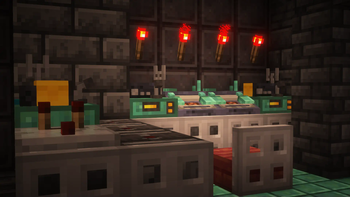
# Analog An addon for (https://modrinth.com/plugin/simple-voice-chat) that adds handheld radios as well as placeable transmitters and receivers.
## Features - Handheld radios - Block transmitters that broadcast nearby players' voices - Block receivers that can be tuned into a channel for passive listening - You can hear another person's radio and their radio can pickup your voice - Handheld radios can enable receiving and transmitting seperately from eachother - Radios can tune to 100 channels (Can be changed in config) - Radios have infinite range but only within the same dimension - Transmitters can play music from nearby jukeboxes over the radio, including custom discs from (https://modrinth.com/mod/audioplayer) (1. 2. 0 or later) - Receivers output a comparator signal when receiving (1. 2. 0 or later)
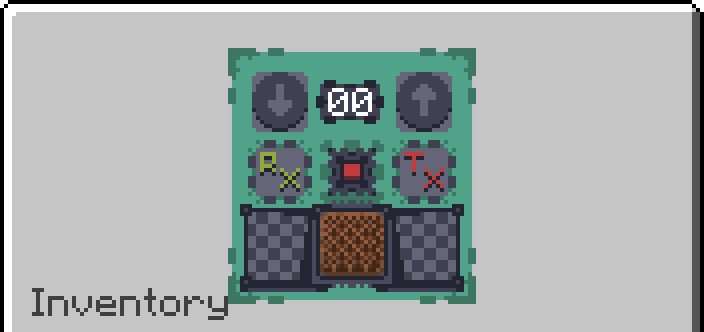
!(https://cdn.modrinth.com/data/cached_images/c6d2b29bbf629355dd131f123abfc51b6164fef7.png)
- Right click while in hand to open the radio GUI
- Use the up and down buttons to select a channel
- Press the ON button, by default Receive will be enabled and you will be listening to the channel
- Press the Transmit button to toggle broadcasting your voice and nearby players' voices over the channel
- Press the Receive button to toggle receiving the channel
- Press F (Swap Hands Key) while in hand to quick toggle Transmitting (1. 1. 0 or later)
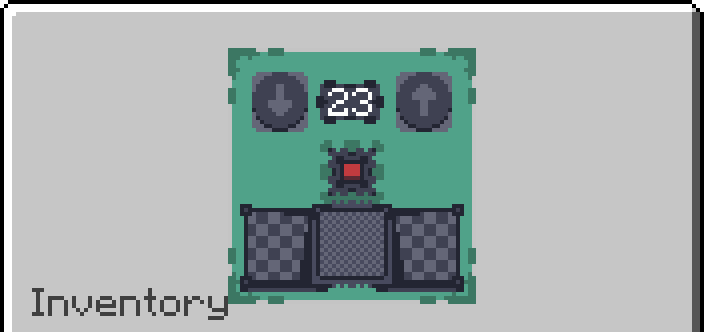
!(https://cdn.modrinth.com/data/cached_images/9836d5050f6ef255b48acd24eca702d22dc606af.png)
- Right click to open transmitter GUI
- Use the up and down buttons to select a channel
- Press the ON button and the transmitter will broadcast nearby players' voices over the channel
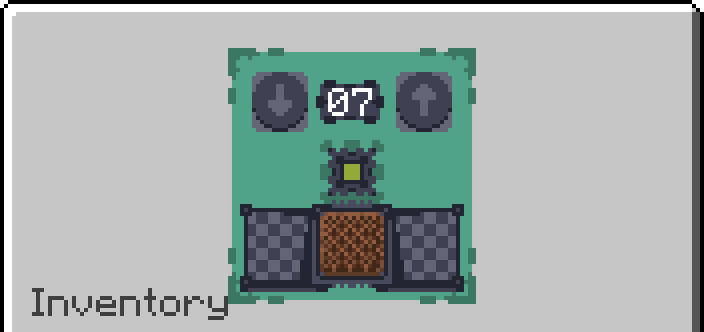
!(https://cdn.modrinth.com/data/cached_images/24fb70cfe1be3c2b44284fde246f902ccac0c5fd.png)
- Right click to open receiver GUI
- Use the up and down buttons to select a channel
- Press the ON button and the receiver will tune into the channel and play anything broadcast over the channel
Transmitter Recipe
!(https://cdn.modrinth.com/data/cached_images/bb4d0d8735f46e5fb654f558316ab7ab569b0814.png)
Receiver Recipe
!(https://cdn.modrinth.com/data/cached_images/99d47c25bfc673f7d36aa328b613d65be70e2566.png)
Radio Recipe
!(https://cdn.modrinth.com/data/cached_images/732d86f3a5bcf95ac16656da71de9abd020cb337.png)
## Notes for Servers Analog requires clients to have the mod on their side or they need to have a resource pack enabled. For a fully server side setup you can use (https://polymer.pb4.eu/latest/user/resource-pack-hosting/) to automatically send the resource pack to clients.
📊 Mod Details
- Game
- Minecraft Mods
- Author
- noWickedfortheRest
- Version
- 1.2.2+1.21
- Downloads
- 161,923
- Endorsements
- 178
- Category
- equipment
- Created
- 5/26/2024
- Updated
- 8/22/2024
- Game Versions
- 1.21, 1.21.1
- Tags
- equipment, game-mechanics, social
🔧 How to Install Minecraft Mods Mods
Download from Modrinth. Use Prism Launcher or drop into your mods folder.
📖 Full step-by-step install guide for Minecraft Mods →
Visit the official mod page for specific installation instructions for this mod.
🎮 Need cheat codes or console commands? Check ur gaming wiki for Minecraft Mods commands, item IDs, and more.
❓ Frequently Asked Questions
Which Minecraft Mods versions does Analog support?
The author lists 1.21, 1.21.1. Other versions may work but are untested by the author.
What is the latest version of Analog?
Version 1.2.2+1.21, published 2024-08-22 with 161,923 downloads recorded at the source.
Keep browsing — more Minecraft Mods mods await