Always Multiplayer
🟡 Updated this year⚠️ Install Order · 2 steps
Install in this order, then this mod last — most mods fail to load without their framework and dependencies in place.
🖼️ Gallery (5 images)
🔍 Analysis
- 👍 0.2% endorsement rate
- 🏆 #578 of 892 fabric mods in this game by downloads
📋 About This Mod
# Key Features * Publish singleplayer worlds automatically when loading the world. * Restrict access to friends only. * Use native server commands like /whitelist and /ban. * Set default gamemode and commands for other players. # Config Global settings can be added in `config/alwaysmultiplayer.json`. These settings can also be found under the Minecraft main menu `Options...` -> `Online...` -> `Always Multiplayer Config...` | Setting | Default | Description | | ------- | ------- | ----------- | | `multiplayer` | `LAN` | Set to `LAN` to open all singleplayer worlds to LAN by default (or to the internet with port forwarding or other mods). Turn `OFF` to stay in singleplayer by default. | | `access` | `FRIENDS` | Who can join your multiplayer worlds. <br> `FRIENDS`: allow Minecraft friends (and whitelisted players). <br> `WHITELIST`: only allow whitelisted players. <br> `OPEN`: allow all connections. | | `gamemode` | `null` (Auto) | The default game mode for other players that join your worlds. Set `null` to follow the world setting, or set to `SURVIVAL`, `CREATIVE`, `ADVENTURE`, or `SPECTATOR` to assign a global default. | | `commands` | `null` (Auto) | The default commands for other players that join your worlds. Set `null` to follow the world setting, or set to `true` or `false` to assign a global default. | | `port` | `null` (Auto) | The default port number for LAN worlds only. Set `null` to auto assign a free port each time, or enter a number between 1024 and 65535. | # Commands All the built in server commands are made available, including /ban /whitelist and /op. These commands create json files at the root of your profile folder (not specific to any world). I.e. the same location as your usercache.json. See example (https://minecraft.wiki/w/Server#Whitelist). | Command | Description | Example | Operator Level | | ------- | ----------- | ------- | -------- | | (https://minecraft.wiki/w/Commands/whitelist) | White-list a player to allow them to join when the Access setting is FRIENDS or WHITELIST. | `/whitelist add Player123` | 3 (Admin) | | (https://minecraft.wiki/w/Commands/ban) | Ban a player from joining any of your worlds. Also includes /ban-ip and /banlist. | `/ban Player123` | 3 (Admin) | | (https://minecraft.wiki/w/Commands/pardon) | Unbans a player so they can join all of your worlds. | `/pardon Player123` | 3 (Admin) | | (https://minecraft.wiki/w/Commands/op) | Makes a player a level 2 Operator (the same permissions that enabling 'Commands' gives by default). | `/op Player123` | 3 (Admin) | | (https://minecraft.wiki/w/Commands/deop) | Removes a players Operator permissions (unless 'Commands' are enabled for other players by default). | `/deop Player123` | 3 (Admin) | | (https://minecraft.wiki/w/Commands/perf) | Starts the performance profiler. | `/perf start` | 4 (Owner) | | (https://minecraft.wiki/w/Commands/save-all) | Saves the world. Also includes /save-off and /save-on. | `/save-all` | 4 (Owner) | | (https://minecraft.wiki/w/Commands/stop) | Stops the server and disconnects all players (alternatively use /unpublish). | `/stop` | 4 (Owner) | # Opening LAN worlds to the internet P2P has been removed from the 26.2 update (for now), and with it the 'Online' multiplayer option for singleplayer worlds. While this does make it harder to connect with friends, it's still possible using the 'LAN' multiplayer option and some additional setup. * Create a port forwarding rule on your home router to forward a specific port to your computer, and get your friends to join using (https://whatismyipaddress.com/) + the port number, e.g. `10.1.1.1:5555`. * Or, use mods like (https://modrinth.com/mod/e4mc) which assigns a unique public domain each time you open your world to LAN. _Make sure to use whitelist or access restrictions if you want to prevent unexpected connections._
# Key Features Publish singleplayer worlds automatically when loading the world. Restrict access to friends only. Use native server commands like /whitelist and /ban. Set default gamemode and commands for other players.
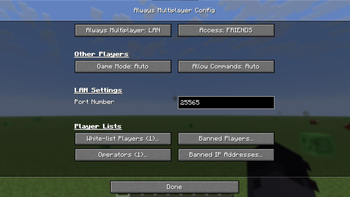
# Config Global settings can be added in `config/alwaysmultiplayer.json`. These settings can also be found under the Minecraft main menu `Options...` -> `Online...` -> `Always Multiplayer Config...`
| Setting | Default | Description | | ------- | ------- | ----------- | | `multiplayer` | `LAN` | Set to `LAN` to open all singleplayer worlds to LAN by default (or to the internet with port forwarding or other mods). Turn `OFF` to stay in singleplayer by default. | | `access` | `FRIENDS` | Who can join your multiplayer worlds. `FRIENDS`: allow Minecraft friends (and whitelisted players). `WHITELIST`: only allow whitelisted players. `OPEN`: allow all connections. | | `gamemode` | `null` (Auto) | The default game mode for other players that join your worlds. Set `null` to follow the world setting, or set to `SURVIVAL`, `CREATIVE`, `ADVENTURE`, or `SPECTATOR` to assign a global default. | | `commands` | `null` (Auto) | The default commands for other players that join your worlds. Set `null` to follow the world setting, or set to `true` or `false` to assign a global default. | | `port` | `null` (Auto) | The default port number for LAN worlds only. Set `null` to auto assign a free port each time, or enter a number between 1024 and 65535. |
# Commands All the built in server commands are made available, including /ban /whitelist and /op. These commands create json files at the root of your profile folder (not specific to any world). I.e. the same location as your usercache.json. See example (https://minecraft.wiki/w/Server#Whitelist).
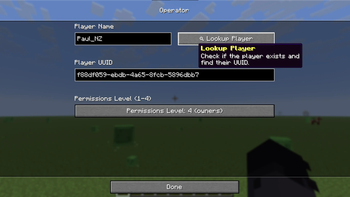
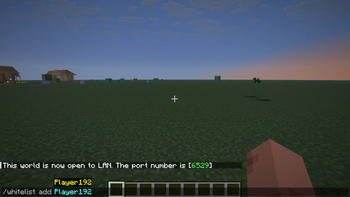
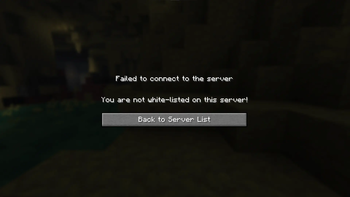
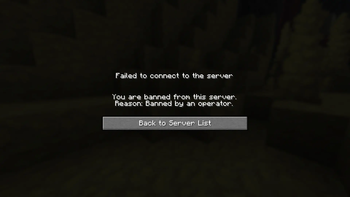
| Command | Description | Example | Operator Level | | ------- | ----------- | ------- | -------- | | (https://minecraft.wiki/w/Commands/whitelist) | White-list a player to allow them to join when the Access setting is FRIENDS or WHITELIST. | `/whitelist add Player123` | 3 (Admin) | | (https://minecraft.wiki/w/Commands/ban) | Ban a player from joining any of your worlds. Also includes /ban-ip and /banlist. | `/ban Player123` | 3 (Admin) | | (https://minecraft.wiki/w/Commands/pardon) | Unbans a player so they can join all of your worlds. | `/pardon Player123` | 3 (Admin) | | (https://minecraft.wiki/w/Commands/op) | Makes a player a level 2 Operator (the same permissions that enabling 'Commands' gives by default). | `/op Player123` | 3 (Admin) | | (https://minecraft.wiki/w/Commands/deop) | Removes a players Operator permissions (unless 'Commands' are enabled for other players by default). | `/deop Player123` | 3 (Admin) | | (https://minecraft.wiki/w/Commands/perf) | Starts the performance profiler. | `/perf start` | 4 (Owner) | | (https://minecraft.wiki/w/Commands/save-all) | Saves the world. Also includes /save-off and /save-on. | `/save-all` | 4 (Owner) | | (https://minecraft.wiki/w/Commands/stop) | Stops the server and disconnects all players (alternatively use /unpublish). | `/stop` | 4 (Owner) |
# Opening LAN worlds to the internet P2P has been removed from the 26. 2 update (for now), and with it the 'Online' multiplayer option for singleplayer worlds. While this does make it harder to connect with friends, it's still possible using the 'LAN' multiplayer option and some additional setup.
Create a port forwarding rule on your home router to forward a specific port to your computer, and get your friends to join using (https://whatismyipaddress.com/) + the port number, e.g. `10. 1. 1. 1:5555`. Or, use mods like (https://modrinth.com/mod/e4mc) which assigns a unique public domain each time you open your world to LAN.
_Make sure to use whitelist or access restrictions if you want to prevent unexpected connections._
📊 Mod Details
- Game
- Minecraft Mods
- Author
- PaulNZ
- Version
- 26.2-1.0.0-neoforge
- Downloads
- 1,350
- Endorsements
- 3
- Category
- fabric
- Created
- 5/18/2026
- Updated
- 6/17/2026
- Game Versions
- 26.2
- Tags
- game-mechanics, management, social
🔧 How to Install Minecraft Mods Mods
Download from Modrinth. Use Prism Launcher or drop into your mods folder.
📖 Full step-by-step install guide for Minecraft Mods →
Visit the official mod page for specific installation instructions for this mod.
🎮 Need cheat codes or console commands? Check ur gaming wiki for Minecraft Mods commands, item IDs, and more.
❓ Frequently Asked Questions
Which Minecraft Mods versions does Always Multiplayer support?
The author lists 26.2. Other versions may work but are untested by the author.
What is the latest version of Always Multiplayer?
Version 26.2-1.0.0-neoforge, published 2026-06-17 with 1,350 downloads recorded at the source.
Keep browsing — more Minecraft Mods mods await