All Items
🟡 Updated this year⚠️ Install Order · 2 steps
Install in this order, then this mod last — most mods fail to load without their framework and dependencies in place.
🖼️ Gallery (2 images)
🔍 Analysis
- 👍 0.6% endorsement rate
- 🏆 #526 of 574 adventure mods in this game by downloads
📋 About This Mod
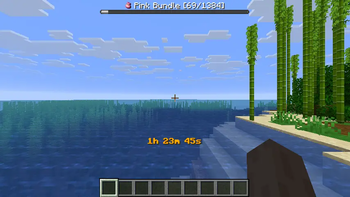
# All Items Collect all items in Minecraft, one at a time. !(https://cdn.modrinth.com/data/cached_images/08b28273367e1dbda66bd16d1c323768d12f73f7_0.webp)<br> The mod randomly selects an item from all obtainable items and displays it in the bossbar. Players must find and collect that item before moving on to the next one. The mod is multiplayer compatible and designed to be played on a multiplayer server, but can also be played without a server. ## Getting Started 1. (https://fabricmc.net/use/installer/) 2. Download (https://modrinth.com/mod/fabric-api) and put it in the mods folder 3. Download All Items from (https://modrinth.com/mod/all_items/versions) and put it in the mods folder ## Commands - `/all-items` - Show all obtained items in a custom dialog (see below) - `/timer` - Pause or resume the game timer ## All Items Dialog !(https://cdn.modrinth.com/data/cached_images/f3a6763cbffece713537905fd66f62bef7cbd66f_0.webp)<br> ## Config The mod saves all progress in a config file located at `config/all-items.json`. The config file contains the following options: - **`showIcons` (boolean, default: false)**<br> Show item icons in the bossbar and in chat messages. This feature requires the (https://github.com/170yt/Minecraft-All-Icons-Resource-Pack) resource pack. - **`timerCommandRequiresOperator` (boolean, default: true)**<br> Whether the `/timer` command requires operator permissions. - **`timerSeconds` (integer)**<br> Stores the timer value in seconds. - **`activeItem` (string)**<br> Stores the current active item id. - **`obtainedItems` (array of strings)**<br> Stores the list of obtained item ids. - **`unobtainableItems` (array of strings)**<br> Stores the list of unobtainable item ids. ## FAQ - **How can I skip the current Item?**<br> Use the `/give` command to give yourself the item you want to skip. - **Do I need to install the mod on the client side?**<br> No, the mod is server-side only and does not require the client to have it installed if it's already installed on the server.<br> The mod is designed to be played on a server with vanilla clients and does not require any client-side mods.
# All Items
Collect all items in Minecraft, one at a time.
!(https://cdn.modrinth.com/data/cached_images/08b28273367e1dbda66bd16d1c323768d12f73f7_0.webp)
The mod randomly selects an item from all obtainable items and displays it in the bossbar. Players must find and collect that item before moving on to the next one. The mod is multiplayer compatible and designed to be played on a multiplayer server, but can also be played without a server.
## Getting Started
1. (https://fabricmc.net/use/installer/) 2. Download (https://modrinth.com/mod/fabric-api) and put it in the mods folder 3. Download All Items from (https://modrinth.com/mod/all_items/versions) and put it in the mods folder
## Commands
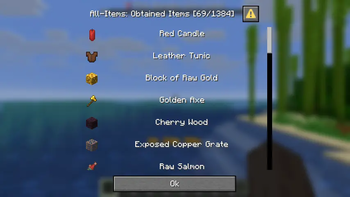
- `/all-items` - Show all obtained items in a custom dialog (see below)
- `/timer` - Pause or resume the game timer
## All Items Dialog
!(https://cdn.modrinth.com/data/cached_images/f3a6763cbffece713537905fd66f62bef7cbd66f_0.webp)
The mod saves all progress in a config file located at `config/all-items.json`. The config file contains the following options:
- `showIcons` (boolean, default: false)
Show item icons in the bossbar and in chat messages. This feature requires the (https://github.com/170yt/Minecraft-All-Icons-Resource-Pack) resource pack. - `timerCommandRequiresOperator` (boolean, default: true)
Whether the `/timer` command requires operator permissions. - `timerSeconds` (integer)
Stores the timer value in seconds. - `activeItem` (string)
Stores the current active item id. - `obtainedItems` (array of strings)
Stores the list of obtained item ids. - `unobtainableItems` (array of strings)
Stores the list of unobtainable item ids.
- How can I skip the current Item?
Use the `/give` command to give yourself the item you want to skip. - Do I need to install the mod on the client side?
No, the mod is server-side only and does not require the client to have it installed if it's already installed on the server.
The mod is designed to be played on a server with vanilla clients and does not require any client-side mods.
📊 Mod Details
- Game
- Minecraft Mods
- Author
- 170yt
- Version
- 1.5+26.1.2
- Downloads
- 1,243
- Endorsements
- 7
- Category
- adventure
- Created
- 12/23/2025
- Updated
- 4/23/2026
- Game Versions
- 26.1.2
- Tags
- adventure, minigame, social
🔧 How to Install Minecraft Mods Mods
Download from Modrinth. Use Prism Launcher or drop into your mods folder.
📖 Full step-by-step install guide for Minecraft Mods →
Visit the official mod page for specific installation instructions for this mod.
🎮 Need cheat codes or console commands? Check ur gaming wiki for Minecraft Mods commands, item IDs, and more.
❓ Frequently Asked Questions
Which Minecraft Mods versions does All Items support?
The author lists 26.1.2. Other versions may work but are untested by the author.
What is the latest version of All Items?
Version 1.5+26.1.2, published 2026-04-23 with 1,243 downloads recorded at the source.
Keep browsing — more Minecraft Mods mods await