AeroEngine
🟡 Updated this year⚠️ Install Order · 2 steps
Install in this order, then this mod last — most mods fail to load without their framework and dependencies in place.
🖼️ Gallery (6 images)
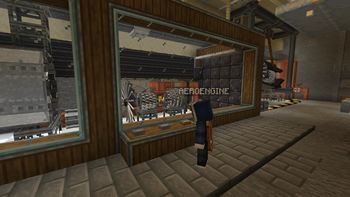
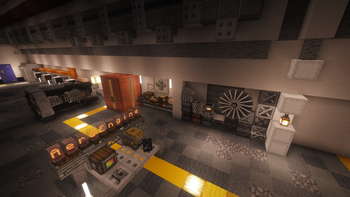
🔍 Analysis
- 👍 0.1% endorsement rate
- 🏆 #33 of 36 neoforge mods in this game by downloads
📋 About This Mod
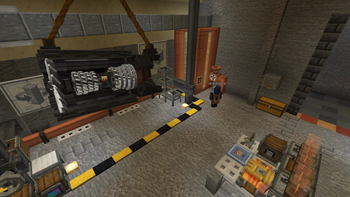
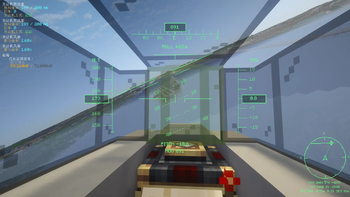
# AeroEngine / Aero Engineering AeroEngine is a Create-style add-on mod for NeoForge 1.21.1, focused on aero-engine systems and flight instruments. This mod allows players to assemble an aero engine in a Create-like way, with fuel supply, control logic, and thrust output, and connect it to physics systems such as Aeronautics / Sable. It also provides a Pilot Helmet HUD system for real-time flight monitoring. The project is still in development. Blocks, textures, models, recipes, Ponder tutorials, and gameplay mechanics may be adjusted in future versions.!(https://cdn.modrinth.com/data/cached_images/4fc407c6c18ddf4f2ee5e0a663ba1cdbbbc6d7a4_0.webp) (https://www.bilibili.com/video/BV1ZrE86hEBW/?spm_id_from=333.1387.0.0&vd_source=1d222e3d8b177728228bcd488c336730) ## Features / Features * Modular aero-engine structure / Modular aero-engine structure * Basic, afterburning and vectoring turbofan engines / Basic, afterburning and vectoring turbofan engines * Liquid fuel based operation / Liquid fuel based operation (Aviation Kerosene) * Redstone-controlled power and afterburner / Redstone-controlled power and afterburner * Create-style multiblock assembly / Create-style multiblock assembly * Pilot Helmet HUD system / Pilot Helmet HUD system * Coordinate navigation and waypoints / Coordinate navigation and waypoints * Ponder tutorial support / Ponder tutorial support * Integration with Aeronautics / Sable / Integration with Aeronautics / Sable ## Engine Components / Engine Components ### Core Blocks / Core Blocks * Engine Fan--- Engine Fan--- Air intake and engine inlet * Engine Compressor--- Engine Compressor--- Compresses incoming air * Engine Combustor--- Engine Combustor--- Burns aviation kerosene and uses redstone to control power * Engine Turbine---Engine Turbine--- Drives the compressor * Engine Exhaust Cone--- Engine Exhaust Cone--- Basic turbofan tail section with reverse thrust support * Engine Afterburner--- Engine Afterburner--- Afterburning turbofan tail section with redstone-controlled afterburner mode * Vector Bearing--- Vector Bearing--- Vector thrust control ### Casing & Nozzle / Casing & Nozzle * Engine Casing--- Engine Casing--- Encloses the engine core and improves thrust * Engine Exhaust Nozzle--- Engine Exhaust Nozzle--- Installed at the rear of the engine for additional thrust * Copycat Engine Casing--- Copycat Engine Casing--- Customizable engine casing appearance, including stairs/slabs * Copycat Engine Nozzle--- Copycat Engine Nozzle--- Customizable nozzle appearance, including stairs/slabs ### Transmission / Transmission * Engine Encased Fluid Pipe--- Engine Encased Fluid Pipe--- Fluid pipe enclosed in engine casing * Engine Encased Shaft--- Engine Encased Shaft--- Shaft enclosed in engine casing * Engine Gearbox--- Engine Gearbox--- Power transmission and direction conversion ## Engine Structures / Engine Structures * Basic Turbofan / Basic Turbofan Engine ``` Engine Fan → Engine Compressor → Engine Combustor → Engine Turbine → Engine Exhaust Cone ``` * Afterburning Turbofan / Afterburning Turbofan Engine ``` Engine Fan → Engine Compressor → Engine Combustor → Engine Turbine → Engine Afterburner ``` * Vectoring Turbofan / Vectoring Turbofan Engine ``` Engine Fan → Engine Compressor → Engine Combustor → Engine Turbine → Vector Bearing ``` ## Fuel and Control / Fuel and Control ### Aviation Kerosene / Aviation Kerosene Engines use Aviation Kerosene as fuel, which is supplied to the Engine Combustor through the Create fluid system. ### Redstone Control / Redstone Control * Engine Combustor: Shift + Right Click to configure redstone frequency and power step, controlling engine power * Engine Afterburner: Independent redstone frequency control for toggling afterburner mode * Engine Exhaust Cone: Redstone-controlled reverse thrust mode * Vector Bearing: Six-axis redstone signal control for thrust direction ## Pilot Helmet / Pilot Helmet The Pilot Helmet is a wearable HUD system used for real-time flight monitoring. ### Features * Bind up to 12 blocks to the same physical structure * Supports multiple sensor types: altitude, velocity, attitude, and navigation * Customizable HUD display content and layout * Supports renaming, hiding, and direction correction ### Sensor Types Sensor Function * Altitude Sensor (Altitude Sensor)----Altimeter * Velocity Sensor (Velocity Sensor)----Speed and heading * Gimbal Sensor (Gimbal Sensor)----Pitch and roll * Navigation Table (Navigation Table)----Waypoints and target direction ### Usage 1. Hold the Pilot Helmet and Shift + Right Click a readable block to bind it 2. Equip the helmet and press the HUD management key, default H 3. Select a target to rename it, hide it, or configure displayed items ## Materials / Materials * Netherite Powder---- Netherite Powder---- Alloy raw material * Aviation Alloy Ingot---- Aviation Alloy Ingot---- Engine crafting material * Aviation Alloy Sheet---- Avi
# AeroEngine / Aero Engineering
AeroEngine is a Create-style add-on mod for NeoForge 1. 21. 1, focused on aero-engine systems and flight instruments.
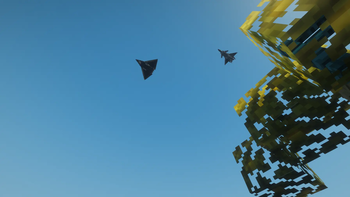
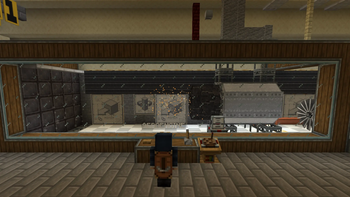
This mod allows players to assemble an aero engine in a Create-like way, with fuel supply, control logic, and thrust output, and connect it to physics systems such as Aeronautics / Sable. It also provides a Pilot Helmet HUD system for real-time flight monitoring.
The project is still in development. Blocks, textures, models, recipes, Ponder tutorials, and gameplay mechanics may be adjusted in future versions.!(https://cdn.modrinth.com/data/cached_images/4fc407c6c18ddf4f2ee5e0a663ba1cdbbbc6d7a4_0.webp) (https://www.bilibili.com/video/BV1ZrE86hEBW/?spm_id_from=333. 1387. 0. 0&vd_source=1d222e3d8b177728228bcd488c336730)
## Features / Features
Modular aero-engine structure / Modular aero-engine structure Basic, afterburning and vectoring turbofan engines / Basic, afterburning and vectoring turbofan engines Liquid fuel based operation / Liquid fuel based operation (Aviation Kerosene) Redstone-controlled power and afterburner / Redstone-controlled power and afterburner Create-style multiblock assembly / Create-style multiblock assembly Pilot Helmet HUD system / Pilot Helmet HUD system Coordinate navigation and waypoints / Coordinate navigation and waypoints Ponder tutorial support / Ponder tutorial support Integration with Aeronautics / Sable / Integration with Aeronautics / Sable
## Engine Components / Engine Components
### Core Blocks / Core Blocks
Engine Fan--- Engine Fan--- Air intake and engine inlet Engine Compressor--- Engine Compressor--- Compresses incoming air Engine Combustor--- Engine Combustor--- Burns aviation kerosene and uses redstone to control power Engine Turbine---Engine Turbine--- Drives the compressor Engine Exhaust Cone--- Engine Exhaust Cone--- Basic turbofan tail section with reverse thrust support Engine Afterburner--- Engine Afterburner--- Afterburning turbofan tail section with redstone-controlled afterburner mode Vector Bearing--- Vector Bearing--- Vector thrust control
### Casing & Nozzle / Casing & Nozzle
Engine Casing--- Engine Casing--- Encloses the engine core and improves thrust Engine Exhaust Nozzle--- Engine Exhaust Nozzle--- Installed at the rear of the engine for additional thrust Copycat Engine Casing--- Copycat Engine Casing--- Customizable engine casing appearance, including stairs/slabs Copycat Engine Nozzle--- Copycat Engine Nozzle--- Customizable nozzle appearance, including stairs/slabs
### Transmission / Transmission
Engine Encased Fluid Pipe--- Engine Encased Fluid Pipe--- Fluid pipe enclosed in engine casing Engine Encased Shaft--- Engine Encased Shaft--- Shaft enclosed in engine casing Engine Gearbox--- Engine Gearbox--- Power transmission and direction conversion
## Engine Structures / Engine Structures
Basic Turbofan / Basic Turbofan Engine
``` Engine Fan → Engine Compressor → Engine Combustor → Engine Turbine → Engine Exhaust Cone ```
Afterburning Turbofan / Afterburning Turbofan Engine
``` Engine Fan → Engine Compressor → Engine Combustor → Engine Turbine → Engine Afterburner ```
Vectoring Turbofan / Vectoring Turbofan Engine
``` Engine Fan → Engine Compressor → Engine Combustor → Engine Turbine → Vector Bearing
## Fuel and Control / Fuel and Control
### Aviation Kerosene / Aviation Kerosene
Engines use Aviation Kerosene as fuel, which is supplied to the Engine Combustor through the Create fluid system.
### Redstone Control / Redstone Control
Engine Combustor: Shift + Right Click to configure redstone frequency and power step, controlling engine power Engine Afterburner: Independent redstone frequency control for toggling afterburner mode Engine Exhaust Cone: Redstone-controlled reverse thrust mode Vector Bearing: Six-axis redstone signal control for thrust direction
## Pilot Helmet / Pilot Helmet
The Pilot Helmet is a wearable HUD system used for real-time flight monitoring.
### Features
Bind up to 12 blocks to the same physical structure Supports multiple sensor types: altitude, velocity, attitude, and navigation Customizable HUD display content and layout Supports renaming, hiding, and direction correction
### Sensor Types
Sensor Function
Altitude Sensor (Altitude Sensor)----Altimeter Velocity Sensor (Velocity Sensor)----Speed and heading Gimbal Sensor (Gimbal Sensor)----Pitch and roll Navigation Table (Navigation Table)----Waypoints and target direction
1. Hold the Pilot Helmet and Shift + Right Click a readable block to bind it 2. Equip the helmet and press the HUD management key, default H 3. Select a target to rename it, hide it, or configure displayed items
## Materials / Materials
Netherite Powder---- Netherite Powder---- Alloy raw material Aviation Alloy Ingot---- Aviation Alloy Ingot---- Engine crafting material * Aviation Alloy Sheet---- Avi
📊 Mod Details
- Game
- Minecraft Mods
- Author
- w843373525
- Version
- 1.3.0
- Downloads
- 106,913
- Endorsements
- 82
- Category
- neoforge
- Created
- 6/25/2026
- Updated
- 8/18/2026
- Game Versions
- 1.21.1
- Tags
- technology, transportation, utility
🔧 How to Install Minecraft Mods Mods
Download from Modrinth. Use Prism Launcher or drop into your mods folder.
📖 Full step-by-step install guide for Minecraft Mods →
Visit the official mod page for specific installation instructions for this mod.
🎮 Need cheat codes or console commands? Check ur gaming wiki for Minecraft Mods commands, item IDs, and more.
❓ Frequently Asked Questions
Which Minecraft Mods versions does AeroEngine support?
The author lists 1.21.1. Other versions may work but are untested by the author.
What is the latest version of AeroEngine?
Version 1.3.0, published 2026-08-18 with 106,913 downloads recorded at the source.
Keep browsing — more Minecraft Mods mods await