AE2 Web Integration
🟡 Updated this year⚠️ Install Order · 2 steps
Install in this order, then this mod last — most mods fail to load without their framework and dependencies in place.
🖼️ Gallery (5 images)


🔍 Analysis
- 👍 0.3% endorsement rate
- 🏆 #230 of 344 forge mods in this game by downloads
📋 About This Mod
# AE2 Web Integration An add-on for AE2 that lets you view your terminal in your web browser wherever you are! This also includes viewing orders, cancelling them and even making a new ones! There is also a discord integration (through a webhook)! **Now also works on multiple networks and on public server = all players can have their own account!** **THE MOD SHOULD ONLY BE INSTALLED ON SERVER SIDE, THERE IS NO ITEMS ADDED IN THE GAME!** # Showcase on youtube ### Main mod (https://img.youtube.com/vi/3uey6nuW09g/0.jpg)](https://www.youtube.com/watch?v=3uey6nuW09g) ### Discord integration (https://img.youtube.com/vi/e4a86dBz7NY/0.jpg)](https://www.youtube.com/watch?v=e4a86dBz7NY) # How? This mod starts a web server on server boot that hosts a simple website that you can access directly, or through API calls ## How does web panel know which network to chose from? Because the mod is server sided only, there is no additional terminal or block added that could identify the networks, Networks are identified through wireless access points (or security terminal on older mc versions), all players who wants to access a specific network through the website, must place an wireless access point on that network, Additionally, if you access the website through an Admin account, you will have access to all networks with at least one wireless access point (doesn't matter if you placed it) On older minecraft versions where there is a security terminal, networks are identified through an security terminal, all players who wants to access the network should have their bio cards in the security terminal block (wild bio card is ignored for security reasons!) Admin account will have access to all networks on the server that have security terminal (doesn't matter it has your bio card) # Current features - AE2 terminal (item list+sorting+filtering) - **Monitor as many networks as you want!** - **Public mode, that allows the mod to works on servers with many independent players!** - Start a new order - Check any CPU status - Cancel any CPU order - Order tracking # Gallery <details> <summary>Gallery</summary> <img width="2560" height="1440" alt="image" src="https://github.com/user-attachments/assets/9363c6c4-26dd-46fe-a6c2-84111338e6b0" /> <img width="737" height="70" alt="image" src="https://github.com/user-attachments/assets/2d95024e-25ca-415f-a63d-945f2c906302" /> <img width="2560" height="1440" alt="image" src="https://github.com/user-attachments/assets/c880a117-75d3-4d53-9ebf-db67135a3275" /> <img width="2560" height="1440" alt="image" src="https://github.com/user-attachments/assets/2aeb72af-7abf-4cad-9a7a-1f66bd243594" /> </details> # Security ## In public mode, all users on your server can create an account on the website and access their AE2 networks, passwords are saved on the server as a PBKDF2WithHmacSHA1 hash Once a user is authenticated, server generates a token valid for 1 hour/7 days and uses it to verify all requests after ## In public mode disabled, there is only an admin account which password is set in the config. token mechanism is the same as in public mode. **Note: localhost connections are automatically authenticated by default, you can change that in config!** # Requirements - An open port if you want to access the service outside your local network (configurable, terminal will be hosted at http://your-server-ip-or-domain:configured-port/ for example: http://server.kuba6000.pl:2324/) # How to use - Download the latest version for your game version from the releases page - Drop the mod in your server mods folder (only on the server!) (This also works on single player, but is not recommended) - Start the server - You can now find the config in /configs/ae2webintegration/ae2webintegration.toml (or .cfg on older mc versions). Edit the port number and password protection for your needs - **Disable public mode if you play by yourself** - Reload the config (/ae2webintegration reload) or restart the server - Make sure you have opened the configured port (firewall, redirections) if you want to use it on public internet - Now you can visit http://your-server-ip-or-domain:configured-port/ and login should appear on your browser! - **There is a default user Admin which password is set in the config** # Discord integration **Note: Discord integration is working only in public mode disabled!** - Create a webhook on your discord server and set it in the ae2webintegration config - <img width="467" height="224" alt="image" src="https://github.com/user-attachments/assets/f9f7635d-676c-40a3-8334-f7fa35e5867a" /> # Custom website - If you already have a web server and want to host the panel there, you can! - There is currently no API documentation... - Check out (https://github.com/kuba6000/AE2-Web-Integration/tr
# AE2 Web Integration
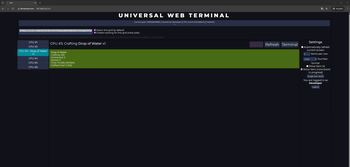
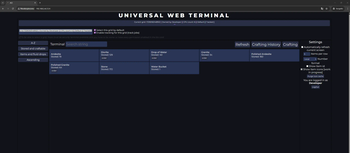
An add-on for AE2 that lets you view your terminal in your web browser wherever you are! This also includes viewing orders, cancelling them and even making a new ones! There is also a discord integration (through a webhook)!
Now also works on multiple networks and on public server = all players can have their own account!
THE MOD SHOULD ONLY BE INSTALLED ON SERVER SIDE, THERE IS NO ITEMS ADDED IN THE GAME!
# Showcase on youtube
### Main mod [!(https://img.youtube.com/vi/3uey6nuW09g/0.jpg)](https://www.youtube.com/watch?v=3uey6nuW09g) ### Discord integration [!(https://img.youtube.com/vi/e4a86dBz7NY/0.jpg)](https://www.youtube.com/watch?v=e4a86dBz7NY)
This mod starts a web server on server boot that hosts a simple website that you can access directly, or through API calls
## How does web panel know which network to chose from?
Because the mod is server sided only, there is no additional terminal or block added that could identify the networks, Networks are identified through wireless access points (or security terminal on older mc versions), all players who wants to access a specific network through the website, must place an wireless access point on that network, Additionally, if you access the website through an Admin account, you will have access to all networks with at least one wireless access point (doesn't matter if you placed it) On older minecraft versions where there is a security terminal, networks are identified through an security terminal, all players who wants to access the network should have their bio cards in the security terminal block (wild bio card is ignored for security reasons!) Admin account will have access to all networks on the server that have security terminal (doesn't matter it has your bio card)
# Current features
- AE2 terminal (item list+sorting+filtering)
- Monitor as many networks as you want!
- Public mode, that allows the mod to works on servers with many independent players!
- Start a new order
- Check any CPU status
- Cancel any CPU order
- Order tracking
Gallery
## In public mode,
all users on your server can create an account on the website and access their AE2 networks, passwords are saved on the server as a PBKDF2WithHmacSHA1 hash Once a user is authenticated, server generates a token valid for 1 hour/7 days and uses it to verify all requests after
## In public mode disabled, there is only an admin account which password is set in the config. token mechanism is the same as in public mode.
Note: localhost connections are automatically authenticated by default, you can change that in config!
# Requirements
- An open port if you want to access the service outside your local network (configurable, terminal will be hosted at http://your-server-ip-or-domain:configured-port/ for example: http://server.kuba6000.pl:2324/)
# How to use
- Download the latest version for your game version from the releases page
- Drop the mod in your server mods folder (only on the server!) (This also works on single player, but is not recommended)
- Start the server
- You can now find the config in /configs/ae2webintegration/ae2webintegration.toml (or .cfg on older mc versions). Edit the port number and password protection for your needs
- Disable public mode if you play by yourself
- Reload the config (/ae2webintegration reload) or restart the server
- Make sure you have opened the configured port (firewall, redirections) if you want to use it on public internet
- Now you can visit http://your-server-ip-or-domain:configured-port/ and login should appear on your browser!
- There is a default user Admin which password is set in the config
# Discord integration
# Custom website
- If you already have a web server and want to host the panel there, you can!
- There is currently no API documentation...
- Check out (https://github.com/kuba6000/AE2-Web-Integration/tr
📊 Mod Details
- Game
- Minecraft Mods
- Author
- kuba6000
- Version
- 1.0.2-forge-1.20.1
- Downloads
- 7,050
- Endorsements
- 18
- Category
- forge
- Created
- 10/17/2024
- Updated
- 4/28/2026
- Game Versions
- 1.20.1
- Tags
- management, technology, utility
🔧 How to Install Minecraft Mods Mods
Download from Modrinth. Use Prism Launcher or drop into your mods folder.
📖 Full step-by-step install guide for Minecraft Mods →
Visit the official mod page for specific installation instructions for this mod.
🎮 Need cheat codes or console commands? Check ur gaming wiki for Minecraft Mods commands, item IDs, and more.
❓ Frequently Asked Questions
Which Minecraft Mods versions does AE2 Web Integration support?
The author lists 1.20.1. Other versions may work but are untested by the author.
What is the latest version of AE2 Web Integration?
Version 1.0.2-forge-1.20.1, published 2026-04-28 with 7,050 downloads recorded at the source.
Keep browsing — more Minecraft Mods mods await