Advanced TFC Blueprint
🟠 Updated over a year ago⚠️ Install Order · 2 steps
Install in this order, then this mod last — most mods fail to load without their framework and dependencies in place.
🖼️ Gallery (2 images)
🔍 Analysis
- 🏆 #216 of 387 forge mods in this game by downloads
📋 About This Mod
# Advanced Blueprint The Advanced Blueprint aims to enhance the functionality of TFC blueprints. This mod is a reconstruction of the (https://terrafirmacraft.com/f/topic/7639-tfc-07914-advanced-blueprint-v03/). Since the original mod's files or code were unavailable, a similar mod was developed independently. ## Item Usage - **Import Schematic**: Use the new blueprint, hold `Shift` and right-click on a detailed block to import the block's schematic into the blueprint. You can also right-click in the air to edit the blueprint directly. - **Apply Schematic**: Once the blueprint stores a schematic, right-click on a detailed block to apply the blueprint's schematic. Similar to TFC blueprints, a hammer and chisel are required in the hotbar to apply the schematic. - **Edit Schematic**: Right-click in the air to open the Advanced Blueprint GUI for schematic editing. ## GUI Usage - **GUI Title**: The top section is the GUI title, which can be ignored. - **Blueprint Naming**: Below the title, you can input any string as the blueprint's name. After saving, this name will be used as the item's name. - **Blueprint Controls**: - Left-click to toggle whether the current position is carved. The default state is uncarved, displayed as a slashed grid. - Right-click to toggle the state of all blocks on the current layer and below. - Left-click and drag to carve a continuous area. - **Operation Buttons**: - Below the blueprint controls, there are 8 buttons that allow you to perform the following operations on the carved schematic: - Move left - Move right - Move up - Move down - Rotate 90° clockwise - Rotate 90° counterclockwise - Mirror left-right - Mirror up-down - **View Direction**: - On the left side of the blueprint controls, there are 6 buttons to select the viewing direction. The default is `TOP` (viewing the blueprint from above). - **View Layer**: - On the right side of the blueprint controls, buttons allow you to select the current viewing layer. The layer closest to you is `0`, and the farthest is `7`. - **Save and Cancel**: - The two buttons at the bottom right are used to either cancel the current changes or save the blueprint: - Cancel: Reads data from NBT and overwrites the current changes. - Save: Stores the current data into NBT. ## Notes - The blueprint can be edited and used infinitely without being consumed, making its recipe relatively expensive. - This mod is an addon of both terrafirmacraft and terrafirmacraftplus, download the correct version to play. - This mod needs (https://github.com/GTNewHorizons/ModularUI) and (https://github.com/GTNewHorizons/ModularUI2), developed by GTNH team. ## Planned Features - Save and load blueprints to and from files. - Share blueprints with other players on the server. - Add a block to upload and download blueprints to and from the server.
# Advanced Blueprint
The Advanced Blueprint aims to enhance the functionality of TFC blueprints. This mod is a reconstruction of the (https://terrafirmacraft.com/f/topic/7639-tfc-07914-advanced-blueprint-v03/). Since the original mod's files or code were unavailable, a similar mod was developed independently.
## Item Usage
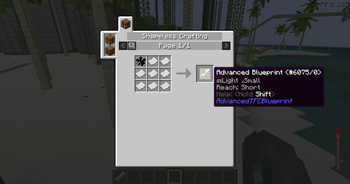
- Import Schematic: Use the new blueprint, hold `Shift` and right-click on a detailed block to import the block's schematic into the blueprint. You can also right-click in the air to edit the blueprint directly.
- Apply Schematic: Once the blueprint stores a schematic, right-click on a detailed block to apply the blueprint's schematic. Similar to TFC blueprints, a hammer and chisel are required in the hotbar to apply the schematic.
- Edit Schematic: Right-click in the air to open the Advanced Blueprint GUI for schematic editing.
## GUI Usage
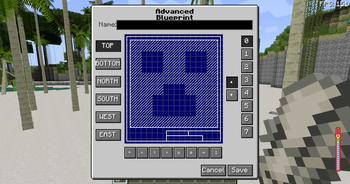
- GUI Title: The top section is the GUI title, which can be ignored.
- Blueprint Naming: Below the title, you can input any string as the blueprint's name. After saving, this name will be used as the item's name.
- Blueprint Controls:
- - Left-click to toggle whether the current position is carved. The default state is uncarved, displayed as a slashed grid.
- - Right-click to toggle the state of all blocks on the current layer and below.
- - Left-click and drag to carve a continuous area.
- Operation Buttons:
- - Below the blueprint controls, there are 8 buttons that allow you to perform the following operations on the carved schematic:
- - Move left
- - Move right
- - Move up
- - Move down
- - Rotate 90° clockwise
- - Rotate 90° counterclockwise
- - Mirror left-right
- - Mirror up-down
- View Direction:
- - On the left side of the blueprint controls, there are 6 buttons to select the viewing direction. The default is `TOP` (viewing the blueprint from above).
- View Layer:
- - On the right side of the blueprint controls, buttons allow you to select the current viewing layer. The layer closest to you is `0`, and the farthest is `7`.
- Save and Cancel:
- - The two buttons at the bottom right are used to either cancel the current changes or save the blueprint:
- - Cancel: Reads data from NBT and overwrites the current changes.
- - Save: Stores the current data into NBT.
- The blueprint can be edited and used infinitely without being consumed, making its recipe relatively expensive.
- This mod is an addon of both terrafirmacraft and terrafirmacraftplus, download the correct version to play.
- This mod needs (https://github.com/GTNewHorizons/ModularUI) and (https://github.com/GTNewHorizons/ModularUI2), developed by GTNH team.
## Planned Features - Save and load blueprints to and from files. - Share blueprints with other players on the server. - Add a block to upload and download blueprints to and from the server.
📊 Mod Details
- Game
- Minecraft Mods
- Author
- Eternal130
- Version
- 1.1.3
- Downloads
- 263
- Endorsements
- 2
- Category
- forge
- Created
- 3/24/2025
- Updated
- 3/21/2025
- Game Versions
- 1.7.10
- Tags
- utility
🔧 How to Install Minecraft Mods Mods
Download from Modrinth. Use Prism Launcher or drop into your mods folder.
📖 Full step-by-step install guide for Minecraft Mods →
Visit the official mod page for specific installation instructions for this mod.
🎮 Need cheat codes or console commands? Check ur gaming wiki for Minecraft Mods commands, item IDs, and more.
❓ Frequently Asked Questions
Which Minecraft Mods versions does Advanced TFC Blueprint support?
The author lists 1.7.10. Other versions may work but are untested by the author.
What is the latest version of Advanced TFC Blueprint?
Version 1.1.3, published 2025-03-21 with 263 downloads recorded at the source.
Keep browsing — more Minecraft Mods mods await