Advanced GUI Manager
🟡 Updated this year⚠️ Install Order · 2 steps
Install in this order, then this mod last — most mods fail to load without their framework and dependencies in place.
🖼️ Gallery (3 images)
🔍 Analysis
- 🏆 #759 of 909 fabric mods in this game by downloads
📋 About This Mod
# Advanced Text Display Build fully custom, interactive menus and persistent HUD overlays — entirely in-game, with no resource packs, no external editors, and no per-menu code. Design shops, quest boards, warp menus, scoreboards-as-UI, timers, and info panels visually, then hook them up to live data using the same raw-JSON text your /tellraw commands already use. ## Two edit sections /gui — windowed menus, opened for specific players on demand. Perfect for shops, kits, warp lists, dialogue, or any menu a player opens and closes. /ui — persistent screen overlays, always on for every connected player (a live scoreboard, timer, or status HUD) — and unlike a resource-pack HUD, it survives pressing F1 by default. ## Everything is built in-game A visual, drag-and-drop editor — no JSON hand-editing, no external tools.Press **`** and click + to add elements, drag to position, right-click for a full property panel. Multi-select, group drag/resize, and copy/cut/paste — even across different GUIs and UIs. Resolution-independent layout — anchor points and percentage-based sizing mean your menus reflow correctly no matter the player's screen size or GUI Scale. An optional snap-to-grid for pixel-perfect alignment. ## Element types Button — runs a command (elevated to operator permission, so a shop/kit button works for any player) or opens a URL, with optional custom texture and text scale. Text — multi-line, with independent per-line formatting/color and full raw-JSON text support, including live storage/scoreboard values — the same {"storage":...}/{"score":...} syntax /tellraw uses. Sprite — show a custom imported image (PNG or animated GIF), or a live-rendered real Minecraft item/block icon — complete with an optional enchant glint — picked from a searchable browser with preview thumbnails, no image editing required. Textfield — a real, typeable input box that writes whatever the player enters straight into NBT command storage, with an optional command to run right after. ## Built for servers **Operator-only, gated by permission level — safe to hand your build team access without giving anything untrusted players can abuse. Fully macro/function-compatible — /gui and /ui are ordinary commands, so they work from .mcfunction files and macros with zero special configuration. Per-world storage — everything you build lives inside the world's own save folder, so different worlds/servers never bleed into each other. Safe by design — a connecting client never permanently caches server-supplied images to disk; they're held in memory for the session and re-fetched on each join.** ### Commands at a glance /gui create|edit|open|close|remove <name> /ui create|edit|hide|show|remove <name> ### Requires Fabric API.
# Advanced Text Display Build fully custom, interactive menus and persistent HUD overlays — entirely in-game, with no resource packs, no external editors, and no per-menu code. Design shops, quest boards, warp menus, scoreboards-as-UI, timers, and info panels visually, then hook them up to live data using the same raw-JSON text your /tellraw commands already use.
## Two edit sections /gui — windowed menus, opened for specific players on demand. Perfect for shops, kits, warp lists, dialogue, or any menu a player opens and closes.
/ui — persistent screen overlays, always on for every connected player (a live scoreboard, timer, or status HUD) — and unlike a resource-pack HUD, it survives pressing F1 by default.
## Everything is built in-game
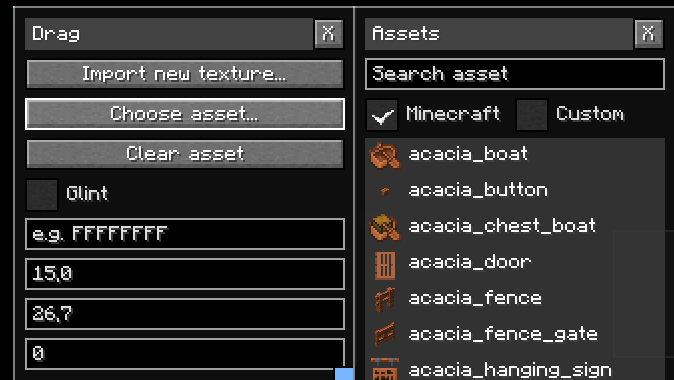
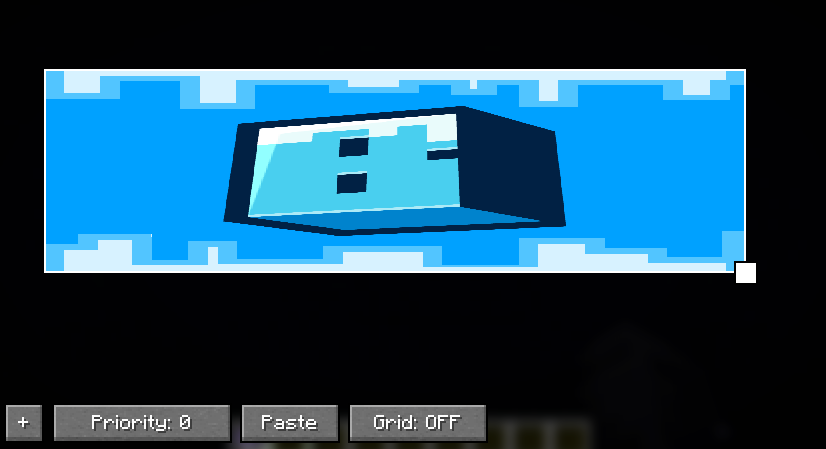
A visual, drag-and-drop editor — no JSON hand-editing, no external tools. Press ` and click + to add elements, drag to position, right-click for a full property panel.
Multi-select, group drag/resize, and copy/cut/paste — even across different GUIs and UIs.
Resolution-independent layout — anchor points and percentage-based sizing mean your menus reflow correctly no matter the player's screen size or GUI Scale.
An optional snap-to-grid for pixel-perfect alignment.
## Element types
Button — runs a command (elevated to operator permission, so a shop/kit button works for any player) or opens a URL, with optional custom texture and text scale.
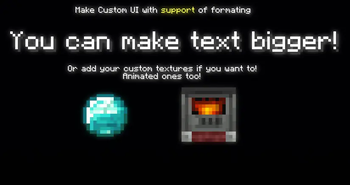
Text — multi-line, with independent per-line formatting/color and full raw-JSON text support, including live storage/scoreboard values — the same {"storage":...}/{"score":...} syntax /tellraw uses.
Sprite — show a custom imported image (PNG or animated GIF), or a live-rendered real Minecraft item/block icon — complete with an optional enchant glint — picked from a searchable browser with preview thumbnails, no image editing required.
Textfield — a real, typeable input box that writes whatever the player enters straight into NBT command storage, with an optional command to run right after.
## Built for servers
Operator-only, gated by permission level — safe to hand your build team access without giving anything untrusted players can abuse.
Fully macro/function-compatible — /gui and /ui are ordinary commands, so they work from .mcfunction files and macros with zero special configuration.
Per-world storage — everything you build lives inside the world's own save folder, so different worlds/servers never bleed into each other.
Safe by design — a connecting client never permanently caches server-supplied images to disk; they're held in memory for the session and re-fetched on each join.
### Commands at a glance
/gui create|edit|open|close|remove
/ui create|edit|hide|show|remove
### Requires Fabric API.
📊 Mod Details
- Game
- Minecraft Mods
- Author
- Kcema
- Version
- 1.1.0+1.21.8
- Downloads
- 249
- Endorsements
- 2
- Category
- fabric
- Created
- 7/8/2026
- Updated
- 7/20/2026
- Game Versions
- 1.21.8
- Tags
- game-mechanics, management, utility
🔧 How to Install Minecraft Mods Mods
Download from Modrinth. Use Prism Launcher or drop into your mods folder.
📖 Full step-by-step install guide for Minecraft Mods →
Visit the official mod page for specific installation instructions for this mod.
🎮 Need cheat codes or console commands? Check ur gaming wiki for Minecraft Mods commands, item IDs, and more.
❓ Frequently Asked Questions
Which Minecraft Mods versions does Advanced GUI Manager support?
The author lists 1.21.8. Other versions may work but are untested by the author.
What is the latest version of Advanced GUI Manager?
Version 1.1.0+1.21.8, published 2026-07-20 with 249 downloads recorded at the source.
Keep browsing — more Minecraft Mods mods await