AdaptiveHUD
🟡 Updated this year⚠️ Install Order · 2 steps
Install in this order, then this mod last — most mods fail to load without their framework and dependencies in place.
🖼️ Gallery (2 images)
🔍 Analysis
- 👍 0.2% endorsement rate
- 🏆 #246 of 343 decoration mods in this game by downloads
📋 About This Mod
!(https://cdn.modrinth.com/data/cached_images/d43e8d5efce63ca141dba0a094c71ad713e806c1.png)
## Description
[ ](https://discord.gg/tqn38v6w7k)
[
](https://discord.gg/tqn38v6w7k)
[ ](https://adaptivehud.gitbook.io/)
[
](https://adaptivehud.gitbook.io/)
[ ](https://modrinth.com/mod/fabric-api)
[
](https://modrinth.com/mod/fabric-api)
[ ](https://modrinth.com/mod/modmenu)
!(https://cdn.modrinth.com/data/cached_images/c3cc68a4f89c53a55ce65e83bdb15031f2b6bb56_0.webp)
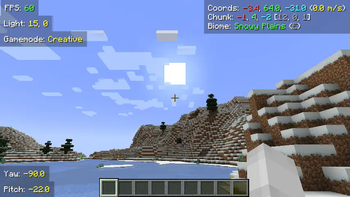
AdaptiveHUD is a highly customizable HUD mod, it is based on variables meaning you can make it display pretty much anything you want! From your current FPS to the amount of outgoing packets, anything is possible. While there are other mods like this, AdaptiveHUD gives you the ability to position these elements wherever you want (_through a dragging-screen_), you can change the padding, the background, the colors, shadows, scale and much more.
When you create a new element you use variables to display what you want. For example you could enter something like `FPS: {fps}`, which then would display your current FPS like `FPS: 103`. The mod has many different variables, and you can find them all by checking out the (https://adaptivehud.gitbook.io/docs/docs/variables_docs).
## Why use this mod instead of other simular ones? While there are a few other mods like this, they all have some missing features that I would have liked.
[Minihud](https://modrinth.com/mod/minihud): Lacks customization, while you can display a lot of information, you can't move each induvidually, it isn't variable based (meaning the text is set), also you can't change colors, scale, padding and such as easily.
[CustomHUD](https://modrinth.com/mod/customhud): Not that user-friendly. While CustomHUD is able to scale, change colors and more, it isn't that easy to use since you must edit the files manually. CustomHUD also focuses more on paragraphs of text, while AdaptiveHUD has each variable as an individual element.
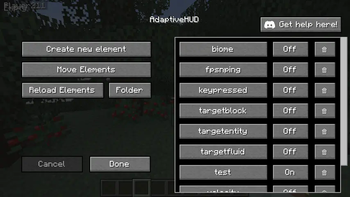
## Editing Screen !(https://cdn.modrinth.com/data/cached_images/e7662e1502b84a090fa2119de25a86f8151929f4.png)
## Moving Screen !(https://cdn.modrinth.com/data/cached_images/5698f5fb1bce97ab4f7e2077aae8c437f47de255_0.webp)
The mod is currently only available for Fabric, but might get ported to other loaders in the future.
📊 Mod Details
- Game
- Minecraft Mods
- Author
- Fy17
- Version
- 1.0.2+1.21.9
- Downloads
- 11,404
- Endorsements
- 22
- Category
- decoration
- Created
- 9/18/2024
- Updated
- 9/29/2025
- Game Versions
- 1.21.9-rc1, 1.21.9, 1.21.10
- Tags
- decoration, utility
🔧 How to Install Minecraft Mods Mods
Download from Modrinth. Use Prism Launcher or drop into your mods folder.
📖 Full step-by-step install guide for Minecraft Mods →
Visit the official mod page for specific installation instructions for this mod.
🎮 Need cheat codes or console commands? Check ur gaming wiki for Minecraft Mods commands, item IDs, and more.
❓ Frequently Asked Questions
Which Minecraft Mods versions does AdaptiveHUD support?
The author lists 1.21.9-rc1, 1.21.9, 1.21.10. Other versions may work but are untested by the author.
What is the latest version of AdaptiveHUD?
Version 1.0.2+1.21.9, published 2025-09-29 with 11,404 downloads recorded at the source.
Keep browsing — more Minecraft Mods mods await