360 FOV
🟢 Updated this month⚠️ Install Order · 2 steps
Install in this order, then this mod last — most mods fail to load without their framework and dependencies in place.
🖼️ Gallery (3 images)
🔍 Analysis
- 🏆 #13 of 907 fabric mods in this game by downloads
📋 About This Mod
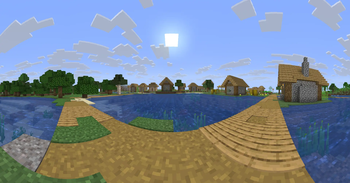
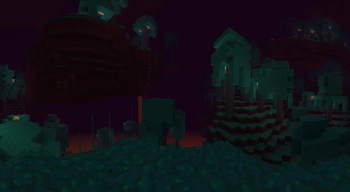
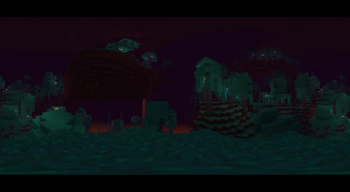
# 360 FOV This mod blends various projections to allow FOV to be set up to 400° and still maintaining visual quality. > Note: \ > **FOV mismatch:** Vanilla's slider sets a vertical FOV while the projection shader works in horizontal FOV, so the same number maps to a different angular extent depending on your aspect ratio and which projection stage you're in. \ > **Performance:** Rendering a full surround view can take up to six world passes per frame instead of one (can decrease FPS) \ > **Bugs:** Several rendering edge cases (billboard/particle handling, shader mod compatibility, untested corner geometry, etc.) haven't been verified in-game yet ## Preview Preview in Modrinth gallery </details> **What it does** The effect is always on while a world is loaded. The mod captures the world as a six-face cubemap and reprojects it in a single shader pass. As you raise the FOV slider (now 400 instead of vanilla's 110) the shader switches through a chain of projections: | FOV range | Projection | | --- | --- | | below 90 | Rectilinear, vanilla projection | | 90 to 160 | Cross-fade rectilinear into the Panini/stereographic hybrid | | 160 to 220 | Cross-fade the hybrid into fisheye (azimuthal equidistant) | | 220 to 300 | Cross-fade fisheye into Mercator | | 300 to 340 | Pure Mercator | | 340 to 360 | Linear cross-fade Mercator into equirectangular | | 360 and above | Equirectangular, the full sphere is shown at 360, past it the view wraps | ## Usage Raise the FOV slider in vanilla video settings; the projection follows it automatically. No keybind or toggle, it's a drop-in replacement for how the world is rendered at wide FOV. ## Config `config/paniniprojection.json` is created on first launch and read once per session (edits need a restart): | Key | Default | Effect | | --- | --- | --- | | `splitScreen` | `false` | Splits the window into a forward half and a rear half, each at the full slider FOV. Meant for two monitors at slider 180, giving a seamless full-sphere view. | | `invertSplitScreen` | `false` | Swaps which half is forward/rear (and where the GUI lives) in split screen. | | `faceSizeCap` | `2048` | Upper bound in pixels on the six capture faces. Raising it sharpens high FOVs at a steep VRAM cost. Clamped to 256-4096. | | `lowResTopBottomFaces` | `false` | Halves resolution on the up/down capture faces (except the one you're looking at) to save performance | | `antialiasSamples` | `4` | Supersample tap count in the reprojection pass: 1, 2, or 4. | ## Attribution The projection math is ported from (https://github.com/shaunlebron/flex-fov) by Shaun LeBron, itself a fork of (https://github.com/18107/MC-Render360) by 18107. Licensed under the GNU Affero General Public License v3.0 or later ## Bugs and contact Contact ```@xpncvr``` on discord if you want to report a bug or feature
This mod blends various projections to allow FOV to be set up to 400° and still maintaining visual quality.
> Note: \ > FOV mismatch: Vanilla's slider sets a vertical FOV while the projection shader works in horizontal FOV, so the same number maps to a different angular extent depending on your aspect ratio and which projection stage you're in. \ > Performance: Rendering a full surround view can take up to six world passes per frame instead of one (can decrease FPS) \ > Bugs: Several rendering edge cases (billboard/particle handling, shader mod compatibility, untested corner geometry, etc.) haven't been verified in-game yet
Preview in Modrinth gallery
What it does
The effect is always on while a world is loaded. The mod captures the world as a six-face cubemap and reprojects it in a single shader pass. As you raise the FOV slider (now 400 instead of vanilla's 110) the shader switches through a chain of projections:
| FOV range | Projection | | --- | --- | | below 90 | Rectilinear, vanilla projection | | 90 to 160 | Cross-fade rectilinear into the Panini/stereographic hybrid | | 160 to 220 | Cross-fade the hybrid into fisheye (azimuthal equidistant) | | 220 to 300 | Cross-fade fisheye into Mercator | | 300 to 340 | Pure Mercator | | 340 to 360 | Linear cross-fade Mercator into equirectangular | | 360 and above | Equirectangular, the full sphere is shown at 360, past it the view wraps |
Raise the FOV slider in vanilla video settings; the projection follows it automatically. No keybind or toggle, it's a drop-in replacement for how the world is rendered at wide FOV.
`config/paniniprojection.json` is created on first launch and read once per session (edits need a restart):
| Key | Default | Effect | | --- | --- | --- | | `splitScreen` | `false` | Splits the window into a forward half and a rear half, each at the full slider FOV. Meant for two monitors at slider 180, giving a seamless full-sphere view. | | `invertSplitScreen` | `false` | Swaps which half is forward/rear (and where the GUI lives) in split screen. | | `faceSizeCap` | `2048` | Upper bound in pixels on the six capture faces. Raising it sharpens high FOVs at a steep VRAM cost. Clamped to 256-4096. | | `lowResTopBottomFaces` | `false` | Halves resolution on the up/down capture faces (except the one you're looking at) to save performance | | `antialiasSamples` | `4` | Supersample tap count in the reprojection pass: 1, 2, or 4. |
## Attribution
The projection math is ported from (https://github.com/shaunlebron/flex-fov) by Shaun LeBron, itself a fork of (https://github.com/18107/MC-Render360) by 18107.
Licensed under the GNU Affero General Public License v3. 0 or later
## Bugs and contact Contact ```@xpncvr``` on discord if you want to report a bug or feature
📊 Mod Details
- Game
- Minecraft Mods
- Author
- xpncvr
- Version
- 1.0.1
- Downloads
- 471
- Endorsements
- 4
- Category
- fabric
- Created
- 7/30/2026
- Updated
- 8/25/2026
- Game Versions
- 26.2
- Tags
- utility
🔧 How to Install Minecraft Mods Mods
Download from Modrinth. Use Prism Launcher or drop into your mods folder.
📖 Full step-by-step install guide for Minecraft Mods →
Visit the official mod page for specific installation instructions for this mod.
🎮 Need cheat codes or console commands? Check ur gaming wiki for Minecraft Mods commands, item IDs, and more.
❓ Frequently Asked Questions
Which Minecraft Mods versions does 360 FOV support?
The author lists 26.2. Other versions may work but are untested by the author.
What is the latest version of 360 FOV?
Version 1.0.1, published 2026-08-25 with 471 downloads recorded at the source.
Keep browsing — more Minecraft Mods mods await