Yoru
🟠 Updated over a year ago🖼️ Gallery (2 images)
🔍 Analysis
- 👍 0.4% endorsement rate
- 🏆 #146 of 673 lightweight mods in this game by downloads
📋 About This Mod
!(https://cdn.discordapp.com/attachments/584765098812243978/988425097368965160/YoruCover.png) # Why Yoru? ## Yoru is a pre-configured, high performance and QoL optimised vanilla modpack with tools for advanced and new users alike. #### With Yoru, you get leading performance ***and*** a polished but not overdone quality of life, expect it to work out of the box with little configuration ever required. #### I personally use this pack and will frequently maintain it. ### Most notably this modpack is running: - Iris and Sodium - Many other rendering, memory and misc fixes/optimisations. - Inventory management, sorting, shulker viewing etc... - World navigation and mapping. - Technical additions such as Litematica, MiniHUD, WorldEdit(CUI) and Tweakeroo. - Immersion additions, footsteps, sound physics and particles. ## Please read the menus below to learn the range of features Yoru offers! ### Special thanks HaiMcFly for allowing me to use their resourcepacks in Yoru. ## Suggestions or issues are welcome via our discord! <details><summary>Shaders</summary> <p> - Complementary v4 - Complementary Reimagined - Shimple Shaders </p> </details> <details><summary>Keybinds</summary> <p> General: - Ctrl + Shift + F - Toggle FPS Display - +/- Zoom map (Z for temp zoom) - Middle Click - Sort Inventory - K - Toggle Shaders - C - Zoom (Scroll to adjust) - R - Reload Shaders - O - Select Shaders - M - Map - B - Waypoints - L - Litematica X+: Tweakeroo: - K - Auto Weapon Switch - T - Auto Tool - C - Menu - F - Freecam - R - Gamma Override - G - Auto refill items to hand H+: Minihud: - C - Menu - R - Toggle Rendering </p> </details> <details><summary>Mods</summary> <p> <details><summary>Quality of life improvements</summary> <p> - 3D Skin Layers - Appleskin - Better Biome Blend - BetterF3 - Better Recipe Book - Blur - Chat Heads - Continuity - CraftPresence - Drip Sounds - Eating Animation - Falling Leaves - Interactic - Mod Menu - Item Scroller - Presence Footsteps - Shoulder Surfing Reloaded - Skip Transitions - Visuality </p> </details> <details><summary>Performance improvements</summary> <p> - Blanket Client Tweaks - C2ME - Debugify - Dynamic FPS - EntityCulling - FastLoad - FerriteCore - Indium - Iris - Krypton - LazyDFU - Lithium - Memory Leak Fix - More Culling - Smooth Boot - Sodium - Sodium Extra - Very Many Players - ViaVersion </p> </details> <details><summary>Utilities</summary> <p> - Axiom - Litematica - MiniHUD - Tweakeroo - Xaero's Minimap and Worldmap </p> </details> </p> </details> <details><summary>Licencing</summary> <p> ## All rights reserved have explicit modpack permission and have been adhered to: ### Stay True - https://www.planetminecraft.com/texture-pack/stay-true-4447380/ ### Xaero's Minimap and World Map - https://chocolateminecraft.com/ ### Complementary Shaders - https://www.complementary.dev </p> </details>
 # Why Yoru?
## Yoru is a pre-configured, high performance and QoL optimised vanilla modpack with tools for advanced and new users alike. #### With Yoru, you get leading performance and a polished but not overdone quality of life, expect it to work out of the box with little configuration ever required. #### I personally use this pack and will frequently maintain it.
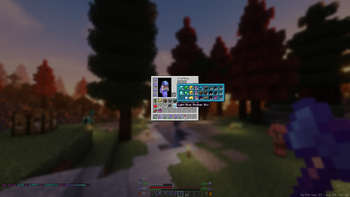
### Most notably this modpack is running: - Iris and Sodium - Many other rendering, memory and misc fixes/optimisations. - Inventory management, sorting, shulker viewing etc... - World navigation and mapping. - Technical additions such as Litematica, MiniHUD, WorldEdit(CUI) and Tweakeroo. - Immersion additions, footsteps, sound physics and particles.
## Please read the menus below to learn the range of features Yoru offers!
### Special thanks HaiMcFly for allowing me to use their resourcepacks in Yoru. ## Suggestions or issues are welcome via our discord!
Shaders
General:
- Ctrl + Shift + F - Toggle FPS Display
- +/- Zoom map (Z for temp zoom)
- Middle Click - Sort Inventory
- K - Toggle Shaders
- C - Zoom (Scroll to adjust)
- R - Reload Shaders
- O - Select Shaders
- M - Map
- B - Waypoints
- L - Litematica X+: Tweakeroo:
- K - Auto Weapon Switch
- T - Auto Tool
- C - Menu
- F - Freecam
- R - Gamma Override
- G - Auto refill items to hand H+: Minihud:
- C - Menu
- R - Toggle RenderingKeybinds
Mods
Quality of life improvements
Performance improvements
Utilities
## All rights reserved have explicit modpack permission and have been adhered to: ### Stay True - https://www.planetminecraft.com/texture-pack/stay-true-4447380/ ### Xaero's Minimap and World Map - https://chocolateminecraft.com/ ### Complementary Shaders - https://www.complementary.devLicencing
📊 Mod Details
- Game
- Minecraft Modpacks
- Author
- rephlexzero
- Version
- 8.0.0
- Downloads
- 20,232
- Endorsements
- 81
- Category
- lightweight
- Created
- 5/25/2022
- Updated
- 8/8/2025
- Game Versions
- 1.21.8
- Tags
- lightweight, multiplayer, optimization
🔧 How to Install Minecraft Modpacks Mods
Download from Modrinth. Use Prism Launcher or drop into your mods folder.
📖 Full step-by-step install guide for Minecraft Modpacks →
Visit the official mod page for specific installation instructions for this mod.
🎮 Need cheat codes or console commands? Check ur gaming wiki for Minecraft Modpacks commands, item IDs, and more.
❓ Frequently Asked Questions
Which Minecraft Modpacks versions does Yoru support?
The author lists 1.21.8. Other versions may work but are untested by the author.
What is the latest version of Yoru?
Version 8.0.0, published 2025-08-08 with 20,232 downloads recorded at the source.
Keep browsing — more Minecraft Modpacks mods await