Vanilla Plus
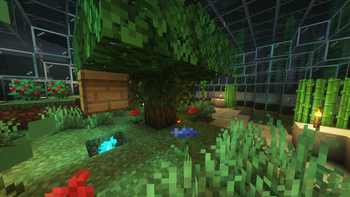
🟡 Updated this year🖼️ Gallery (1 images)
🔍 Analysis
- 👍 0.0% endorsement rate
- 🏆 #290 of 673 lightweight mods in this game by downloads
📋 About This Mod
# Vanilla Plus A simple modpack meant to be compatible with vanilla clients/servers, but has various performance improvements, controller support, and shader compatibility. ## Performance With the modpack I am able to load into a ~2 gigabyte save file in ~7 seconds. Vanilla took ~12 Seconds using the same save file. As far as frame rate goes I went from ~120 fps in vanilla to ~140 fps with the modpack without shaders. There should be some performance benefits on the server side of things as well I'll try and remember to compare the difference at some point. ## Usage ### Client To use on a client use the integrated modrinth downloader on prism launcher or download the .mrpack and open it using prism launcher or whatever launcher you prefer as long as it has modrinth support. ### Server Before you continue with the server installation it does require (https://www.docker.com/) or (https://podman-desktop.io/) If there's enough demand I might make a script to run the server that doesn't involve containers. You can run it using ```docker run -dit -v /path/for/world:/Minecraft/server/world -p 25565:25565 ghcr.io/nathan-r-wood/vanilla-plus-mc:latest``` The default ram ussage of the server is set to 4G if you want to change the amount of ram the server can use add ```-e RAM=5G``` or ```-e RAM=3000M``` to the docker run command so it looks something like this ```docker run -dit -v /path/for/world:/Minecraft/server/world -e RAM=5G -p 25565:25565 ghcr.io/nathan-r-wood/vanilla-plus-mc:latest``` If you want consistent ops or server properties you'll have to add a ops.json file or a server.properties file on the host somewhere and link the to the container with a start command that looks something like this ```docker run -dit -v /path/for/world:/Minecraft/server/world -v /path/for/ops.json:/Minecraft/server/ops.json -p 25565:25565 ghcr.io/nathan-r-wood/vanilla-plus-mc:latest``` Good luck have fun and hopefully these instructions are good enough.
# Vanilla Plus
A simple modpack meant to be compatible with vanilla clients/servers, but has various performance improvements, controller support, and shader compatibility. ## Performance
With the modpack I am able to load into a ~2 gigabyte save file in ~7 seconds. Vanilla took ~12 Seconds using the same save file.
As far as frame rate goes I went from ~120 fps in vanilla to ~140 fps with the modpack without shaders.
There should be some performance benefits on the server side of things as well I'll try and remember to compare the difference at some point.
To use on a client use the integrated modrinth downloader on prism launcher or download the .mrpack and open it using prism launcher or whatever launcher you prefer as long as it has modrinth support.
Before you continue with the server installation it does require (https://www.docker.com/) or (https://podman-desktop.io/) If there's enough demand I might make a script to run the server that doesn't involve containers.
You can run it using ```docker run -dit -v /path/for/world:/Minecraft/server/world -p 25565:25565 ghcr.io/nathan-r-wood/vanilla-plus-mc:latest```
The default ram ussage of the server is set to 4G if you want to change the amount of ram the server can use add ```-e RAM=5G``` or ```-e RAM=3000M``` to the docker run command so it looks something like this ```docker run -dit -v /path/for/world:/Minecraft/server/world -e RAM=5G -p 25565:25565 ghcr.io/nathan-r-wood/vanilla-plus-mc:latest```
If you want consistent ops or server properties you'll have to add a ops.json file or a server.properties file on the host somewhere and link the to the container with a start command that looks something like this ```docker run -dit -v /path/for/world:/Minecraft/server/world -v /path/for/ops.json:/Minecraft/server/ops.json -p 25565:25565 ghcr.io/nathan-r-wood/vanilla-plus-mc:latest```
Good luck have fun and hopefully these instructions are good enough.
📊 Mod Details
- Game
- Minecraft Modpacks
- Author
- Wizard-Dragon
- Version
- 8.0.0
- Downloads
- 7,925
- Endorsements
- 3
- Category
- lightweight
- Created
- 1/25/2023
- Updated
- 8/12/2026
- Game Versions
- 26.2
- Tags
- lightweight, optimization
🔧 How to Install Minecraft Modpacks Mods
Download from Modrinth. Use Prism Launcher or drop into your mods folder.
📖 Full step-by-step install guide for Minecraft Modpacks →
Visit the official mod page for specific installation instructions for this mod.
🎮 Need cheat codes or console commands? Check ur gaming wiki for Minecraft Modpacks commands, item IDs, and more.
❓ Frequently Asked Questions
Which Minecraft Modpacks versions does Vanilla Plus support?
The author lists 26.2. Other versions may work but are untested by the author.
What is the latest version of Vanilla Plus?
Version 8.0.0, published 2026-08-12 with 7,925 downloads recorded at the source.
Keep browsing — more Minecraft Modpacks mods await