Vanilla modpack
🟠 Updated over a year ago🖼️ Gallery (9 images)
🔍 Analysis
- 👍 0.1% endorsement rate
- 🏆 #167 of 673 lightweight mods in this game by downloads
📋 About This Mod
# Description This modpack was created for the vanilla game. It contains the best optimizing mods at the moment. As well as client mods (client mods are those mods that do not require installation on the server) that will help you in your game. ## Optimization This modpack is still based on a lot of optimization mods, the main ones being (https://modrinth.com/mods/sodium) and (https://modrinth.com/mods/nvidium) (this is a mod that really increases FPS by 2 or 3 times, but if you don't have an Nvidia graphics card, then don't worry, nothing will happen, and only other mods will work on optimization). The modpack also contains many other optimizing mods for a comfortable game. This modpack will run on any computer or laptop, I checked it myself. # List of modifications <details> <summary>Mods</summary> 1. (https://modrinth.com/mod/antighost) — press G to see ghost blocks within a 4 block radius due to fast breaking 2. (https://modrinth.com/mod/armor-trim-item-fix) — changes the armor icon to make it clear what kind of trim it currently has 3. (https://modrinth.com/mod/better-trim-tooltips) — condenses the tooltips of Trimmed Armor items 4. (https://modrinth.com/mod/betterf3) — replaces Minecraft's original debug HUD with a highly customizable, more human-readable HUD 5. (https://modrinth.com/mod/broken-lead-warner) — let's you know if your lead breaks 7. (https://modrinth.com/mod/chest-tracker) — item storage, remember where you've put things 7. (https://modrinth.com/mod/chunks-fade-in) — adds fade-in animation for chunks 7. (https://modrinth.com/mod/clickthrough+) — allows you to click through the plates and frames without pressing Shift 8. (https://modrinth.com/mod/continuity) — connects textures, such as glass 8. (https://modrinth.com/mod/emotecraft) — adds emotion. Press B in supported servers 9. (https://modrinth.com/mod/lambdynamiclights) — adds dynamic lights 10. (https://modrinth.com/mod/lighty) — when you press the F8 key, it shows where there is not enough light 11. (https://modrinth.com/mod/litematica) — allows you to create schemes for rebuilding buildings 12. (https://modrinth.com/mod/modelfix) — fixes gaps in Block Models and Item Models 12. (https://modrinth.com/mod/mouse-wheelie) — improves the handling of the mouse in the inventory 13. (https://modrinth.com/mod/not-enough-animations) — adds more animation 14. (https://modrinth.com/mod/notenoughcrashes) — When crashing, you can go back to the title screen and keep playing, without needing to restart, alongside other things to make crashes more pleasant 16. (https://modrinth.com/mod/presence-footsteps) — adds sounds when walking on different blocks 17. (https://modrinth.com/mod/shulkerboxtooltip) — view the contents of shulker boxes from your inventory 18. (https://modrinth.com/mod/simple-shulker-preview) — displays a icon indicating the contents of a shulker box, as well as a capacity bar 19. (https://modrinth.com/mod/sound) — adds a wide range of new and improved sound effects 20. (https://modrinth.com/mod/status-effect-bars) — improves the display of effects 21. (https://modrinth.com/mod/wdmgslt) — stops the glass sound from breaking your eardrums when you have silk touch 22. (https://modrinth.com/mod/zoomify) — allows you to zoom in on the C key and even more using the mouse wheel </details> <details> <summary>Resource Packs</summary> 1. (https://modrinth.com/resourcepack/fast-better-grass) — makes grass and related blocks use the top texture on the sides 2. (https://modrinth.com/resourcepack/fresh-animations) — make your game like the trailers! Dynamic animated entities to freshen your Minecraft experience 3. (https://modrinth.com/resourcepack/no-z-fighting) — fixes those annoying flickering glitches 4. (https://modrinth.com/resourcepack/shield-corrections) — it can fix broken shield patterns and lowering shield for you 4. (https://modrinth.com/resourcepack/translations-for-sodium) — unofficial translations for the Sodium Minecraft mod 5. (https://modrinth.com/resourcepack/xalis-enchanted-books) — atribute custom textures to enchanted books to be more identifiable 6. (https://modrinth.com/resourcepack/xalis-enhanced-vanilla) — improves the nature and adds variability to some blocks 7. (https://modrinth.com/resourcepack/xalis-potions) — atribute custom textures to potions to be more identifiable </details> <details> <summary>Shaders</summary> 1. [AstraLex Shad
# Description This modpack was created for the vanilla game. It contains the best optimizing mods at the moment. As well as client mods (client mods are those mods that do not require installation on the server) that will help you in your game.
## Optimization This modpack is still based on a lot of optimization mods, the main ones being (https://modrinth.com/mods/sodium) and (https://modrinth.com/mods/nvidium) (this is a mod that really increases FPS by 2 or 3 times, but if you don't have an Nvidia graphics card, then don't worry, nothing will happen, and only other mods will work on optimization). The modpack also contains many other optimizing mods for a comfortable game. This modpack will run on any computer or laptop, I checked it myself.
# List of modifications
Mods
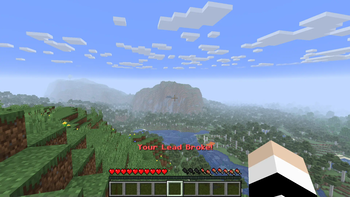
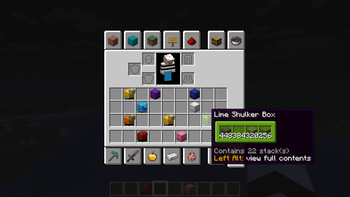
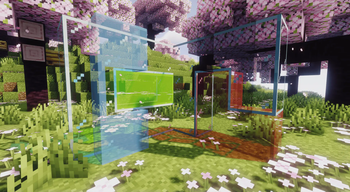
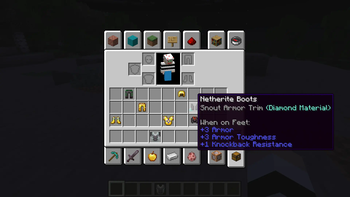
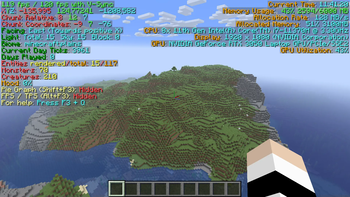
1. (https://modrinth.com/mod/antighost) — press G to see ghost blocks within a 4 block radius due to fast breaking 2. (https://modrinth.com/mod/armor-trim-item-fix) — changes the armor icon to make it clear what kind of trim it currently has 3. (https://modrinth.com/mod/better-trim-tooltips) — condenses the tooltips of Trimmed Armor items 4. (https://modrinth.com/mod/betterf3) — replaces Minecraft's original debug HUD with a highly customizable, more human-readable HUD 5. (https://modrinth.com/mod/broken-lead-warner) — let's you know if your lead breaks 7. (https://modrinth.com/mod/chest-tracker) — item storage, remember where you've put things 7. (https://modrinth.com/mod/chunks-fade-in) — adds fade-in animation for chunks 7. (https://modrinth.com/mod/clickthrough+) — allows you to click through the plates and frames without pressing Shift 8. (https://modrinth.com/mod/continuity) — connects textures, such as glass 8. (https://modrinth.com/mod/emotecraft) — adds emotion. Press B in supported servers 9. (https://modrinth.com/mod/lambdynamiclights) — adds dynamic lights 10. (https://modrinth.com/mod/lighty) — when you press the F8 key, it shows where there is not enough light 11. (https://modrinth.com/mod/litematica) — allows you to create schemes for rebuilding buildings 12. (https://modrinth.com/mod/modelfix) — fixes gaps in Block Models and Item Models 12. (https://modrinth.com/mod/mouse-wheelie) — improves the handling of the mouse in the inventory 13. (https://modrinth.com/mod/not-enough-animations) — adds more animation 14. (https://modrinth.com/mod/notenoughcrashes) — When crashing, you can go back to the title screen and keep playing, without needing to restart, alongside other things to make crashes more pleasant 16. (https://modrinth.com/mod/presence-footsteps) — adds sounds when walking on different blocks 17. (https://modrinth.com/mod/shulkerboxtooltip) — view the contents of shulker boxes from your inventory 18. (https://modrinth.com/mod/simple-shulker-preview) — displays a icon indicating the contents of a shulker box, as well as a capacity bar 19. (https://modrinth.com/mod/sound) — adds a wide range of new and improved sound effects 20. (https://modrinth.com/mod/status-effect-bars) — improves the display of effects 21. (https://modrinth.com/mod/wdmgslt) — stops the glass sound from breaking your eardrums when you have silk touch 22. (https://modrinth.com/mod/zoomify) — allows you to zoom in on the C key and even more using the mouse wheel
Resource Packs
1. (https://modrinth.com/resourcepack/fast-better-grass) — makes grass and related blocks use the top texture on the sides 2. (https://modrinth.com/resourcepack/fresh-animations) — make your game like the trailers! Dynamic animated entities to freshen your Minecraft experience 3. (https://modrinth.com/resourcepack/no-z-fighting) — fixes those annoying flickering glitches 4. (https://modrinth.com/resourcepack/shield-corrections) — it can fix broken shield patterns and lowering shield for you 4. (https://modrinth.com/resourcepack/translations-for-sodium) — unofficial translations for the Sodium Minecraft mod 5. (https://modrinth.com/resourcepack/xalis-enchanted-books) — atribute custom textures to enchanted books to be more identifiable 6. (https://modrinth.com/resourcepack/xalis-enhanced-vanilla) — improves the nature and adds variability to some blocks 7. (https://modrinth.com/resourcepack/xalis-potions) — atribute custom textures to potions to be more identifiable
Shaders
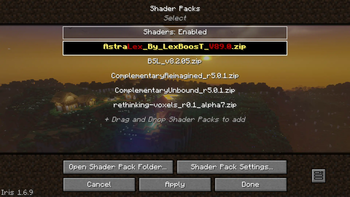
1. [AstraLex Shad
📊 Mod Details
- Game
- Minecraft Modpacks
- Author
- Tinkotron
- Version
- 1.6.2
- Downloads
- 16,553
- Endorsements
- 15
- Category
- lightweight
- Created
- 10/11/2023
- Updated
- 6/23/2025
- Game Versions
- 1.21.6
- Tags
- lightweight, multiplayer, optimization
🔧 How to Install Minecraft Modpacks Mods
Download from Modrinth. Use Prism Launcher or drop into your mods folder.
📖 Full step-by-step install guide for Minecraft Modpacks →
Visit the official mod page for specific installation instructions for this mod.
🎮 Need cheat codes or console commands? Check ur gaming wiki for Minecraft Modpacks commands, item IDs, and more.
❓ Frequently Asked Questions
Which Minecraft Modpacks versions does Vanilla modpack support?
The author lists 1.21.6. Other versions may work but are untested by the author.
What is the latest version of Vanilla modpack?
Version 1.6.2, published 2025-06-23 with 16,553 downloads recorded at the source.
Keep browsing — more Minecraft Modpacks mods await