Splitted Multiplayer
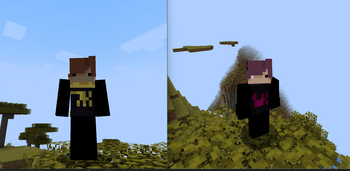
🟡 Updated this year🖼️ Gallery (1 images)
🔍 Analysis
- 👍 0.0% endorsement rate
- 🏆 #72 of 184 multiplayer mods in this game by downloads
📋 About This Mod
### Good News- 6/26 So I got my pc back so there will be new updates to the modpack. ### Description you ever wanted to chill on the couch playing minecraft with your buds but don't have a console? welp now u can do that. quick tutorial below: ### Requirements - Friends (very difficult) MultiMC (optional) 1 Minecraft Account 1 Controller or more This ModPack ### Step-by-step this tutorial uses MultiMC but you can use any launcher that has Modrinth API and can run multiple instances at the same time (like Modrinth App or PrismLauncher) Launch MultiMC and click on "Add Instance" !(https://cdn.modrinth.com/data/cached_images/e909b62061d200f276d9f38ccd0697038e6e69ac.png) Select "Import from zip" and select the file (or select modrinth and look for the modpack) !(https://cdn.modrinth.com/data/cached_images/ee8cfb5b43c0810fc4dcc9de9a187af9325e85ae.png) Duplicate the instance for each player !(https://cdn.modrinth.com/data/cached_images/adab0171c677eb0879e3e0dbe4aa99e1b4628de1.png) Launch both the instances offline and choose a name !(https://cdn.modrinth.com/data/cached_images/6ec9f28032b2c66921cc64e6aa9ddb7657981772.png) !(https://cdn.modrinth.com/data/cached_images/52942b4f31ee7b1b70551e1800824c214292f4b0.png) Download Controllify's libraries !(https://cdn.modrinth.com/data/cached_images/866c1897c090643399ea427bb0bb30922a90a7ed_0.webp) Press F11 on both windows to turn on splitscreen !(https://cdn.modrinth.com/data/cached_images/103f9ad6f4be4c2081887a571ee779bba50a485f.png) Make sure each account is using different controllers !(https://cdn.modrinth.com/data/cached_images/a4d94b969ed390fdeb60aeaf486846b1b53e04c3_0.webp) Select global settings !(https://cdn.modrinth.com/data/cached_images/b3c23a28a49227c5993a77293573928e4c51bb51_0.webp) Turn on "Out Of Focus Input" on each controller !(https://cdn.modrinth.com/data/cached_images/5a0045d1203bc768765f76e9d3ace399a7ec0466.png) Create a world in one account and open it to LAN !(https://cdn.modrinth.com/data/cached_images/85d51059362af35eb14a12b632dfd684211f7ef0_0.webp) Tell the other players to join the world and you should be all good to go !(https://cdn.modrinth.com/data/cached_images/15bc930ff35ad028bcec8f97eb7eb12c37b89cca.png) ### FAQ Q: "Why is my skin not showing up on other people's screen?" A: Select another skin THEN select the one you want. if it still doesn't work try rejoining the world Q: "Is this compatible with ______?" A: I have no idea. i've only tested the modpack with sodium and nothing else. Essential might not work because you have to launch offline aka. without a Microsoft Account Q: "How do i use this modpack/How do i make it work?" A: There's a step-by-step tutorial on the description. Q: "Can i use this logged in on a Microsoft Account?" A: No. When you try to join the world it's gonna say the name's already taken Q: "Can i use this on a pirated version?" A: No. Minecraft's $25. You can pay for that. Q: "Are you a potato?" A: What? Q: "Who would win, 100 Men or 1 Gorilla?" A: can you like.. ask questions about the modpack? also 100 men win Q: "Can my friend use a VPN play from his house?" A: I don't know why'd you download the modpack if you wanna do that but sure. I don't know how to do that tho. dm jorden (@jordensmiley) for that Q: "How many players can play at the same time?" A: SplitScreen supports only up to 4 players but you can just mess around with the windows yourself Q: "I don't have a controller! what should i do??" A: Download "Monect" on your PC and phone and download a controller layout on the forums. I'm not showing you how to do that so go watch a random tutorial from some indian guy.
### Good News- 6/26 So I got my pc back so there will be new updates to the modpack.
### Description you ever wanted to chill on the couch playing minecraft with your buds but don't have a console? welp now u can do that. quick tutorial below: ### Requirements - Friends (very difficult)
MultiMC (optional)
1 Minecraft Account
1 Controller or more
This ModPack ### Step-by-step
this tutorial uses MultiMC but you can use any launcher that has Modrinth API and can run multiple instances at the same time (like Modrinth App or PrismLauncher) Launch MultiMC and click on "Add Instance"
!(https://cdn.modrinth.com/data/cached_images/e909b62061d200f276d9f38ccd0697038e6e69ac.png)
Select "Import from zip" and select the file (or select modrinth and look for the modpack)
!(https://cdn.modrinth.com/data/cached_images/ee8cfb5b43c0810fc4dcc9de9a187af9325e85ae.png)
Duplicate the instance for each player
!(https://cdn.modrinth.com/data/cached_images/adab0171c677eb0879e3e0dbe4aa99e1b4628de1.png)
Launch both the instances offline and choose a name
!(https://cdn.modrinth.com/data/cached_images/6ec9f28032b2c66921cc64e6aa9ddb7657981772.png) !(https://cdn.modrinth.com/data/cached_images/52942b4f31ee7b1b70551e1800824c214292f4b0.png)
Download Controllify's libraries
!(https://cdn.modrinth.com/data/cached_images/866c1897c090643399ea427bb0bb30922a90a7ed_0.webp)
Press F11 on both windows to turn on splitscreen
!(https://cdn.modrinth.com/data/cached_images/103f9ad6f4be4c2081887a571ee779bba50a485f.png)
Make sure each account is using different controllers
!(https://cdn.modrinth.com/data/cached_images/a4d94b969ed390fdeb60aeaf486846b1b53e04c3_0.webp)
Select global settings
!(https://cdn.modrinth.com/data/cached_images/b3c23a28a49227c5993a77293573928e4c51bb51_0.webp)
Turn on "Out Of Focus Input" on each controller
!(https://cdn.modrinth.com/data/cached_images/5a0045d1203bc768765f76e9d3ace399a7ec0466.png)
Create a world in one account and open it to LAN
!(https://cdn.modrinth.com/data/cached_images/85d51059362af35eb14a12b632dfd684211f7ef0_0.webp)
Tell the other players to join the world and you should be all good to go
!(https://cdn.modrinth.com/data/cached_images/15bc930ff35ad028bcec8f97eb7eb12c37b89cca.png)
Q: "Why is my skin not showing up on other people's screen?" A: Select another skin THEN select the one you want. if it still doesn't work try rejoining the world
Q: "Is this compatible with ______?"
A: I have no idea. i've only tested the modpack with sodium and nothing else. Essential might not work because you have to launch offline aka. without a Microsoft Account
Q: "How do i use this modpack/How do i make it work?"
A: There's a step-by-step tutorial on the description.
Q: "Can i use this logged in on a Microsoft Account?"
A: No. When you try to join the world it's gonna say the name's already taken
Q: "Can i use this on a pirated version?"
A: No. Minecraft's $25. You can pay for that.
Q: "Are you a potato?"
Q: "Who would win, 100 Men or 1 Gorilla?"
A: can you like.. ask questions about the modpack? also 100 men win
Q: "Can my friend use a VPN play from his house?"
A: I don't know why'd you download the modpack if you wanna do that but sure. I don't know how to do that tho. dm jorden (@jordensmiley) for that
Q: "How many players can play at the same time?"
A: SplitScreen supports only up to 4 players but you can just mess around with the windows yourself
Q: "I don't have a controller! what should i do??"
A: Download "Monect" on your PC and phone and download a controller layout on the forums. I'm not showing you how to do that so go watch a random tutorial from some indian guy.
📊 Mod Details
- Game
- Minecraft Modpacks
- Author
- jordensmiley
- Version
- 1.2
- Downloads
- 6,920
- Endorsements
- 3
- Category
- multiplayer
- Created
- 5/15/2025
- Updated
- 7/9/2026
- Game Versions
- 26.2
- Tags
- multiplayer
🔧 How to Install Minecraft Modpacks Mods
Download from Modrinth. Use Prism Launcher or drop into your mods folder.
📖 Full step-by-step install guide for Minecraft Modpacks →
Visit the official mod page for specific installation instructions for this mod.
🎮 Need cheat codes or console commands? Check ur gaming wiki for Minecraft Modpacks commands, item IDs, and more.
❓ Frequently Asked Questions
Which Minecraft Modpacks versions does Splitted Multiplayer support?
The author lists 26.2. Other versions may work but are untested by the author.
What is the latest version of Splitted Multiplayer?
Version 1.2, published 2026-07-09 with 6,920 downloads recorded at the source.
Keep browsing — more Minecraft Modpacks mods await