Shotbow MineZ Modpack
🟡 Updated this year🖼️ Gallery (6 images)

🔍 Analysis
- 👍 0.2% endorsement rate
- 🏆 #383 of 1508 adventure mods in this game by downloads
📋 About This Mod
# MineZ Modpack for Shotbow Server !(https://cdn.modrinth.com/data/cached_images/b5f2bbe24d378d863f70c8b4bf7bf9c0ef2b56f7.png) !(https://cdn.modrinth.com/data/cached_images/9eac87b58331af401c559133e1438798e88a55d6.png) This modpack is designed for players on the MineZ server hosted by Shotbow. Its goal is to provide optimizations for smoother gameplay and enhance the experience with specially tailored mods and configurations. ## What’s included in the modpack? 1. Game Optimization: The modpack includes performance-boosting tools such as Sodium, and other optimization mods, enhancing the game’s performance across a wide range of hardware. With these optimizations, gameplay remains smooth even during intense interactions and large-scale exploration. 2. Minimap with Marked Locations: This modpack integrates a custom minimap (Xaero’s Minimap and Xaero’s Worldmap), specifically configured for MineZ gameplay. Key locations, such as towns, outposts, shrines, and hidden resource spots, are marked on the map. Each location is carefully labeled to help players navigate the MineZ world and locate critical points, shelters, and important resource areas. **Most locations are already marked, if any are missing please contact us. Through our discord server** (https://discord.gg/wYQx9K9eMV) 3. HUD and User Interface Improvements: Additional mods, like EssentialGUI and BetterF3, enhance the user interface to make exploration more intuitive. Modified HUD elements give better access to critical gameplay information. 4. Visual and Audio Enhancements: The modpack includes optimized texture and sound packs that match the atmosphere of MineZ. Textures retain the dark and immersive style of the game world, while sounds add ambiance and provide audio cues for threats or helpful spatial orientation. 5. Configurations for the MineZ Server: All mods and settings are optimized for the shotbow.net server to ensure full compatibility and prevent any synchronization or stability issues. Everything is designed to maximize and enhance the experience of exploring and surviving in the MineZ world. ## !!! Distant Horizons Map render !!! Note if you play on version that has ``Distant Horizons`` mod. We recommend turning off the ``Distant Horizons`` mod when entering the dungeons and before teleportation to Meridian (Spawn Island) because currently mod does not distinguish that these are different worlds and displays them together! **Below is the instructions on how to do it:** <details> <summary>Distant Horizons ON/OFF instruction</summary> - Mod Disabling instructions > Press the ``ESC`` Then buttons ``Options`` > Then, next to the FOV changing belt, there will be a button with the icon, click it. > In the menu that opens, change the value of ``Enable Rendering`` to ``False`` - Mod enabling instructions > Press the ``ESC`` Then buttons ``Options`` > Then, next to the FOV changing belt, there will be a button with the icon, click it. > In the menu that opens, change the value of ``Enable Rendering`` to ``True`` </details> # Information about Modpack **This modpack has been approved by the Shotbow.net's Staff team and fully complies with its the server's rules, however it has not been created nor maintained by them.** <details> <summary>Controls</summary> 1. ``U`` - Mods settings 2. ``Y`` - Essential Emote Wheel 3. ``C`` - Zoom 4. ``M`` - World Map 5. ``-`` - Zoom In Minimap 6. ``=`` - Zoom Out In Minimap 7. ``L`` - Waypoint List 8. ``+`` - New Waypoint 9. ``N`` - Minimap display settings 10. ``O`` - Shaderpack Screen 11. ``G`` - Gamma On/Off </details> <details> <summary>Waypoint Sets (Hold N key to switch)</summary> !!! Not all are added yet !!! - default (All cities, towns, houses, towers, castles, ruins and some more) - Dungeons (All entrances and exits to dungeons) - Winter Cave (All locations in Winter Cave system) - Swamp Cave (All locations in Swamp Cave system) | Added since Ver: 1.1.1 - Bosses (All Bosses spawn locations) - Others (Locations not assigned to other categories or temporary designations) </details> <details> <summary>Resourcepack (4) & Shaders (1)</summary> Cubic Sun & Moon by JoeFly Essential UI by KartoffelChipss Fast Better Grass 1.21 by Fabulously Optimized > MineZ-1.2.0-official (https://github.com/Shotbow/minez-official-textures/releases)] > > since modpack version 1.2.0 ``MineZ-1.2.0-official`` replaced with ``prereleaseMineZ_Official_Textures-1.2.1`` BSL Shaders by CaptTatsu Complementary Reimagined </details>
# MineZ Modpack for Shotbow Server !(https://cdn.modrinth.com/data/cached_images/b5f2bbe24d378d863f70c8b4bf7bf9c0ef2b56f7.png) !(https://cdn.modrinth.com/data/cached_images/9eac87b58331af401c559133e1438798e88a55d6.png)
This modpack is designed for players on the MineZ server hosted by Shotbow. Its goal is to provide optimizations for smoother gameplay and enhance the experience with specially tailored mods and configurations.
## What’s included in the modpack? 1. Game Optimization: The modpack includes performance-boosting tools such as Sodium, and other optimization mods, enhancing the game’s performance across a wide range of hardware. With these optimizations, gameplay remains smooth even during intense interactions and large-scale exploration.
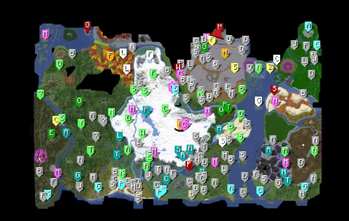
2. Minimap with Marked Locations: This modpack integrates a custom minimap (Xaero’s Minimap and Xaero’s Worldmap), specifically configured for MineZ gameplay. Key locations, such as towns, outposts, shrines, and hidden resource spots, are marked on the map. Each location is carefully labeled to help players navigate the MineZ world and locate critical points, shelters, and important resource areas. Most locations are already marked, if any are missing please contact us. Through our discord server (https://discord.gg/wYQx9K9eMV)
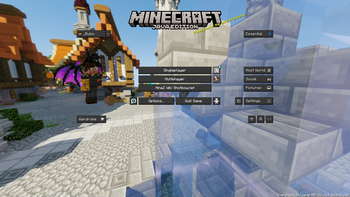
3. HUD and User Interface Improvements: Additional mods, like EssentialGUI and BetterF3, enhance the user interface to make exploration more intuitive. Modified HUD elements give better access to critical gameplay information.
4. Visual and Audio Enhancements: The modpack includes optimized texture and sound packs that match the atmosphere of MineZ. Textures retain the dark and immersive style of the game world, while sounds add ambiance and provide audio cues for threats or helpful spatial orientation.
5. Configurations for the MineZ Server: All mods and settings are optimized for the shotbow.net server to ensure full compatibility and prevent any synchronization or stability issues. Everything is designed to maximize and enhance the experience of exploring and surviving in the MineZ world.
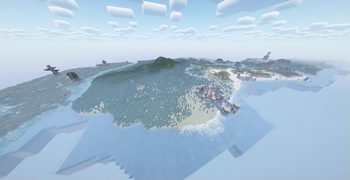
## !!! Distant Horizons Map render !!! Note if you play on version that has ``Distant Horizons`` mod. We recommend turning off the ``Distant Horizons`` mod when entering the dungeons and before teleportation to Meridian (Spawn Island) because currently mod does not distinguish that these are different worlds and displays them together!
Below is the instructions on how to do it:
Distant Horizons ON/OFF instruction
- Mod Disabling instructions
> Press the ``ESC`` Then buttons ``Options``
> Then, next to the FOV changing belt, there will be a button with the icon, click it.
> In the menu that opens, change the value of ``Enable Rendering`` to ``False``
- Mod enabling instructions
- > Press the ``ESC`` Then buttons ``Options``
- > Then, next to the FOV changing belt, there will be a button with the icon, click it.
- > In the menu that opens, change the value of ``Enable Rendering`` to ``True``
# Information about Modpack This modpack has been approved by the Shotbow.net's Staff team and fully complies with its the server's rules, however it has not been created nor maintained by them.
Controls
1. ``U`` - Mods settings 2. ``Y`` - Essential Emote Wheel
3. ``C`` - Zoom
4. ``M`` - World Map
5. ``-`` - Zoom In Minimap
6. ``=`` - Zoom Out In Minimap
7. ``L`` - Waypoint List
8. ``+`` - New Waypoint 9. ``N`` - Minimap display settings
10. ``O`` - Shaderpack Screen 11. ``G`` - Gamma On/Off
Waypoint Sets (Hold N key to switch)
!!! Not all are added yet !!!
- default (All cities, towns, houses, towers, castles, ruins and some more)
- Dungeons (All entrances and exits to dungeons)
- Winter Cave (All locations in Winter Cave system)
- Swamp Cave (All locations in Swamp Cave system) | Added since Ver: 1. 1. 1
- Bosses (All Bosses spawn locations)
- Others (Locations not assigned to other categories or temporary designations)
Resourcepack (4) & Shaders (1)
Cubic Sun & Moon by JoeFly
Essential UI by KartoffelChipss
Fast Better Grass 1. 21 by Fabulously Optimized
> MineZ-1. 2. 0-official (https://github.com/Shotbow/minez-official-textures/releases)] > > since modpack version 1. 2. 0 ``MineZ-1. 2. 0-official`` replaced with ``prereleaseMineZ_Official_Textures-1. 2. 1``
BSL Shaders by CaptTatsu
Complementary Reimagined
📊 Mod Details
- Game
- Minecraft Modpacks
- Author
- Bubix
- Version
- 1.2.5
- Downloads
- 1,721
- Endorsements
- 4
- Category
- adventure
- Created
- 11/3/2024
- Updated
- 9/30/2025
- Game Versions
- 1.21.1
- Tags
- adventure, multiplayer, optimization
🔧 How to Install Minecraft Modpacks Mods
Download from Modrinth. Use Prism Launcher or drop into your mods folder.
📖 Full step-by-step install guide for Minecraft Modpacks →
Visit the official mod page for specific installation instructions for this mod.
🎮 Need cheat codes or console commands? Check ur gaming wiki for Minecraft Modpacks commands, item IDs, and more.
❓ Frequently Asked Questions
Which Minecraft Modpacks versions does Shotbow MineZ Modpack support?
The author lists 1.21.1. Other versions may work but are untested by the author.
What is the latest version of Shotbow MineZ Modpack?
Version 1.2.5, published 2025-09-30 with 1,721 downloads recorded at the source.
Keep browsing — more Minecraft Modpacks mods await