NaWorld DH&Optimization
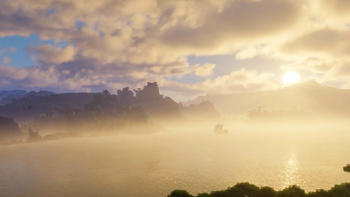
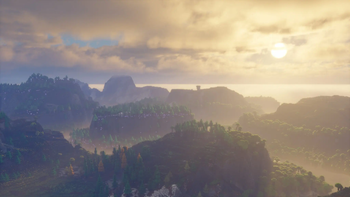
🟡 Updated this year🖼️ Gallery (4 images)


🔍 Analysis
- 👍 0.2% endorsement rate
- 🏆 #161 of 184 multiplayer mods in this game by downloads
📋 About This Mod
<table> <tr> <td> <img src="https://cdn.modrinth.com/data/cached_images/49eb0633f5f4328f51f4a85b4e8ef41cd1ec2d0c_0.webp" width="350"> </td> <td style="text-align:center;"> <div><b>Website</b></div> <br> <a href="https://white-studio.org/"> <img src="https://cdn.modrinth.com/data/cached_images/29144635f29039230e417c97468fe33268d03ada_0.webp" width="100" alt="White Studio website"> </a> <br> <td style="text-align:center;"> <div><b>Discord</b></div> <br> <a href="https://dc.white-studio.org/"> <img src="https://cdn.modrinth.com/data/cached_images/07f48da8cdca6e711660968fbf05770bb7017f29_0.webp" width="100" alt="White Studio Discord"> </a> </td> </table> --- <table width="100%" style="border-collapse:separate;border-spacing:0;table-layout:fixed;border:1px solid #303030;border-radius:16px;overflow:hidden;"> <!-- Header --> <tr> <td width="50%" align="center" style="padding:14px;border-right:1px solid #303030;background:#1e1e1e;font-weight:bold;"> 🌐 繁 體 中 文 </td> <td width="50%" align="center" style="padding:14px;background:#1e1e1e;font-weight:bold;"> 🌍 English </td> </tr> <!-- Divider (細線,不會變黑條) --> <tr> <td colspan="2" style="height:1px;background:#303030;padding:0;"></td> </tr> <!-- Body --> <tr> <td width="50%" valign="top" style="padding:24px;border-right:1px solid #303030;"> <strong>這個模組包適合</strong> 🛡️ 生存、🏗️ 建築 及 🗺️ 冒險玩家<br><br> • 🛡️ <strong>生存玩家</strong>:加入多款生存輔助模組,提升遊戲便利性與體驗<br> • 🏗️ <strong>建築玩家</strong>:新增 <strong>Axiom</strong> 與 <strong>WorldEdit</strong> 等強大建築工具<br> • 🗺️ <strong>冒險玩家</strong>:加入第一人稱視覺強化與探索體驗優化模組<br><br> <em>⚙️ 客戶端與伺服器端皆可運行</em> </td> <td width="50%" valign="top" style="padding:24px;"> <strong>This modpack is designed for</strong> 🛡️ Survivors, 🏗️ Builders, and 🗺️ Adventurers<br><br> • 🛡️ <strong>Survivors</strong>: Includes various quality-of-life and survival-assist modules<br> • 🏗️ <strong>Builders</strong>: Adds powerful building tools such as <strong>Axiom</strong> and <strong>WorldEdit</strong><br> • 🗺️ <strong>Adventurers</strong>: Enhances exploration with first-person visual improvements and immersive features<br><br> <em>⚙️ Runs on both client and server sides</em> </td> </tr> </table> --- ## ⚠️ Important Notices | 重要通知 ⚠️ <details> <summary><strong>❗ Troubleshooting Guide | ❗ 疑難排解指南</strong></summary> ## ❗ Troubleshooting Guide | ❗ 疑難排解指南 ### 🌏 繁體中文 #### 🔍 前置檢查 - ✅ 已安裝正確版本的 Java(**Java 21**) 適用於 **Minecraft 1.20.5–1.21.11+** - ✅ **分配足夠記憶體:** 建議配置為 **4–8 GB**。 若使用高品質材質包、更遠的視野距離(例如啟用 **Distant Horizon** 或 **Bobby**)時,建議依實際需求提升記憶體分配,以確保遊戲流暢運行。 #### 🛠 常見問題與解決方案 - 🟥 **遊戲崩潰:** 嘗試移除最近新增的模組 - 🟨 **畫面異常:** 關閉光影或調整顯示設定 - 🟦 **效能低落:** 降低視野距離,或關閉高負載材質包/光影/模組(如 **Distant Horizon**) --- ### 🔧 模組相容性說明 > 🔸 **FlashBack 渲染說明** > 使用前請先停用 **CustomSkinLoader** 模組,否則 FlashBack 將無法正常運作。 > 🔸 **Distant Horizon 與 Blur+ 模組顯示衝突** > 同時啟用 **Blur+** 模糊效果與 **Distant Horizon**,可能導致畫面異常或出現重影。 > 💡 解決方式:請先在 **Mod Menu** 關閉 Blur+,確認渲染正常後再重新啟用。 > 🔸 **Bliss Shader 光影渲染問題(太陽光黑線)** > 問題源自 **3D Skin Layers** 模組,在光照場景中可能導致黑線出現。 > 💡 請在光影設定中關閉 **Fast Render** 並啟用 **Compatibility Mode(相容模式)** --- ### 🌐 English #### 🔍 Initial Checks - ✅ Java Version: Ensure **Java 21** is installed Compatible with **Minecraft 1.20.5–1.21.8** - ✅ **Allocate sufficient memory:** Recommended allocation is **4–8 GB**. If you're using high-resolution resource packs or extended render distance (e.g., with **Distant Horizon** or **Bobby**), increase memory allocation accordingly to maintain smooth performance. #### 🛠 Common Issues & Fixes - 🟥 **Game Crashes:** Remove recently added mods - 🟨 **Visual Glitches:** Disable shaders or adjust display settings - 🟦 **Performance Drops:** Reduce render distance or disable high-load content (e.g., **Distant Horizon**) --- ### 🔧 Mod Compatibility Notes > 🔸 **FlashBack Render Instructions** > Before rendering and exporting, disable **CustomSkinLoader** — FlashBack will not function properly otherwise. > 🔸 **Distant Horizon and Blur+ Rendering Conflict** > Enabling **Blur+** and **Distant Horizon** together may cause ghosting or screen artifacts. > 💡 Fix: Disable **Blur+** via the **Mod Menu**, ensure rendering is stable, then re-enable if needed. > 🔸 **Bliss Shader Rendering Issue (Black Lines in Sun Rays)** > Caused by the **3D Skin Layers** mod when sunlight is active. > 💡 Fix: In shader settings, **disable Fast Render** and **enable Compatibility Mode** </details> --- ## 📘 Other Information | 其他資訊 📘 <details> <summary><strong>📋 DH&O Practical Shortcut Mod List | 📋 DH&O 實用快捷鍵模組清單</strong></summary> <details> <summary>🔖 繁體中文版清單</summary> | 模組 | 功能 | 快捷鍵 | 說明 | |----------|------------|------------------|--------------------| | **Axiom** | 上下文選單 | Ta

|
Website
|
Discord
|


## ⚠️ Important Notices | 重要通知 ⚠️
❗ Troubleshooting Guide | ❗ 疑難排解指南
## ❗ Troubleshooting Guide | ❗ 疑難排解指南
### 🌏 繁體中文
#### 🔍 前置檢查 - ✅ 已安裝正確版本的 Java(Java 21) 適用於 Minecraft 1. 20. 5–1. 21. 11+ - ✅ 分配足夠記憶體: 建議配置為 4–8 GB。 若使用高品質材質包、更遠的視野距離(例如啟用 Distant Horizon 或 Bobby)時,建議依實際需求提升記憶體分配,以確保遊戲流暢運行。
#### 🛠 常見問題與解決方案 - 🟥 遊戲崩潰: 嘗試移除最近新增的模組 - 🟨 畫面異常: 關閉光影或調整顯示設定 - 🟦 效能低落: 降低視野距離,或關閉高負載材質包/光影/模組(如 Distant Horizon)
### 🔧 模組相容性說明 > 🔸 FlashBack 渲染說明 > 使用前請先停用 CustomSkinLoader 模組,否則 FlashBack 將無法正常運作。
> 🔸 Distant Horizon 與 Blur+ 模組顯示衝突 > 同時啟用 Blur+ 模糊效果與 Distant Horizon,可能導致畫面異常或出現重影。 > 💡 解決方式:請先在 Mod Menu 關閉 Blur+,確認渲染正常後再重新啟用。
> 🔸 Bliss Shader 光影渲染問題(太陽光黑線) > 問題源自 3D Skin Layers 模組,在光照場景中可能導致黑線出現。 > 💡 請在光影設定中關閉 Fast Render 並啟用 Compatibility Mode(相容模式)
### 🌐 English
#### 🔍 Initial Checks - ✅ Java Version: Ensure Java 21 is installed Compatible with Minecraft 1. 20. 5–1. 21. 8 - ✅ Allocate sufficient memory: Recommended allocation is 4–8 GB. If you're using high-resolution resource packs or extended render distance (e.g., with Distant Horizon or Bobby), increase memory allocation accordingly to maintain smooth performance. #### 🛠 Common Issues & Fixes - 🟥 Game Crashes: Remove recently added mods - 🟨 Visual Glitches: Disable shaders or adjust display settings - 🟦 Performance Drops: Reduce render distance or disable high-load content (e.g., Distant Horizon)
### 🔧 Mod Compatibility Notes
> 🔸 FlashBack Render Instructions > Before rendering and exporting, disable CustomSkinLoader — FlashBack will not function properly otherwise.
> 🔸 Distant Horizon and Blur+ Rendering Conflict > Enabling Blur+ and Distant Horizon together may cause ghosting or screen artifacts. > 💡 Fix: Disable Blur+ via the Mod Menu, ensure rendering is stable, then re-enable if needed.
> 🔸 Bliss Shader Rendering Issue (Black Lines in Sun Rays) > Caused by the 3D Skin Layers mod when sunlight is active. > 💡 Fix: In shader settings, disable Fast Render and enable Compatibility Mode
- --
- ## 📘 Other Information | 其他資訊 📘
📋 DH&O Practical Shortcut Mod List | 📋 DH&O 實用快捷鍵模組清單
🔖 繁體中文版清單
| 模組 | 功能 | 快捷鍵 | 說明 | |----------|------------|------------------|--------------------| | Axiom | 上下文選單 | Ta
📊 Mod Details
- Game
- Minecraft Modpacks
- Author
- NaLuWorld
- Version
- Naw-27
- Downloads
- 2,822
- Endorsements
- 5
- Category
- multiplayer
- Created
- 8/12/2024
- Updated
- 2/14/2026
- Game Versions
- 1.21.11
- Tags
- multiplayer, optimization
🔧 How to Install Minecraft Modpacks Mods
Download from Modrinth. Use Prism Launcher or drop into your mods folder.
📖 Full step-by-step install guide for Minecraft Modpacks →
Visit the official mod page for specific installation instructions for this mod.
🎮 Need cheat codes or console commands? Check ur gaming wiki for Minecraft Modpacks commands, item IDs, and more.
❓ Frequently Asked Questions
Which Minecraft Modpacks versions does NaWorld DH&Optimization support?
The author lists 1.21.11. Other versions may work but are untested by the author.
What is the latest version of NaWorld DH&Optimization?
Version Naw-27, published 2026-02-14 with 2,822 downloads recorded at the source.
Keep browsing — more Minecraft Modpacks mods await