MedieCraft - Server - Cross-Platform
🟠 Updated over a year ago🖼️ Gallery (1 images)
🔍 Analysis
- 🏆 #513 of 1452 adventure mods in this game by downloads
📋 About This Mod
!(https://cdn.modrinth.com/data/cached_images/4e7fc749da13601251ecc2b7ca23613538715184.png)
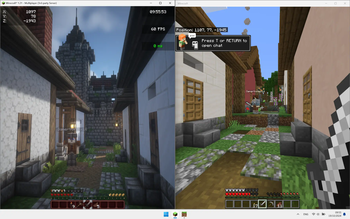
This modpack has been created with the aim of rediscovering the game through an ultra-immersive, challenging world full of new things to discover throughout your adventure.
Roam the world, traverse biomes and worlds, fight monsters on the prowl, and explore structures and dungeons to make your armor and weapons. Forget boring mining sessions and prepare yourself for an unforgettable experience with your friends.
This modpack is very challenging by setting game difficulty to normal or hard. If you want to explore the world and chill, easy difficulty is recommended. Good luck if you want to play in hardcore. ;) (This version is a bit easier compared to the standard MedieCraft modpack)
See (https://modrinth.com/modpack/mediecraft-server). _________________________
- 🐓 ~~New mobs and mob variants~~ (not in Cross-Platform Version of MedieCraft)
- 🍅 ~~More plants~~ (not in Cross-Platform Version of MedieCraft)
- 🏛 Enhanced structures and new ones
- 🛖 Themed villages and structures
- ⛰️ Beautiful landscapes with new and larger biomes using Terralith and Tectonic
- ⚔️ Dungeons, mobs, structures to build your stuff using battles instead of mining
- 🎑 _Ultra immersive environment sounds and songs_ (limited in Cross-Platform Version of MedieCraft)
- 🪓 Realistic trees
- 🗡 ~~New tools and weapons~~ (not in Cross-Platform Version of MedieCraft)
- 🔦 Dynamic Lights
- 🎙 ~~Proximity chat (with voice effects depending on the environment)~~ (not in Cross-Platform Version of MedieCraft)
- 👹 ~~More monsters~~ (not in Cross-Platform Version of MedieCraft)
- 🌋 ~~Better Nether~~ (not in Cross-Platform Version of MedieCraft)
- 👁 ~~Better End~~ (not in Cross-Platform Version of MedieCraft)
- ⚡️ Hyper fast and ultra optimized
- 🔥 Very challenging
# Compatibility
❌ MedieCraft
❌ MedieCraft - Lite
❌ MedieCraft - Server
✅ MedieCraft - Cross-Platform
✅ MedieCraft - Lite - Cross-Platform
✅ MedieCraft - Server - Cross-Platform
✅ MC Bedrock Clients
✅ MC Java Clients (using Fabric, ViaVersion, ViaFabric, CreativeCore and GeckoLib)
# Key notes - Cross-Platform server side modpack. Bedrock and vanilla Java players can join, even players using (https://modrinth.com/modpack/mediecraft) and (https://modrinth.com/modpack/mediecraft-lite) can join the server. - See instructions to get your server up and running in minutes ! - The mod list is available by clicking on 'versions' and then on the version number you chose to install. - If you want to save and quit the server, just type `stop` in the console. - If you can't break anything or if want you or your friends to be able to do commands and cheats, you can type `op ` directly in the server console.
# System Requirements Minimal System Requirements
- 4GB allocated to the server
- 4 Cores / 4-8 Threads CPU (AMD Ryzen 3 3100, Intel Core i5 7400)
- 1,5GB SSD storage
Recommended System Requirements
- 6GB allocated to the server
- 6 Cores / 12 Threads CPU (AMD Ryzen 5 5600, Intel Core i5 12400F)
- 1,5GB SSD storage
# Instructions
1. Download (https://fabricmc.net/use/server/) and chose the version of the loader according to the version of MedieCraft - Server and MedieCraft you want. (Example: if you are playing in 1. 21, download both MedieCraft and MedieCraft - Server compatible for 1. 21 AND (https://fabricmc.net/use/server/) for 1. 21) 2. Launch it using the command named `Launch Command` on (https://fabricmc.net/use/server/). NB: change the number `2` in `-Xmx2G` command and put how much RAM you want to allocate to the server (Example: if you want 6GB for your server, write `-Xmx6G`). 3. Close server console by typing `stop`. 3. Accept EULA by replacing `false` to `true` in the file : `eula.txt`. 4. On Modrinth, go to your library and click on this modpack. Click on `Folder` to access the modpack's folder. 5. Copy the `mods` folder and paste it into the server folder (it should replace the empty `mods` folder previously created by Fabric) 6. Restart the server using the same command, a line mentionning that `Geyser is started`. And then, close server console again by typing `stop`. 7. Enter `Floodgate` folder in `config` folder, copy the file `key.pem` and paste it into the `GeyserMC` folder (also in the `config` folder). 8. Restart the server using the same command and your server is up and running! (If you are running the server on your computer, you may have to forward your ports but it can be dangerous so be careful!).
**NB: If you are having trouble with these instructions, you can watch (https://youtu.be/NwCUhAJCaR0?si=hHgCawQJX7qNfp1x). It's not mandatory to follow
📊 Mod Details
- Game
- Minecraft Modpacks
- Author
- GamerVortex
- Version
- 1.0.1
- Downloads
- 352
- Endorsements
- 0
- Category
- adventure
- Created
- 10/21/2024
- Updated
- 10/26/2024
- Game Versions
- 1.21
- Tags
- adventure, combat, multiplayer
🔧 How to Install Minecraft Modpacks Mods
Download from Modrinth. Use Prism Launcher or drop into your mods folder.
📖 Full step-by-step install guide for Minecraft Modpacks →
Visit the official mod page for specific installation instructions for this mod.
🎮 Need cheat codes or console commands? Check ur gaming wiki for Minecraft Modpacks commands, item IDs, and more.
❓ Frequently Asked Questions
Which Minecraft Modpacks versions does MedieCraft - Server - Cross-Platform support?
The author lists 1.21. Other versions may work but are untested by the author.
What is the latest version of MedieCraft - Server - Cross-Platform?
Version 1.0.1, published 2024-10-26 with 352 downloads recorded at the source.
Keep browsing — more Minecraft Modpacks mods await