MC Backrooms - Found Footage
🟠 Updated over a year ago🖼️ Gallery (5 images)
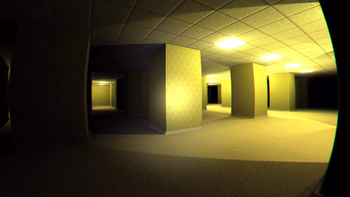
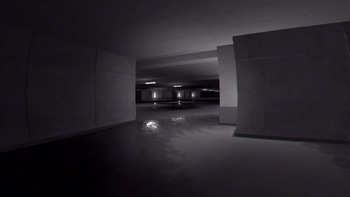

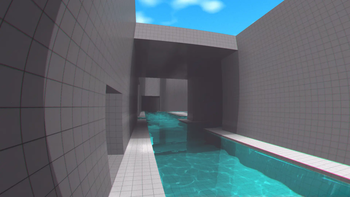

🔍 Analysis
- 👍 0.0% endorsement rate
- 🏆 #198 of 1435 adventure mods in this game by downloads
📋 About This Mod
<center> <sup>a modpack for the (https://modrinth.com/mod/minecraft-found-footage) mod by (https://flicker-knot-00b.notion.site/I-Turned-Minecraft-Into-a-Found-Footage-Video-1a31d31c0feb807a8ab2fe7ed6191ad7)!</sup> **updated for 1.1.7** </center> ## 🚪 to enter the backrooms 1. create a new world 2. be in survival mode 3. suffocate yourself with sand or gravel ## 🎮 host a Singleplayer world for friends > **note:** best if the host has the most stable/fastest internet connection <details><summary>✅ Essential Mod (recommended)</summary> > if you know how **Essential Mod** works, just host your world as you normally would! --- ### 👥 add your friends in Essential 1. click <kbd>Social 👥</kbd> button 2. click the blue <kbd>👤+</kbd>Add Friend icon 3. enter their Minecraft username, click <kbd>Add</kbd> --- ### 🌐 invite friends (in world) 1. open Esc menu 2. click <kbd>Invite ✉️</kbd> button 3. choose friends to invite! ### 🌐 or from the main menu 1. click <kbd>Host World 🌎</kbd> 2. select the world you want 3. choose friends to invite and host </details> <details><summary>⚠️ e4mc (with workaround)</summary> > **e4mc** requires a bit of a workaround for the Simple Voice Chat mod to work properly! --- ### 🌐 hosting your world 1. open Esc menu 2. click <kbd>Open to LAN</kbd> button 3. click <kbd>Start LAN World</kbd> button 4. **share the link** - you will see a message in chat - click the link to **copy** it - send it to your friends! they can join via **Multiplayer** - **Direct Connection** is recommended *(domains change each session)* --- ### 🗣️ Simple Voice Chat workaround - watch this short video tutorial: https://youtu.be/TOE6dbtrZWg - or check this guide here: https://sora.framer.wiki/ </details> ## 💡 things - this modpack is **incompatible** with **Mac OS** - **integrated graphics** are not currently supported - do not use **Fabulous!** graphics, only **Fast** or **Fancy** - do not remove **veil/deferred** resource pack - you can **configure the shaders and video/camera settings** for the Found Footage mod from **ModMenu** *(if you get motion sickness for example)* <details><summary>mods information</summary> > this modpack aims to provide a stable and optimized base for you to customize. feel free to add your own mods or see the **addon mod recommendations** below for inspiration --- ### ⚙️ stuff - removed (https://modrinth.com/mod/c2me-fabric) because it crashes the game when entering new levels *(crashed on entering Level 1 in 1.1.7)* - mods like (https://modrinth.com/mod/sodium), (https://modrinth.com/mod/lithium), (https://modrinth.com/mod/vulkanmod), (https://www.optifine.net/home), (https://modrinth.com/mod/iris), are **incompatible** - *for more information about the Found Footage mod, check their (https://github.com/SpacePotatoee/MinecraftFoundFootage/wiki)* --- ### 📌 included mods (21+1) - (https://modrinth.com/mod/badoptimizations): low-impact miscellaneous optimizations - (https://modrinth.com/mod/cloth-config): dependency for MoreCulling mod - (https://modrinth.com/mod/cubes-without-borders): allows you to play in borderless fullscreen window - (https://modrinth.com/mod/ebe): reimplements block (tile) entities for performance - (https://modrinth.com/mod/entityculling): uses path tracing to cull entities behind walls - (https://modrinth.com/mod/fabric-api): essential hooks and interoperability mechanisms for Fabric mods - (https://modrinth.com/mod/ferrite-core): memory usage optimizations - (https://modrinth.com/mod/geckolib): dependency for Minecraft Backrooms Found Footage mod - (https://modrinth.com/mod/gputape): fix video memory leaks, based on (https://modrinth.com/mod/videotape) - (https://modrinth.com/mod/immediatelyfast): immediate-mode rendering optimizations across many areas - (https://modrinth.com/mod/krypton): attempts to optimize the Minecraft networking stack - (https://modrinth.com/mod/memoryleakfix): fixes multiple memory leaks in Minecraft - (https://modrinth.com/mod/minecraft-found-footage): the backrooms mod - (https://modrinth.com/mod/modernfix): miscellaneous optimizations targeting load times and memory usage - (https://modrinth.com/mod/modmenu): lets you easily view and configure the mods you have installed - (https://modrinth.com/mod/moreculling): various culling-related optimizations - (https://modrinth.com/mod/noisium): low-impact worldgen optimizations - (https://modrinth.com/mod/servercore): aims to optimize the Minecraft server - (https://modrinth.com/mod/simple-voice-chat): proximity voice
a modpack for the (https://modrinth.com/mod/minecraft-found-footage) mod by (https://flicker-knot-00b.notion.site/I-Turned-Minecraft-Into-a-Found-Footage-Video-1a31d31c0feb807a8ab2fe7ed6191ad7)! updated for 1. 1. 7
## 🚪 to enter the backrooms 1. create a new world 2. be in survival mode 3. suffocate yourself with sand or gravel
## 🎮 host a Singleplayer world for friends > note: best if the host has the most stable/fastest internet connection
✅ Essential Mod (recommended)
> if you know how Essential Mod works, just host your world as you normally would!
### 👥 add your friends in Essential 1. click Social 👥 button 2. click the blue 👤+Add Friend icon 3. enter their Minecraft username, click Add
### 🌐 invite friends (in world) 1. open Esc menu 2. click Invite ✉️ button 3. choose friends to invite!
### 🌐 or from the main menu 1. click Host World 🌎 2. select the world you want 3. choose friends to invite and host
⚠️ e4mc (with workaround)
> e4mc requires a bit of a workaround for the Simple Voice Chat mod to work properly!
### 🌐 hosting your world 1. open Esc menu 2. click Open to LAN button 3. click Start LAN World button 4. share the link - you will see a message in chat - click the link to copy it - send it to your friends! they can join via Multiplayer - Direct Connection is recommended (domains change each session)
### 🗣️ Simple Voice Chat workaround - watch this short video tutorial: https://youtu.be/TOE6dbtrZWg - or check this guide here: https://sora.framer.wiki/
## 💡 things - this modpack is incompatible with Mac OS - integrated graphics are not currently supported - do not use Fabulous! graphics, only Fast or Fancy - do not remove veil/deferred resource pack - you can configure the shaders and video/camera settings for the Found Footage mod from ModMenu (if you get motion sickness for example)
mods information
> this modpack aims to provide a stable and optimized base for you to customize. feel free to add your own mods or see the addon mod recommendations below for inspiration
### ⚙️ stuff - removed (https://modrinth.com/mod/c2me-fabric) because it crashes the game when entering new levels (crashed on entering Level 1 in 1. 1. 7) - mods like (https://modrinth.com/mod/sodium), (https://modrinth.com/mod/lithium), (https://modrinth.com/mod/vulkanmod), (https://www.optifine.net/home), (https://modrinth.com/mod/iris), are incompatible - *for more information about the Found Footage mod, check their (https://github.com/SpacePotatoee/MinecraftFoundFootage/wiki)*
### 📌 included mods (21+1) - (https://modrinth.com/mod/badoptimizations): low-impact miscellaneous optimizations - (https://modrinth.com/mod/cloth-config): dependency for MoreCulling mod - (https://modrinth.com/mod/cubes-without-borders): allows you to play in borderless fullscreen window - (https://modrinth.com/mod/ebe): reimplements block (tile) entities for performance - (https://modrinth.com/mod/entityculling): uses path tracing to cull entities behind walls - (https://modrinth.com/mod/fabric-api): essential hooks and interoperability mechanisms for Fabric mods - (https://modrinth.com/mod/ferrite-core): memory usage optimizations - (https://modrinth.com/mod/geckolib): dependency for Minecraft Backrooms Found Footage mod - (https://modrinth.com/mod/gputape): fix video memory leaks, based on (https://modrinth.com/mod/videotape) - (https://modrinth.com/mod/immediatelyfast): immediate-mode rendering optimizations across many areas - (https://modrinth.com/mod/krypton): attempts to optimize the Minecraft networking stack - (https://modrinth.com/mod/memoryleakfix): fixes multiple memory leaks in Minecraft - (https://modrinth.com/mod/minecraft-found-footage): the backrooms mod - (https://modrinth.com/mod/modernfix): miscellaneous optimizations targeting load times and memory usage - (https://modrinth.com/mod/modmenu): lets you easily view and configure the mods you have installed - (https://modrinth.com/mod/moreculling): various culling-related optimizations - (https://modrinth.com/mod/noisium): low-impact worldgen optimizations - (https://modrinth.com/mod/servercore): aims to optimize the Minecraft server - (https://modrinth.com/mod/simple-voice-chat): proximity voice
📊 Mod Details
- Game
- Minecraft Modpacks
- Author
- phruut
- Version
- 1.1.7
- Downloads
- 40,047
- Endorsements
- 9
- Category
- adventure
- Created
- 5/31/2025
- Updated
- 8/28/2025
- Game Versions
- 1.20.1
- Tags
- adventure, multiplayer, optimization
🔧 How to Install Minecraft Modpacks Mods
Download from Modrinth. Use Prism Launcher or drop into your mods folder.
📖 Full step-by-step install guide for Minecraft Modpacks →
Visit the official mod page for specific installation instructions for this mod.
🎮 Need cheat codes or console commands? Check ur gaming wiki for Minecraft Modpacks commands, item IDs, and more.
❓ Frequently Asked Questions
Which Minecraft Modpacks versions does MC Backrooms - Found Footage support?
The author lists 1.20.1. Other versions may work but are untested by the author.
What is the latest version of MC Backrooms - Found Footage?
Version 1.1.7, published 2025-08-28 with 40,047 downloads recorded at the source.
Keep browsing — more Minecraft Modpacks mods await