Low-end Optimization
🟡 Updated this year🖼️ Gallery (4 images)
🔍 Analysis
- 👍 0.0% endorsement rate
- 🏆 #595 of 673 lightweight mods in this game by downloads
📋 About This Mod
### Low-end Optimization --- **Low-end Optimization** is a meticulously curated Fabric-based modpack built specifically for players with modest hardware. With a tight selection of client-side and performance-enhancing mods like **Sodium**, **Lithium**, **FerriteCore**, **ModernFix**, **C2ME**, and **MemoryLeakFix**, this pack ensures significantly higher frame rates, reduced lag spikes, and overall smoother gameplay. Visual improvements are kept lean and efficient with **LambDynamicLights**, **CullLeaves**, and **Enhanced Block Entities**, while tools like **Zoomify** and **ModMenu** add small but useful quality-of-life upgrades. Mods such as **Clumps**, **Entity Culling**, and **ImmediatelyFast** further cut down unnecessary rendering and memory strain, making this an ideal setup for laptops or low-end desktops. This pack is perfect for players who want the most out of vanilla Minecraft without the performance hit of full-scale modpacks. **Notes** : - **Please do not turn on 'show FPS'**, mojangs text rendering engine is far from optimized - Big FPS numbers are cool but **Please keep the FPS capped at 60**(If you don't have a display over 60 Hz), this way your GPU will have more room for breathing and other things like chunk generation. - The device's specs that was used to take the screenshots are : - CPU: Intel Core i5-8250U @ 1.60GHz, 4 cores, 8 threads (Laptop CPU) - RAM: 8GB DDR4 @ 2400 MHz - GPU: Intel UHD Graphics 620 - OS: Kubuntu 25.04 --- <details> <summary><strong>📦 Mod List & Credits (click to expand)</strong></summary> - <a href="https://modrinth.com/mod/boosted-brightness" target="_blank">Boosted Brightness</a> - <a href="https://modrinth.com/mod/c2me-fabric" target="_blank">C2ME (Concurrent Chunk Management Engine)</a> - <a href="https://modrinth.com/mod/cloth-config" target="_blank">Cloth Config</a> - <a href="https://modrinth.com/mod/clumps" target="_blank">Clumps</a> - <a href="https://modrinth.com/mod/cull-leaves" target="_blank">Cull Leaves</a> - <a href="https://modrinth.com/mod/dynamic-fps" target="_blank">Dynamic FPS</a> - <a href="https://modrinth.com/mod/ebe" target="_blank">Enhanced Block Entities</a> - <a href="https://modrinth.com/mod/entityculling" target="_blank">Entity Culling</a> - <a href="https://modrinth.com/mod/exordium" target="_blank">Exordium</a> - <a href="https://modrinth.com/mod/fabric-api" target="_blank">Fabric API</a> - <a href="https://modrinth.com/mod/fabric-language-kotlin" target="_blank">Fabric Language Kotlin</a> - <a href="https://modrinth.com/mod/ferrite-core" target="_blank">FerriteCore</a> - <a href="https://modrinth.com/mod/forge-config-api-port" target="_blank">Forge Config API Port</a> - <a href="https://modrinth.com/mod/immediatelyfast" target="_blank">ImmediatelyFast</a> - <a href="https://modrinth.com/mod/lambdynamiclights" target="_blank">LambDynamicLights</a> - <a href="https://modrinth.com/mod/leaves-be-gone" target="_blank">Leaves Be Gone</a> - <a href="https://modrinth.com/mod/lithium" target="_blank">Lithium</a> - <a href="https://modrinth.com/mod/memoryleakfix" target="_blank">Memory Leak Fix</a> - <a href="https://modrinth.com/mod/modmenu" target="_blank">Mod Menu</a> - <a href="https://modrinth.com/mod/modernfix" target="_blank">ModernFix</a> - <a href="https://modrinth.com/mod/moreculling" target="_blank">More Culling</a> - <a href="https://modrinth.com/mod/puzzles-lib" target="_blank">Puzzles Lib</a> - <a href="https://modrinth.com/mod/reeses-sodium-options" target="_blank">Reese's Sodium Options</a> - <a href="https://modrinth.com/mod/sodium" target="_blank">Sodium</a> - <a href="https://modrinth.com/mod/sodium-extra" target="_blank">Sodium Extra</a> - <a href="https://modrinth.com/mod/yacl" target="_blank">Yet Another Config Lib v3</a> - <a href="https://modrinth.com/mod/zoomify" target="_blank">Zoomify</a> </details>
### Low-end Optimization
Low-end Optimization is a meticulously curated Fabric-based modpack built specifically for players with modest hardware. With a tight selection of client-side and performance-enhancing mods like Sodium, Lithium, FerriteCore, ModernFix, C2ME, and MemoryLeakFix, this pack ensures significantly higher frame rates, reduced lag spikes, and overall smoother gameplay.
Visual improvements are kept lean and efficient with LambDynamicLights, CullLeaves, and Enhanced Block Entities, while tools like Zoomify and ModMenu add small but useful quality-of-life upgrades. Mods such as Clumps, Entity Culling, and ImmediatelyFast further cut down unnecessary rendering and memory strain, making this an ideal setup for laptops or low-end desktops.
This pack is perfect for players who want the most out of vanilla Minecraft without the performance hit of full-scale modpacks.
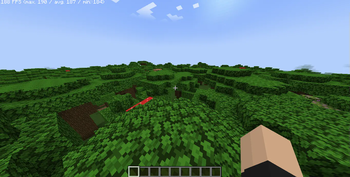
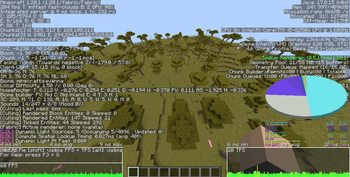
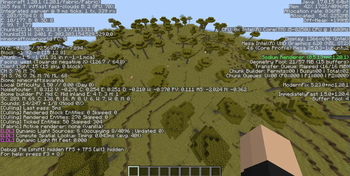
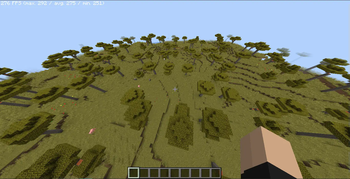
Notes : - Please do not turn on 'show FPS', mojangs text rendering engine is far from optimized - Big FPS numbers are cool but Please keep the FPS capped at 60(If you don't have a display over 60 Hz), this way your GPU will have more room for breathing and other things like chunk generation. - The device's specs that was used to take the screenshots are : - CPU: Intel Core i5-8250U @ 1. 60GHz, 4 cores, 8 threads (Laptop CPU) - RAM: 8GB DDR4 @ 2400 MHz - GPU: Intel UHD Graphics 620 - OS: Kubuntu 25. 04
📦 Mod List & Credits (click to expand)
- Boosted Brightness
- C2ME (Concurrent Chunk Management Engine)
- Cloth Config
- Clumps
- Cull Leaves
- Dynamic FPS
- Enhanced Block Entities
- Entity Culling
- Exordium
- Fabric API
- Fabric Language Kotlin
- FerriteCore
- Forge Config API Port
- ImmediatelyFast
- LambDynamicLights
- Leaves Be Gone
- Lithium
- Memory Leak Fix
- Mod Menu
- ModernFix
- More Culling
- Puzzles Lib
- Reese's Sodium Options
- Sodium
- Sodium Extra
- Yet Another Config Lib v3
- Zoomify
📊 Mod Details
- Game
- Minecraft Modpacks
- Author
- Carloplayz
- Version
- 1.2.0
- Downloads
- 2,901
- Endorsements
- 0
- Category
- lightweight
- Created
- 5/31/2025
- Updated
- 2/22/2026
- Game Versions
- 1.21.11
- Tags
- lightweight, optimization
🔧 How to Install Minecraft Modpacks Mods
Download from Modrinth. Use Prism Launcher or drop into your mods folder.
📖 Full step-by-step install guide for Minecraft Modpacks →
Visit the official mod page for specific installation instructions for this mod.
🎮 Need cheat codes or console commands? Check ur gaming wiki for Minecraft Modpacks commands, item IDs, and more.
❓ Frequently Asked Questions
Which Minecraft Modpacks versions does Low-end Optimization support?
The author lists 1.21.11. Other versions may work but are untested by the author.
What is the latest version of Low-end Optimization?
Version 1.2.0, published 2026-02-22 with 2,901 downloads recorded at the source.
Keep browsing — more Minecraft Modpacks mods await