Hermitcraft Setup Guide
⚪ Last updated 2024🖼️ Gallery (12 images)




🔍 Analysis
- 👍 0.5% endorsement rate
- 🏆 #1302 of 1508 adventure mods in this game by downloads
📋 About This Mod
Hi everyone. This is a fan-made guide for setting up a multiplayer server for the Hermitcraft Season 9 world download. Season 9 ended in December 20, 2023, and it had some of the most amazing and hilarious moments throughout it. In this guide, I plan to give you a walkthrough of how to setup this world, including Decked Out 2, so that you can play it with your friends, too.
_Additional information, including info about the other seasons, can be found in the Q&A section at the end._
# Server setup ### Before you go looking in the versions tab for a server download... There is no one-click installation for setting up a server. The modpack download is only there to provide links to the mods that the server should have. The setup process isn't terribly long, but it'll require you to download more than just mods. That being said, I tried keeping the things you need to download to a minimum. If you already have a server setup, you can skip this part.
How to setup a server
The first thing you need to install is Java JDK, if it wasn't already. Minecraft itself comes packaged with its own version of Java, but the server does not. If you have it installed already, then you can continue to the next section to download the server files.\
If not, head on over to (https://www.oracle.com/java/technologies/downloads/ "Download page for Java JDK") page to download the Java installer. Scroll down to the latest JDK version, click on the link for the installer to download it, open it and follow the steps presented.
### Download the server files
First, you will need to download the files that will make up your server.
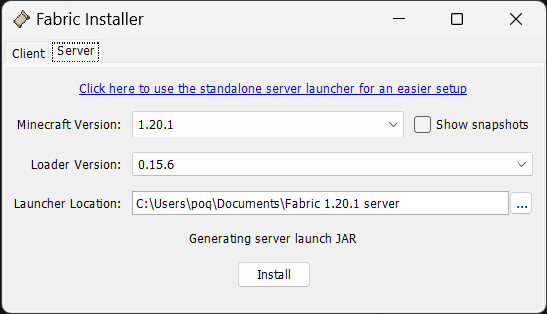
Download the Fabric installer (https://fabricmc.net/use/installer/ "Download page for the Fabric installer"). This will provide you with the files needed for running a server.\
Once it finishes downloading, open it and select the "Server" tab.\
For the Minecraft Version, choose "1. 20. 1".\
For the install location, choose the place you would like to install it. I recommend creating a folder in Documents for it, which would look something like
```C:\Users\\Documents\Fabric 1. 20. 1 server"```.\
Click "Install", which will then open a popup window.\
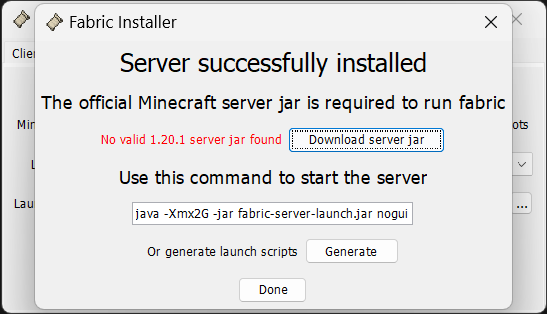
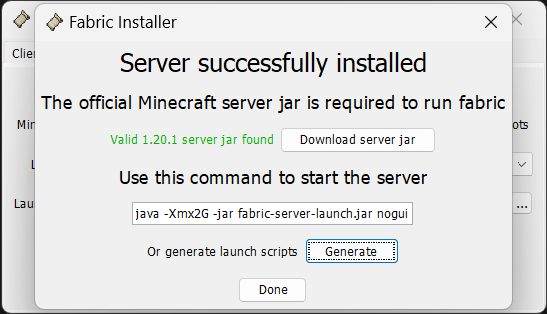
In the popup window, click "Download server jar". Once the text to the left of it turns green, click "Generate". Then click "Done". You can close out of the installer now.
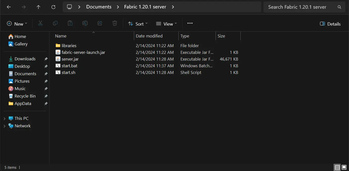
Your server files should look like this:
> !(https://cdn.modrinth.com/data/fl6n6cRF/images/42d6deca11b422e0c72f957c07c7e8463d7882b4.png)
### Setting up the server
Now that the server files have been created, we can start setting up the server.
Open the folder that you just created.\
Right-click on "start.bat" and click "Edit". Increase -Xmx2G to -Xmx4G, save with ctrl+s, and close the window.\
Once this is done, start the server by opening "start.bat". This will open a new window. If the server runs into an error, it probably means that Java is not installed. The steps for installing it can be found above.\
Note that it will say "Failed to load eula.txt". The console should end with this:
!(https://cdn.modrinth.com/data/fl6n6cRF/images/47cea7be8da16caf1d4838f9ba6a69e7c1d6f023.png)\
Once this happens, close out of the window.\
There will now be a "eula.txt" file. Open it and change eula=false to eula=true, then save and close.\
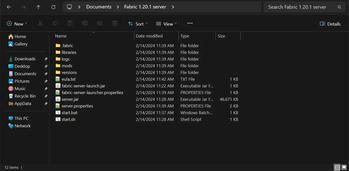
Your server files should now look like this:
> !(https://cdn.modrinth.com/data/fl6n6cRF/images/20d158e020012b0c2c17a5013fb1b92d7a796d2a.png)
### World download
The world download can be found on Hermitcraft's own (https://hermitcraft.com/ "hermitcraft.com"), in the left panel and under "Maps". Look for "Vanilla S9" and click "Java" to download a zip file.\
Right-click on the zip file and click "Extract all...", then in the popup, click "Extract". This will create a new folder.\
Rename the folder to world and move it into the server files.
The contents of the world folder should look like this:
> !(https://cdn.modrinth.com/data/fl6n6cRF/images/f6bafe91bb43bcf1b30b2ad4027a38e17bfa00bc.png)
#### You just created a server!
You can now use the "start.bat" file to start the server! You can test it by opening Minecraft 1. 20. 1 and connecting to "127. 0. 0. 1". This represents localhost. When a computer pings it, it is communicating with itself.\
To save the server, use save-all.\
To stop the server, use stop.
However, this does not mean that others can connect to it. That still requires a bit o
📊 Mod Details
- Game
- Minecraft Modpacks
- Author
- poqbox
- Version
- 1.0.0
- Downloads
- 980
- Endorsements
- 5
- Category
- adventure
- Created
- 2/23/2024
- Updated
- 2/7/2024
- Game Versions
- 1.20.1
- Tags
- adventure, multiplayer, optimization
🔧 How to Install Minecraft Modpacks Mods
Download from Modrinth. Use Prism Launcher or drop into your mods folder.
📖 Full step-by-step install guide for Minecraft Modpacks →
Visit the official mod page for specific installation instructions for this mod.
🎮 Need cheat codes or console commands? Check ur gaming wiki for Minecraft Modpacks commands, item IDs, and more.
❓ Frequently Asked Questions
Which Minecraft Modpacks versions does Hermitcraft Setup Guide support?
The author lists 1.20.1. Other versions may work but are untested by the author.
What is the latest version of Hermitcraft Setup Guide?
Version 1.0.0, published 2024-02-07 with 980 downloads recorded at the source.
Keep browsing — more Minecraft Modpacks mods await