Cinematic Pack
⚪ Last updated 2024🖼️ Gallery (1 images)
🔍 Analysis
- 👍 0.0% endorsement rate
- 🏆 #60 of 99 optimization mods in this game by downloads
📋 About This Mod
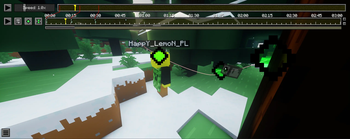
# Cinematic Pack A mod pack that includes shaders, resource packs, and mods that add support for various animated textures, optimization, etc. This pack is perfect for starting out; you just need to install FFmpeg according to the official ReplayMod guide. --- ## REQUIRED TO USE THIS PACK, READ THIS!! To render videos with ReplayMod, you need to add FFmpeg to your Minecraft folder. The full guide is available here: https://www.replaymod.com/docs/#installing-ffmpeg --- The pack includes initial textures that are similar to those in the official Minecraft trailers. --- The mod pack will definitely be optimized as I find cool mods for animations or decorations that can enhance your cinematics. --- **REMEMBER!** The mod pack does not need to be installed on the server ; all mods are client-side, and you can record with friends who don’t have these mods. It’s important that the person responsible for rendering, etc., is using this pack on the server. However, for better immersion, it’s best if your friends use the same textures and shaders so they can better get into character. ;) The pack got new furniture, etc. This version of the pack needs to be uploaded to the server so we can 'use' friends for role-playing. ;)
# Cinematic Pack A mod pack that includes shaders, resource packs, and mods that add support for various animated textures, optimization, etc. This pack is perfect for starting out; you just need to install FFmpeg according to the official ReplayMod guide.
## REQUIRED TO USE THIS PACK, READ THIS!! To render videos with ReplayMod, you need to add FFmpeg to your Minecraft folder. The full guide is available here:
https://www.replaymod.com/docs/#installing-ffmpeg
The pack includes initial textures that are similar to those in the official Minecraft trailers.
The mod pack will definitely be optimized as I find cool mods for animations or decorations that can enhance your cinematics.
REMEMBER! The mod pack does not need to be installed on the server ; all mods are client-side, and you can record with friends who don’t have these mods. It’s important that the person responsible for rendering, etc., is using this pack on the server. However, for better immersion, it’s best if your friends use the same textures and shaders so they can better get into character. ;)
The pack got new furniture, etc. This version of the pack needs to be uploaded to the server so we can 'use' friends for role-playing. ;)
📊 Mod Details
- Game
- Minecraft Modpacks
- Author
- LemoN_PL
- Version
- 2.0.0-1.20.4
- Downloads
- 3,930
- Endorsements
- 0
- Category
- optimization
- Created
- 5/28/2024
- Updated
- 9/4/2024
- Game Versions
- 1.20.4
- Tags
- optimization, technology
🔧 How to Install Minecraft Modpacks Mods
Download from Modrinth. Use Prism Launcher or drop into your mods folder.
📖 Full step-by-step install guide for Minecraft Modpacks →
Visit the official mod page for specific installation instructions for this mod.
🎮 Need cheat codes or console commands? Check ur gaming wiki for Minecraft Modpacks commands, item IDs, and more.
❓ Frequently Asked Questions
Which Minecraft Modpacks versions does Cinematic Pack support?
The author lists 1.20.4. Other versions may work but are untested by the author.
What is the latest version of Cinematic Pack?
Version 2.0.0-1.20.4, published 2024-09-04 with 3,930 downloads recorded at the source.
Keep browsing — more Minecraft Modpacks mods await