Bed Client
⚪ Last updated 2023🖼️ Gallery (4 images)
🔍 Analysis
- 👍 0.0% endorsement rate
- 🏆 #125 of 275 combat mods in this game by downloads
📋 About This Mod
<h1>IMPORTANT NOTICE:</h1> <p>Due to OptiFine's FAQ stating "Generally no, unless you have an explicit permission from us.", I can't include OptiFine. OptiFine isn't necessary for anything but zoom, so unless there's a specific reason to install it, there shouldn't be any issue when it comes to playing without it.</p> <h1>Bed Client</h1> <p>A simple, configurable, powerful and no nonsense Minecraft client.</p> <h2>Features</h2> <p>Bed Client includes various Sk1er mods and convenience mods to make your playing experience the best that it can be, while keeping things fairly simple.</p> <b>Such features include:</b> <h3>Mods</h3> <ul> <li>3D Skin Layers for visual improvements.</li> <li>AutoGG, for convenience.</li> <li>ChromaHUD, for a great in-game interface that works well with the game.</li> <li>CrashPatch, so you can keep on playing, even when the game decides to randomly crash.</li> <li>KeystrokesMod, which gives a nice view of what keys you're pressing in-game.</li> <li>Loading Progress Bar, to provide a simple progress bar that lets you know how much time something will take.</li> <li>Lobby Sounds, to filter out the annoying sounds while in Hypixel's lobbies.</li> <li>Motion Blur, to enhance the visual experience.</li> <li>OptiFine (not included due to the important note at the start), for great configuration and visual options.</li> <li>Resource Pack Organizer, so you can organize your entire collection of resource packs.</li> <li>Resourceify, so you can download resource packs and shaders all from inside of the game.</li> <li>Scrollable Tooltips, to help you scroll through incredibly long item names.</li> <li>TNT Time, to give a useful indicator on how much time you have left before TNT explodes.</li> </ul> <h3>Shaders</h3> <p>All shaders listed here have great looking predefined configs designed especially for Bed Client.</p> <ul> <li>Builder's QOL Shaders, for a simple, configurable, and lightweight shader that works great on low end computers and the game.</li> <li>Sildurs Enhanced Default (not included with the modpack), for a lightweight and very vanilla visual experience.</li> <li>Stereo's Default, for a simple and easy option that works with the vanilla game.</li> <li>Tea Shaders (not included with the modpack), which work extremely well with the vanilla game while providing a simple and lightweight experience.</li> <h3>Resource Packs</h3> </ul> <ul> <li>1.7.10, (made by me by reverting a few things changed in 1.8) is a simple resource pack that makes the game look like 1.7 for a simpler look.</li> <li>Bed Client Resources, which is an internal pack that changes a few minor things to fit in with the modpack.</li> </ul> <h2>Installation Instructions</h2> <p>Bed Client is incredibly simple to install. On MultiMC, Prism, PolyMC and the Modrinth launcher, it's as simple as searching and installing it. For the official launcher, you'll have to extract and install everything manually.</p> <h2>The idea of Bed Client</h2> <p>Originally I came up with the idea of making my own client, and threw everything I knew together. Within the next few days, I expanded on it, making its own style, interface and more. As I playtested it, I grew to love it, and that's where it is today.</p> <p>My original goal of making a simple, customizable, and cosmetic free experience on 1.8.9 is what this project is today.</p> <h2>Stability</h2> <p>At this current point in time, Bed Client as far as I've tested it, has been fairly stable. I noticed that with parties, being warped can occasionally crash the game.</p> <p>If the game crashes on launch, try going to the config and deleting forge.cfg. This will restore the splash screen.</p> <h2>Roadmap for the future</h2> <p>So far the modpack seems mostly final. I might add other mods if I feel like it, but on GitHub please let me know if you want me to add anything.</p>
IMPORTANT NOTICE:
Due to OptiFine's FAQ stating "Generally no, unless you have an explicit permission from us.", I can't include OptiFine. OptiFine isn't necessary for anything but zoom, so unless there's a specific reason to install it, there shouldn't be any issue when it comes to playing without it.
Bed Client
A simple, configurable, powerful and no nonsense Minecraft client.
Features
Bed Client includes various Sk1er mods and convenience mods to make your playing experience the best that it can be, while keeping things fairly simple.
Such features include:Mods
- 3D Skin Layers for visual improvements.
- AutoGG, for convenience.
- ChromaHUD, for a great in-game interface that works well with the game.
- CrashPatch, so you can keep on playing, even when the game decides to randomly crash.
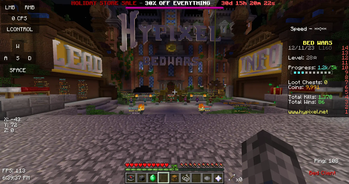
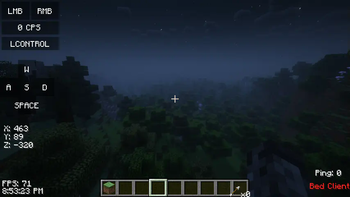
- KeystrokesMod, which gives a nice view of what keys you're pressing in-game.
- Loading Progress Bar, to provide a simple progress bar that lets you know how much time something will take.
- Lobby Sounds, to filter out the annoying sounds while in Hypixel's lobbies.
- Motion Blur, to enhance the visual experience.
- OptiFine (not included due to the important note at the start), for great configuration and visual options.
- Resource Pack Organizer, so you can organize your entire collection of resource packs.
- Resourceify, so you can download resource packs and shaders all from inside of the game.
- Scrollable Tooltips, to help you scroll through incredibly long item names.
- TNT Time, to give a useful indicator on how much time you have left before TNT explodes.
Shaders
All shaders listed here have great looking predefined configs designed especially for Bed Client.
- Builder's QOL Shaders, for a simple, configurable, and lightweight shader that works great on low end computers and the game.
- Sildurs Enhanced Default (not included with the modpack), for a lightweight and very vanilla visual experience.
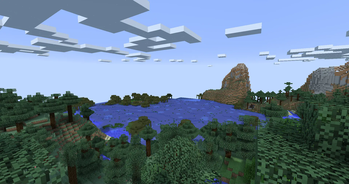
- Stereo's Default, for a simple and easy option that works with the vanilla game.
- Tea Shaders (not included with the modpack), which work extremely well with the vanilla game while providing a simple and lightweight experience.
Resource Packs
- 1. 7. 10, (made by me by reverting a few things changed in 1. 8) is a simple resource pack that makes the game look like 1. 7 for a simpler look.
- Bed Client Resources, which is an internal pack that changes a few minor things to fit in with the modpack.
Installation Instructions
Bed Client is incredibly simple to install. On MultiMC, Prism, PolyMC and the Modrinth launcher, it's as simple as searching and installing it. For the official launcher, you'll have to extract and install everything manually.
The idea of Bed Client
Originally I came up with the idea of making my own client, and threw everything I knew together. Within the next few days, I expanded on it, making its own style, interface and more. As I playtested it, I grew to love it, and that's where it is today.
My original goal of making a simple, customizable, and cosmetic free experience on 1. 8. 9 is what this project is today.
Stability
At this current point in time, Bed Client as far as I've tested it, has been fairly stable. I noticed that with parties, being warped can occasionally crash the game.
If the game crashes on launch, try going to the config and deleting forge.cfg. This will restore the splash screen.
Roadmap for the future
So far the modpack seems mostly final. I might add other mods if I feel like it, but on GitHub please let me know if you want me to add anything.
📊 Mod Details
- Game
- Minecraft Modpacks
- Author
- 4194304
- Version
- 1.0.0
- Downloads
- 9,078
- Endorsements
- 1
- Category
- combat
- Created
- 12/21/2023
- Updated
- 12/17/2023
- Game Versions
- 1.8.9
- Tags
- combat, kitchen-sink, multiplayer
🔧 How to Install Minecraft Modpacks Mods
Download from Modrinth. Use Prism Launcher or drop into your mods folder.
📖 Full step-by-step install guide for Minecraft Modpacks →
Visit the official mod page for specific installation instructions for this mod.
🎮 Need cheat codes or console commands? Check ur gaming wiki for Minecraft Modpacks commands, item IDs, and more.
❓ Frequently Asked Questions
Which Minecraft Modpacks versions does Bed Client support?
The author lists 1.8.9. Other versions may work but are untested by the author.
What is the latest version of Bed Client?
Version 1.0.0, published 2023-12-17 with 9,078 downloads recorded at the source.
Keep browsing — more Minecraft Modpacks mods await