World Colors
⚪ Last updated 2023🖼️ Gallery (2 images)
🔍 Analysis
- 👍 0.5% endorsement rate
- 🏆 #221 of 2046 datapack mods in this game by downloads
📋 About This Mod
ENG To add to the server you need: 1.Download zip archive 2.Open the server folder /world/datapacks 3. Drop the downloaded zip archive into the open folder and restart the server or write `/reload` to the console, if you do not have a paper or spigot server core, then write `/reload confirm` To start using it, just turn it on and it will configure itself, 3 scoreboards will be automatically created, 1 for each world and they will tune in themselves, if you want, for example, in the ordinary world, write `scoreboard modifity overworld` and write what you want to change Changes the color of your nickname in the tab depending on the world. For example, if one of the players is in the general world, then the nickname in the tab will be green, if it is in the lower world, then red, and if in the end, then purple. This can be seen in the screenshot:!(https://cdn.modrinth.com/data/wplC3VWZ/images/1613e26d988e9e3a2023d83fabfc5e83f714e6ea.png) It shows that the first 2 people are in the end and the third in the ordinary world. РУС Что бы добавить на сервер нужно: 1.Скачать zip архив 2.Открыть папку сервера /world/datapacks 3.Перекиньте скачанный zip архив в открытую папку и перезапустите сервер или напишите в консоль `/reload` если у вас не ядро сервера paper или spigot то пишите `/reload confirm` Что бы начать его использовать просто включите его и он сам настроится, автоматически создастся 3 таблицы счёта (scoreboard) по 1 на каждый мир и сами настроятся если вы хотите что бы например в обычном мире напишите `scoreboard modifity overworld` и пишите что вхотите изменить Изменяет цвет вашего ника во вкладке в зависимости от мира. Например если кто-то из игроков будет в обычном мире то го никнейм в табе будет зелёным цветом , если будет в нижнем мире то красным а если в энде то пурпурным. Это видно на скриншоте:!(https://cdn.modrinth.com/data/wplC3VWZ/images/1613e26d988e9e3a2023d83fabfc5e83f714e6ea.png) На нём видно что первые 2 человека находятся в эндер мире а третий в обычном мире
To add to the server you need: 1. Download zip archive 2. Open the server folder /world/datapacks 3. Drop the downloaded zip archive into the open folder and restart the server or write `/reload` to the console, if you do not have a paper or spigot server core, then write `/reload confirm`
To start using it, just turn it on and it will configure itself, 3 scoreboards will be automatically created, 1 for each world and they will tune in themselves, if you want, for example, in the ordinary world, write `scoreboard modifity overworld` and write what you want to change
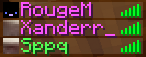
Changes the color of your nickname in the tab depending on the world. For example, if one of the players is in the general world, then the nickname in the tab will be green, if it is in the lower world, then red, and if in the end, then purple. This can be seen in the screenshot:!(https://cdn.modrinth.com/data/wplC3VWZ/images/1613e26d988e9e3a2023d83fabfc5e83f714e6ea.png)
It shows that the first 2 people are in the end and the third in the ordinary world.
Что бы добавить на сервер нужно: 1.Скачать zip архив 2.Открыть папку сервера /world/datapacks 3.Перекиньте скачанный zip архив в открытую папку и перезапустите сервер или напишите в консоль `/reload` если у вас не ядро сервера paper или spigot то пишите `/reload confirm`
Что бы начать его использовать просто включите его и он сам настроится, автоматически создастся 3 таблицы счёта (scoreboard) по 1 на каждый мир и сами настроятся если вы хотите что бы например в обычном мире напишите `scoreboard modifity overworld` и пишите что вхотите изменить
Изменяет цвет вашего ника во вкладке в зависимости от мира. Например если кто-то из игроков будет в обычном мире то го никнейм в табе будет зелёным цветом , если будет в нижнем мире то красным а если в энде то пурпурным. Это видно на скриншоте:!(https://cdn.modrinth.com/data/wplC3VWZ/images/1613e26d988e9e3a2023d83fabfc5e83f714e6ea.png)
На нём видно что первые 2 человека находятся в эндер мире а третий в обычном мире
📊 Mod Details
- Game
- Minecraft Data Packs
- Author
- Sppq
- Version
- 1
- Downloads
- 632
- Endorsements
- 3
- Category
- datapack
- Created
- 8/26/2023
- Updated
- 8/18/2023
- Game Versions
- 1.16.5, 1.17, 1.17.1, 1.18, 1.18.1
- Tags
- utility
🔧 How to Install Minecraft Data Packs Mods
Download from Modrinth. Use Prism Launcher or drop into your mods folder.
📖 Full step-by-step install guide for Minecraft Data Packs →
Visit the official mod page for specific installation instructions for this mod.
🎮 Need cheat codes or console commands? Check ur gaming wiki for Minecraft Data Packs commands, item IDs, and more.
❓ Frequently Asked Questions
Which Minecraft Data Packs versions does World Colors support?
The author lists 1.16.5, 1.17, 1.17.1, 1.18, 1.18.1, 1.18.2. Other versions may work but are untested by the author.
What is the latest version of World Colors?
Version 1, published 2023-08-18 with 632 downloads recorded at the source.
Keep browsing — more Minecraft Data Packs mods await