WASD Detection
⚪ Last updated 2024🖼️ Gallery (1 images)
🔍 Analysis
- 👍 0.6% endorsement rate
- 🏆 #1887 of 2025 datapack mods in this game by downloads
📋 About This Mod
# WASD Detection Accurate WASD detection for Minecraft datapacks. ### Latest Data Pack version 1.4 ### Compatible Minecraft Versions Java Edition 1.20.2 - 1.21 *(Versions of the pack for 1.20.1 and 1.19.2 also available in versions)* # How to Use the Data pack (Full video explaination https://www.youtube.com/watch?v=DsjAlwNN2AQ) The WASD detection works as an in-game *predicate* that can be accessed through /execute commands, and or player selectors. ``` /execute as @a if predicate wasd:w run say pressed w ``` ``` /execute as @a run say pressed w ``` Either of these will result in a message in chat saying "pressed w" when the player walks forward. ### List of preciates (All of these will have a prefix of `wasd:`) **wasd:w** = if the player walks forward **wasd:a** = if the player walks left **wasd:s** = if the player walks right **wasd:d** = if the player walks backward **wasd:moving** = if the player pressed any of the four directions **wasd:space** = if the player moves upward **wasd:falling** = if the player moves downward **wasd:shift** = if the player presses SHIFT ### Lock the player's movement If you want to lock the player from moving you will need to run this command: ``` /execute as @a run function wasd:lock ``` This will lock all players at their current positions. If you want to lock the player at a specific location, then run this command: ``` /execute as @a postitioned <XYZ> rotated <Y ROTATION> <X ROTATION> run function wasd:lock ``` *Replacing `<XYZ>` with your desired coordinates, and `<Y ROTATION>` and `<X ROTATION>` with your desired rotations. To unlock the players, run: ``` /execute as @a run function wasd:unlock ``` # Installation ### Method 1 (Pre-made world) 1. Locate to your .minecraft/saves/\<worldname\>/datapacks folder. 2. Paste the .zip file you installed into this folder. 3. Enter your Minecraft world and type /reload. 4. A message should pop up that says "Datapack Installed". ### Method 2 (Create new world) 1. In the Create new world screen, click the "Datapacks" button 2. Drag and drop the .zip file you downloaded into the game window. 4. Apply the datapack.~~~~ 5. Create new world.
# WASD Detection Accurate WASD detection for Minecraft datapacks.
### Latest Data Pack version 1. 4
### Compatible Minecraft Versions Java Edition 1. 20. 2 - 1. 21 (Versions of the pack for 1. 20. 1 and 1. 19. 2 also available in versions)
# How to Use the Data pack
(Full video explaination https://www.youtube.com/watch?v=DsjAlwNN2AQ)
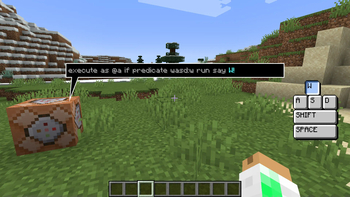
The WASD detection works as an in-game predicate that can be accessed through /execute commands, and or player selectors.
``` /execute as @a if predicate wasd:w run say pressed w ```
``` /execute as @a run say pressed w ``` Either of these will result in a message in chat saying "pressed w" when the player walks forward.
### List of preciates (All of these will have a prefix of `wasd:`)
wasd:w = if the player walks forward
wasd:a = if the player walks left
wasd:s = if the player walks right
wasd:d = if the player walks backward
wasd:moving = if the player pressed any of the four directions
wasd:space = if the player moves upward
wasd:falling = if the player moves downward
wasd:shift = if the player presses SHIFT
### Lock the player's movement
If you want to lock the player from moving you will need to run this command: ``` /execute as @a run function wasd:lock ``` This will lock all players at their current positions.
If you want to lock the player at a specific location, then run this command:
```
/execute as @a postitioned
To unlock the players, run: ``` /execute as @a run function wasd:unlock ```
# Installation
### Method 1 (Pre-made world)
1. Locate to your .minecraft/saves/\
### Method 2 (Create new world) 1. In the Create new world screen, click the "Datapacks" button 2. Drag and drop the .zip file you downloaded into the game window. 4. Apply the datapack.~~~~ 5. Create new world.
📊 Mod Details
- Game
- Minecraft Data Packs
- Author
- JDawgtor
- Version
- 1.4
- Downloads
- 789
- Endorsements
- 5
- Category
- datapack
- Created
- 9/1/2024
- Updated
- 8/31/2024
- Game Versions
- 1.20.2, 1.20.3, 1.20.4, 1.20.5, 1.20.6
- Tags
- game-mechanics, technology, utility
🔧 How to Install Minecraft Data Packs Mods
Download from Modrinth. Use Prism Launcher or drop into your mods folder.
📖 Full step-by-step install guide for Minecraft Data Packs →
Visit the official mod page for specific installation instructions for this mod.
🎮 Need cheat codes or console commands? Check ur gaming wiki for Minecraft Data Packs commands, item IDs, and more.
❓ Frequently Asked Questions
Which Minecraft Data Packs versions does WASD Detection support?
The author lists 1.20.2, 1.20.3, 1.20.4, 1.20.5, 1.20.6, 1.21. Other versions may work but are untested by the author.
What is the latest version of WASD Detection?
Version 1.4, published 2024-08-31 with 789 downloads recorded at the source.
Keep browsing — more Minecraft Data Packs mods await