Warp Pads
⚪ Last updated 2024🖼️ Gallery (4 images)
🔍 Analysis
- 👍 1.6% endorsement rate — high engagement, a strong quality signal
- 🏆 #409 of 2025 datapack mods in this game by downloads
📋 About This Mod
# Warp Pads Warp Pads is a data pack enabling players to create and teleport between Warp Pads in the world. It is designed to be balanced for survival Minecraft, but beneficial for players in all game modes. <iframe width="1280" height="720" src="https://www.youtube.com/embed/BT8Gtw-HmLA" title="Warp Pads v2 Showcase" frameborder="0" allow="accelerometer; autoplay; clipboard-write; encrypted-media; gyroscope; picture-in-picture; web-share" allowfullscreen></iframe> Warp Pads follows the Minecraft Datapacks (https://mc-datapacks.github.io/en/) as well as (https://wiki.smithed.dev/conventions) to ensure compatibility with other certified data packs. ### Warning: Warp Pads force-load the chunk they are in. This can cause overhead at large scales and can be used by players for unintended purposes. If you are a server owner or an advanced player, please consider this behavior before installing. A good alternative is (https://modrinth.com/datapack/waystones-data-pack). ## About ### Features * Multiplayer friendly * No additional resource packs required (optional textures supported) * Infinite warp distances * Configurable * Items, tiers, effects, values * Requires recompilation with Trident * Balanced tiers for each game stage * Warp Pad customization * Warp Pad labeling * Warp Pad indicator colors * Warp Pad decoration * Low performance impact * Custom advancements * Custom dimension support * Requires recompilation with Trident * No constant cooldowns or long animations * Rapid warping on lower tiers will trigger a cooldown to encourage higher tiers * Warp stream frequencies for extra organization * New "Reserved Streams" for player-specific networks * Private Warp Pads linked to players * Warping passenger system ## Usage To warp, stand on a Warp Pad, look at the indicator for the desired Warp Pad and sneak (Left-Shift by default). Any mobs or players on top of the Warp Pad will be warped, too. ### Crafting Warp Pads can be crafted in a Crafting Table like so: !(https://i.imgur.com/gWg9Gvv.png) !(https://i.imgur.com/fQrLyx4.png) !(https://i.imgur.com/7Pmtv4Z.png) ### Creation (Alternate Method w/ a Fancy Animation) Each Warp Pad requires a primary item and four secondary items to be dropped on top of a base block. Instructions for each tier are as follows: * Tier 1 - Throw an Ender Pearl and 4 Amethyst Shards on top of a Gold Block. Has a maximum radius of 1000 blocks. * Tier 2 - Throw a Eye of Ender and 4 Nether Quartz on top of an Amethyst Block. Has a maximum radius of 25000 blocks. * Tier 3 - Throw a Nether Star and 4 Popped Chorus Fruit on top of a Diamond Block. Has no maximum distance. Warp Pads must be at least 2 blocks apart from one another. ### Labeling * To label a Warp Pad, name the crafted Warp Pad prior to placing it. * To relabel a Warp Pad, throw a named piece of Paper on top of the Warp Pad after it has been placed. ### Destruction To destroy any Warp Pad, break the block as you normally would with the proper tool. An item will be dropped along with any modifier items the Warp Pad had. The main item will retain the label, if applicable. ### Other Please note that only the player who placed the Warp Pad will be able to modify it. * To change the color of the Warp Pad icon, throw the corresponding Dye on top of the Warp Pad. * To increment the Warp Stream Frequency, throw a Redstone Dust on top of a Warp Pad. * To make a Warp Pad private, throw a Diamond on top of the Warp Pad. * To switch to Reserved Frequencies, throw a Glowstone Dust on top of the Warp Pad. Warp Pads in the Nether are limited to 1/8th the distance of those in the Overworld. ### Support Tested to support Minecraft: Java Edition 1.17-1.20.4. ### Uninstalling To uninstall, run `/function warppad:uninstall`. Then disable or remove the data pack from the world. ### Configuration I designed this rewrite to be easily customizable, but you'll still need to compile the pack yourself to make changes. I've outlined the process in the (https://github.com/SmoochyPit/Warp-Pads-Rewrite). ### Resource Packs Resource Packs can define custom textures or models for Warp Pad items by using the Custom Model Data value `02900XX`, with XX being the zero-padded tier, starting with 00. Known Resource Packs implementing these textures (for default recipes) will be linked below if/when available: * Stay tuned... ## Credits I used (https://advancements.thedestruc7i0n.
# Warp Pads
Warp Pads is a data pack enabling players to create and teleport between Warp Pads in the world. It is designed to be balanced for survival Minecraft, but beneficial for players in all game modes.
Warp Pads follows the Minecraft Datapacks (https://mc-datapacks.github.io/en/) as well as (https://wiki.smithed.dev/conventions) to ensure compatibility with other certified data packs.
### Warning:
Warp Pads force-load the chunk they are in. This can cause overhead at large scales and can be used by players for unintended purposes. If you are a server owner or an advanced player, please consider this behavior before installing. A good alternative is (https://modrinth.com/datapack/waystones-data-pack).
### Features
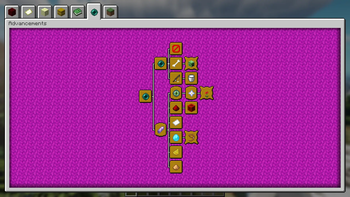
Multiplayer friendly No additional resource packs required (optional textures supported) Infinite warp distances Configurable Items, tiers, effects, values Requires recompilation with Trident Balanced tiers for each game stage Warp Pad customization Warp Pad labeling Warp Pad indicator colors Warp Pad decoration Low performance impact Custom advancements Custom dimension support Requires recompilation with Trident No constant cooldowns or long animations Rapid warping on lower tiers will trigger a cooldown to encourage higher tiers Warp stream frequencies for extra organization New "Reserved Streams" for player-specific networks Private Warp Pads linked to players Warping passenger system
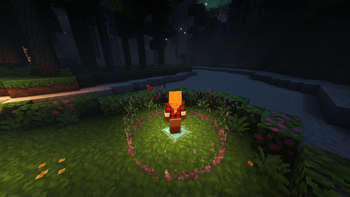
To warp, stand on a Warp Pad, look at the indicator for the desired Warp Pad and sneak (Left-Shift by default). Any mobs or players on top of the Warp Pad will be warped, too.
### Crafting
Warp Pads can be crafted in a Crafting Table like so:
!(https://i.imgur.com/gWg9Gvv.png)
!(https://i.imgur.com/fQrLyx4.png)
!(https://i.imgur.com/7Pmtv4Z.png)
### Creation (Alternate Method w/ a Fancy Animation)
Each Warp Pad requires a primary item and four secondary items to be dropped on top of a base block. Instructions for each tier are as follows: Tier 1 - Throw an Ender Pearl and 4 Amethyst Shards on top of a Gold Block. Has a maximum radius of 1000 blocks. Tier 2 - Throw a Eye of Ender and 4 Nether Quartz on top of an Amethyst Block. Has a maximum radius of 25000 blocks. Tier 3 - Throw a Nether Star and 4 Popped Chorus Fruit on top of a Diamond Block. Has no maximum distance.
Warp Pads must be at least 2 blocks apart from one another.
### Labeling
To label a Warp Pad, name the crafted Warp Pad prior to placing it. To relabel a Warp Pad, throw a named piece of Paper on top of the Warp Pad after it has been placed.
### Destruction
To destroy any Warp Pad, break the block as you normally would with the proper tool. An item will be dropped along with any modifier items the Warp Pad had. The main item will retain the label, if applicable.
Please note that only the player who placed the Warp Pad will be able to modify it.
To change the color of the Warp Pad icon, throw the corresponding Dye on top of the Warp Pad. To increment the Warp Stream Frequency, throw a Redstone Dust on top of a Warp Pad. To make a Warp Pad private, throw a Diamond on top of the Warp Pad. To switch to Reserved Frequencies, throw a Glowstone Dust on top of the Warp Pad.
Warp Pads in the Nether are limited to 1/8th the distance of those in the Overworld.
### Support
Tested to support Minecraft: Java Edition 1. 17-1. 20. 4.
### Uninstalling
To uninstall, run `/function warppad:uninstall`. Then disable or remove the data pack from the world.
### Configuration
I designed this rewrite to be easily customizable, but you'll still need to compile the pack yourself to make changes. I've outlined the process in the (https://github.com/SmoochyPit/Warp-Pads-Rewrite).
### Resource Packs
Resource Packs can define custom textures or models for Warp Pad items by using the Custom Model Data value `02900XX`, with XX being the zero-padded tier, starting with 00.
Known Resource Packs implementing these textures (for default recipes) will be linked below if/when available:
* Stay tuned...
I used (https://advancements.thedestruc7i0n.
📊 Mod Details
- Game
- Minecraft Data Packs
- Author
- SmoochyPit
- Version
- 2.1.6
- Downloads
- 2,289
- Endorsements
- 36
- Category
- datapack
- Created
- 3/16/2023
- Updated
- 3/29/2024
- Game Versions
- 1.17, 1.17.1, 1.18, 1.18.1, 1.18.2
- Tags
- game-mechanics, magic, transportation
🔧 How to Install Minecraft Data Packs Mods
Download from Modrinth. Use Prism Launcher or drop into your mods folder.
📖 Full step-by-step install guide for Minecraft Data Packs →
Visit the official mod page for specific installation instructions for this mod.
🎮 Need cheat codes or console commands? Check ur gaming wiki for Minecraft Data Packs commands, item IDs, and more.
❓ Frequently Asked Questions
Which Minecraft Data Packs versions does Warp Pads support?
The author lists 1.17, 1.17.1, 1.18, 1.18.1, 1.18.2, 1.19. Other versions may work but are untested by the author.
What is the latest version of Warp Pads?
Version 2.1.6, published 2024-03-29 with 2,289 downloads recorded at the source.
Keep browsing — more Minecraft Data Packs mods await