Vanilla Replays
🟡 Updated this year🖼️ Gallery (5 images)




🔍 Analysis
- 👍 2.1% endorsement rate — high engagement, a strong quality signal
- 🏆 #461 of 2025 datapack mods in this game by downloads
📋 About This Mod
# Vanilla Replays - Youly !(https://cdn.modrinth.com/data/cached_images/0399d5bf274cb6d23c01ecb7ee7e65d9fe8f4542_0.webp) <iframe width="512" height="288" src="https://www.youtube-nocookie.com/embed/Nh6koHSuWC8" title="YouTube video player" frameborder="0" allow="accelerometer; autoplay; clipboard-write; encrypted-media; gyroscope; picture-in-picture; web-share" allowfullscreen></iframe> <details> <summary>Version 1.1.0 Overview</summary> <iframe width="512" height="288" src="https://www.youtube-nocookie.com/embed/WMzjwGuMYuQ" title="YouTube video player" frameborder="0" allow="accelerometer; autoplay; clipboard-write; encrypted-media; gyroscope; picture-in-picture; web-share" allowfullscreen></iframe> </details> # 📇 PRESENTATION Vanilla Replays is a datapack giving the ability to record and playback player actions, such as position, equipped items, used items and more. Each actor can be a mannequin entity or a mob wich can be customized (profile, name, skin customization, data values etc), and belongs to a scene. Every actor in the same scene can play their record together (using _"Scene Manager"_ screen) # ⚒️ UTILS !(https://cdn.modrinth.com/data/cached_images/16adfbe5b0d6b5314553a5f574663aa3e7eb7861.png) - **Press** _"quick actions"_ key (default to _"G"_), or click on _"Vanilla Replays"_ button in pause menu, to open Main Menu. - **Sneak** + **Right Click** on the actor you are looking at to open his Configuration Menu - Be **next** to an actor to view his name, ID and scene, above actionbar. # 📜 INSTRUCTIONS - **Click** on _"Create a New Actor"_ to summon a new actor, by specifying entity type, his name, profile data (it can be player's name, or a profile component), and the scene he belongs to. If the name/profile is a player name and contains digits or spaces, put it in quotes ("name 123" instead of : name 123). Profile works only for "mannequin" entities - **Click** on _"Configure Actor"_ and specify Actor'ID to configure actor : _playback_, _record_, _remove_, _customize_ and _teleport to_. - **Click** on _"Convert Nearest Entity into Actor"_ to convert the nearest entity within a radius of 50 blocks, some entity types can't be converted (marker, minecarts & boats, etc) - **Click** on _"Scene Manager"_ and specify Scene Name to _playback_ the specified scene name, _change_ its name and _pause/resume_ it. - **Click** on _"Stop Recording"_ or **Type** _"trigger vanilla_replays.trigger.stop_recording"_ in chat to stop the actor you are currently recording. - **Click** on _"Actors List"_ to view all loaded actors from nearest to furthest. Click on any actor to open his configuration screen. # ⚠️ LIMITATIONS - For now, all modifications applied to the world (placing/destroying blocks, interacting with entities/blocks) are not recorded. - You can record interactions between actors if several players each start a recording of an actor at the same time, but doing everything alone is more difficult. - Mannequin entities & Mobs don't have all animations of held items (aiming with bow/trident, reloading crossbow, etc). - Mannequin entities & Mobs don't have attack destroy/punch animations. - Riding pose is recorded but the position and rotation of the vehicle are not. # 🚫 KNOWN ISSUES - ✅ FIXED: Scene names containing spaces cannot be paused/resumed using the _"Scene Manager"_ screen.
# Vanilla Replays - Youly
!(https://cdn.modrinth.com/data/cached_images/0399d5bf274cb6d23c01ecb7ee7e65d9fe8f4542_0.webp)
Version 1. 1. 0 Overview
# 📇 PRESENTATION
Vanilla Replays is a datapack giving the ability to record and playback player actions, such as position, equipped items, used items and more.
Each actor can be a mannequin entity or a mob wich can be customized (profile, name, skin customization, data values etc), and belongs to a scene. Every actor in the same scene can play their record together (using _"Scene Manager"_ screen)
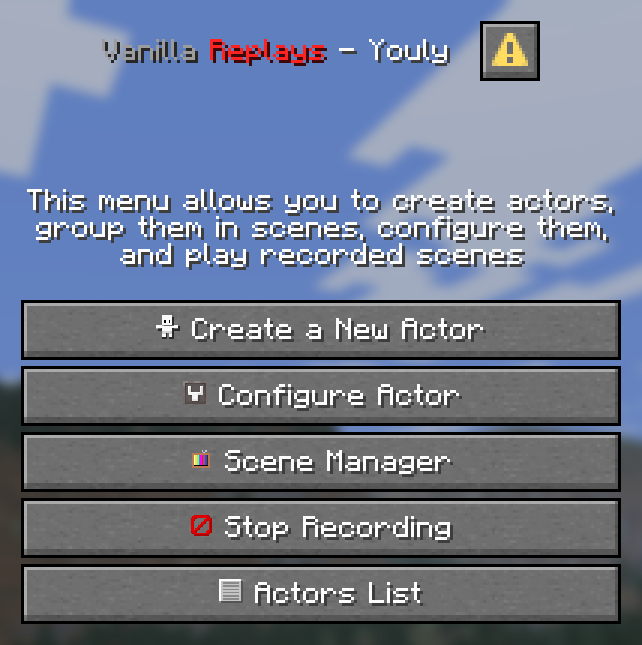
!(https://cdn.modrinth.com/data/cached_images/16adfbe5b0d6b5314553a5f574663aa3e7eb7861.png)
- Press _"quick actions"_ key (default to _"G"_), or click on _"Vanilla Replays"_ button in pause menu, to open Main Menu.
- Sneak + Right Click on the actor you are looking at to open his Configuration Menu
- Be next to an actor to view his name, ID and scene, above actionbar.
# 📜 INSTRUCTIONS
- Click on _"Create a New Actor"_ to summon a new actor, by specifying entity type, his name, profile data (it can be player's name, or a profile component), and the scene he belongs to.
- If the name/profile is a player name and contains digits or spaces, put it in quotes ("name 123" instead of : name 123). Profile works only for "mannequin" entities
- Click on _"Configure Actor"_ and specify Actor'ID to configure actor : _playback_, _record_, _remove_, _customize_ and _teleport to_.
- Click on _"Convert Nearest Entity into Actor"_ to convert the nearest entity within a radius of 50 blocks, some entity types can't be converted (marker, minecarts & boats, etc)
- Click on _"Scene Manager"_ and specify Scene Name to _playback_ the specified scene name, _change_ its name and _pause/resume_ it.
- Click on _"Stop Recording"_ or Type _"trigger vanilla_replays.trigger.stop_recording"_ in chat to stop the actor you are currently recording.
- Click on _"Actors List"_ to view all loaded actors from nearest to furthest. Click on any actor to open his configuration screen.
# ⚠️ LIMITATIONS
- For now, all modifications applied to the world (placing/destroying blocks, interacting with entities/blocks) are not recorded.
- You can record interactions between actors if several players each start a recording of an actor at the same time, but doing everything alone is more difficult.
- Mannequin entities & Mobs don't have all animations of held items (aiming with bow/trident, reloading crossbow, etc).
- Mannequin entities & Mobs don't have attack destroy/punch animations.
- Riding pose is recorded but the position and rotation of the vehicle are not.
# 🚫 KNOWN ISSUES
- ✅ FIXED: Scene names containing spaces cannot be paused/resumed using the _"Scene Manager"_ screen.
📊 Mod Details
- Game
- Minecraft Data Packs
- Author
- Youly
- Version
- 1.1.1
- Downloads
- 2,174
- Endorsements
- 45
- Category
- datapack
- Created
- 10/13/2025
- Updated
- 4/18/2026
- Game Versions
- 1.21.11-pre1, 1.21.11-pre2, 1.21.11-pre3, 1.21.11-pre4, 1.21.11-pre5
- Tags
- game-mechanics, technology, utility
🔧 How to Install Minecraft Data Packs Mods
Download from Modrinth. Use Prism Launcher or drop into your mods folder.
📖 Full step-by-step install guide for Minecraft Data Packs →
Visit the official mod page for specific installation instructions for this mod.
🎮 Need cheat codes or console commands? Check ur gaming wiki for Minecraft Data Packs commands, item IDs, and more.
❓ Frequently Asked Questions
Which Minecraft Data Packs versions does Vanilla Replays support?
The author lists 1.21.11-pre1, 1.21.11-pre2, 1.21.11-pre3, 1.21.11-pre4, 1.21.11-pre5, 1.21.11-rc1. Other versions may work but are untested by the author.
What is the latest version of Vanilla Replays?
Version 1.1.1, published 2026-04-18 with 2,174 downloads recorded at the source.
Keep browsing — more Minecraft Data Packs mods await