Ultimate Weapons
🟠 Updated over a year ago🖼️ Gallery (1 images)
🔍 Analysis
- 👍 0.5% endorsement rate
- 🏆 #1992 of 2025 datapack mods in this game by downloads
📋 About This Mod
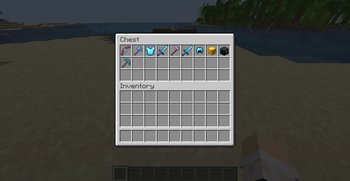
## Description Ultimate Weapons introduces powerful and highly customizable items for Minecraft 1.21.4+ that draws inspiration from major Minecraft servers, especially Hypixel, and aims to minimize performance impact by avoiding the use of tick functions. ## How to use <details> <summary>Get item</summary> To obtain an UWS item, simply run this command: ```mcfunction /function uws:get_item/<item_name> ``` Currently, there are 14 available items, and more unique ones will be coming in future updates. All items are now only obtainable through commands, so as to give server admins full control over how items are distributed and utilized, allowing for flexible adaptation to gameplay without directly affecting mechanics through predefined recipes. For the documentation of all UWS items, visit (https://github.com/akastrmix/Ultimate-Weapons/wiki/Items). </details> <details> <summary>Customize item / effect</summary> UWS items are driven by UWS effects that are customizable and independent, meaning the effects are not bound to a specific item and you have full control over their application, making things possible like stacking as many effects as you like onto an item. These effects are usually triggered through enchantments, advancements, or `consumable` components. Each UWS item is associated with a unique UWS effect. Visit (https://github.com/akastrmix/Ultimate-Weapons/wiki/Effects) for the full documentation of all UWS effects. <br><br> To customize an UWS item / effect, first use this command: ```mcfunction /function uws:get_item_config/<item_name> ``` This will give you two command blocks with name `<item_name> Template` and `<item_name> Modifier`. The `<item_name> Template` block is responsible for giving you an UWS item whilst allowing you to tweak its effects by editing its arguments, while the `<item_name> Modifier` lets you modify the effects of your held item. <br> - **In Template block:** Inside this block, look for this data: ``` "minecraft:custom_data":"{uws_effects:{<effect_name>:{key1:value,key2:value,...}}}" ``` The `<effect_name>` refers to the effect that will apply to this item; in this case, it is the effect that the UWS item is associated with. You can customize it by editing the `value` of specific fields in the object. A complete list of effect fields and their details can be found on the wiki. Once you've finished editing, activate the command block to receive the customized version of the target UWS item. <br> - **In Modifier block:** Inside this block, look for the this data: ``` "minecraft:set_custom_data","tag":"{uws_effects:{<effect_name>:{key1:value,key2:value,...}}}" ``` This is similar to above. Modify the `value` of a given field in the object, then activate it to apply the changes to your held item's effect. This also ensures the item gains the necessary trigger to activate the effect. > **** > Customization will only work if all arguments of the effect are complete and correctly formatted. Missing or incorrectly formatted arguments could result in all values falling back to their default ones when triggering the effect. </details> <details> <summary>Apply effect to other item</summary> To apply an UWS effect to your held item, use the command below: ```mcfunction /function uws:set_effect/<effect_name> ``` If you're not sure which effect is associated with which item, use this command to get the effect info of your held item: ```mcfunction /function uws:help/lookup_held_item ``` </details> <details> <summary>Manage effects</summary> Ban an UWS effect: ```mcfunction /function uws:ban_effect/<effect_name> ``` This will prevent the effect from being triggered. For blocks or items that are consumable, this also cancels their placement or consumption. Unban an UWS effect or clear banlist: ```mcfunction /function uws:unban_effect/<effect_name> /function uws:unban_effect/all ``` </details> <details> <summary>Adjust your preferences</summary> Whether or not you have permission, you can use this command to view available options and adjust settings such as language, cooldown displays, and more: ```mcfunction /trigger uws_options ``` Add `set <number>` at the end of the command to target a specific option. </details> ## Notes - Ultimate Weapons requires a persistent entity and a forceloaded chunk to function properly. Please avoid killing all entities (use `/kill @e` instead) or removing all forceloaded chunks in the overworld. - Ultimate Weapons overrides vanilla loot tables to implement some advanced features, so it's advisable to ensure there are no conflicts with other packs. - If you need to uninstall the datapack, you can use `/function uws:unload` to remove all traces left by it (player database not included). <br> ## Supported languages Ultimate Weapons supports the following languages (covering text messages and UWS item lores): - English - Simplified Chinese - Cantonese (Hong Kong) <details> <sum
## Description
Ultimate Weapons introduces powerful and highly customizable items for Minecraft 1. 21. 4+ that draws inspiration from major Minecraft servers, especially Hypixel, and aims to minimize performance impact by avoiding the use of tick functions.
## How to use
Get item
To obtain an UWS item, simply run this command:
```mcfunction
/function uws:get_item/
For the documentation of all UWS items, visit (https://github.com/akastrmix/Ultimate-Weapons/wiki/Items).
Customize item / effect
UWS items are driven by UWS effects that are customizable and independent, meaning the effects are not bound to a specific item and you have full control over their application, making things possible like stacking as many effects as you like onto an item. These effects are usually triggered through enchantments, advancements, or `consumable` components. Each UWS item is associated with a unique UWS effect. Visit (https://github.com/akastrmix/Ultimate-Weapons/wiki/Effects) for the full documentation of all UWS effects.
To customize an UWS item / effect, first use this command:
```mcfunction
/function uws:get_item_config/
- In Template block: Inside this block, look for this data:
- ```
- "minecraft:custom_data":"{uws_effects:{
:{key1:value,key2:value,...}}}" - ```
- The `
` refers to the effect that will apply to this item; in this case, it is the effect that the UWS item is associated with. You can customize it by editing the `value` of specific fields in the object. A complete list of effect fields and their details can be found on the wiki.
Once you've finished editing, activate the command block to receive the customized version of the target UWS item.
- In Modifier block: Inside this block, look for the this data:
- ```
- "minecraft:set_custom_data","tag":"{uws_effects:{
:{key1:value,key2:value,...}}}" - ```
- This is similar to above. Modify the `value` of a given field in the object, then activate it to apply the changes to your held item's effect. This also ensures the item gains the necessary trigger to activate the effect.
- >
- > Customization will only work if all arguments of the effect are complete and correctly formatted. Missing or incorrectly formatted arguments could result in all values falling back to their default ones when triggering the effect.
Apply effect to other item
To apply an UWS effect to your held item, use the command below:
```mcfunction
/function uws:set_effect/
Manage effects
Ban an UWS effect:
```mcfunction
/function uws:ban_effect/
Unban an UWS effect or clear banlist:
```mcfunction
/function uws:unban_effect/
Adjust your preferences
Whether or not you have permission, you can use this command to view available options and adjust settings such as language, cooldown displays, and more:
```mcfunction
/trigger uws_options
```
Add `set
## Notes - Ultimate Weapons requires a persistent entity and a forceloaded chunk to function properly. Please avoid killing all entities (use `/kill @e` instead) or removing all forceloaded chunks in the overworld. - Ultimate Weapons overrides vanilla loot tables to implement some advanced features, so it's advisable to ensure there are no conflicts with other packs. - If you need to uninstall the datapack, you can use `/function uws:unload` to remove all traces left by it (player database not included).
## Supported languages Ultimate Weapons supports the following languages (covering text messages and UWS item lores): - English - Simplified Chinese - Cantonese (Hong Kong)
📊 Mod Details
- Game
- Minecraft Data Packs
- Author
- akastrmix
- Version
- 1.1.1
- Downloads
- 737
- Endorsements
- 4
- Category
- datapack
- Created
- 1/17/2025
- Updated
- 7/25/2025
- Game Versions
- 1.21.5, 1.21.6, 1.21.7, 1.21.8
- Tags
- equipment, utility
🔧 How to Install Minecraft Data Packs Mods
Download from Modrinth. Use Prism Launcher or drop into your mods folder.
📖 Full step-by-step install guide for Minecraft Data Packs →
Visit the official mod page for specific installation instructions for this mod.
🎮 Need cheat codes or console commands? Check ur gaming wiki for Minecraft Data Packs commands, item IDs, and more.
❓ Frequently Asked Questions
Which Minecraft Data Packs versions does Ultimate Weapons support?
The author lists 1.21.5, 1.21.6, 1.21.7, 1.21.8. Other versions may work but are untested by the author.
What is the latest version of Ultimate Weapons?
Version 1.1.1, published 2025-07-25 with 737 downloads recorded at the source.
Keep browsing — more Minecraft Data Packs mods await