TimeLib
🟠 Updated over a year ago🖼️ Gallery (2 images)
🔍 Analysis
- 👍 0.5% endorsement rate
- 🏆 #1482 of 1805 datapack mods in this game by downloads
📋 About This Mod
# ⚠ ATTENTION ⚠ (Sep 27, 2025) I found few **major problems with TimeLib** that make it unreliable for certain usecases. Please **read through these carefully** and assess for yourself whether you want to use TimeLib. Once a way is found or added by Mojang to fix these issues, **I will keep supporting TimeLib again**. As of me writing this, **TimeLib v2.3.1** is the latest release.\ \ **TimeLib is NOT permanently discontinued, it will come back once all is sorted out!**\ I will post updates to the situation here, as well as the (https://discord.gg/QAFXFtZ) (in #resources). ## Fundamental (currently) unfixable Problems: Because of these issues, for TimeLib to keep working as expected, the user would need to **manually** confirm / adjust the date **every time the world reloads**. That breaks the point of TimeLib, which is why I need time to think / wait until Mojang makes it possible to mitigate these issues. - **⚠** If the player head profile (which includes a timestamp) is **older than 24 hours** (which can happen due to caching and cannot be detected), it's **impossible to automatically detect the date accurately** - **⚠** Since 1.21.9, the unix timestamp can only be retrieved from online players, meaning **TimeLib cannot update the date while nobody's online**, potentially breaking packs that rely on it (Note: It only needs the player to synchronize the date initially. Until the time is desynced, it keeps working even when nobody's online) - The `PausedTicks` score that contains the number of ticks that the game has been paused/frozen for only works if at least one player is online from start to finish. If everyone leaves (doesn't have to be at the same time) while the game is frozen, or nobody was online in the first place, the **stored value in `PausedTicks` is not reliable** - The same problem makes it so **freezing the game for 24h+ makes the day not increment** (because there's no way to tell how much time has passed if nobody's online) - Because of daylight savings, the **unix timestamp** (which is expected to increase monotonously) could go backwards by 1h, potentially **breaking packs that necessarily rely on the monotony**. Being unable to detect timezones & daylight savings automatically, this cannot be counteracted without manual player input ## Other big known fixable bugs / oversights: **I will fix these issues** once I get to them. In the meantime, I put them here so you're aware of them. While these are not all known issues, these are the major ones. - **⚠** An oversight makes it possible under rare circumstances for the date to be 1 day ahead of what it should be - **⚠** An oversight prevents the date from incrementing after more than 1 day has passed since the server / client was running without reboots - **⚠** While the time is incorrect (because it takes a bit to retrieve the necessary data), TimeLib does not indicate that the time is not synchronized yet, potentially breaking packs that try to grab data when it's not ready # TimeLib A Minecraft Data Pack library that lets you get the real life date & time ingame. For inquiries, please contact **@silicatYT** on Discord.\ \ Download: (https://modrinth.com/datapack/timelib)\ Report bugs: (https://github.com/CMDred/TimeLib) ## Features - Provides the real life date & time with tick accuracy: - Year, Month, Day, Week Day, Hour, Minute, Second & the Unix Timestamp - Provides the current tickrate - Detects pausing the game & the pause duration (e.g. `/tick freeze` or singleplayer) - Convert any Unix Timestamp into a date & time - Supports different timezones & daylight savings time - Supports lag, different tick rates & pausing - High efficiency ## How to use TimeLib automatically keeps track of the date & time for you. For that to work, you first need to configure the settings to your personal taste. To access the settings, click the message that appears in chat after reloading, or manually run `/function timelib:util/settings`. ### → Settings - `Command Block Offset`: This is required to offset the time difference between the UTC timezone and your system time. If daylight savings change, this setting needs to be adjusted to ensure that the date calculation works properly. - **Example:** UTC (7pm), System clock (8pm) → Use 1h - `Timezone Offset`: Use this to change the displayed time. - **Example:** 8pm + 1h offset → 9pm ### → Get the real life date & time The values for Year, Month, Day, Week Day, Hour, Minute, Second & the Unix Timestamp are all stored inside the player `#TimeLib`, with each value having its own scoreboard objective: - `TimeLib.Year, TimeLib.Month, TimeLib.Day, TimeLib.WeekDay, TimeLib.Hour, TimeLib.Minute, TimeLib.Second & TimeLib.UnixTime` Additionally, string versions (with leading 0s) of the date and daytime are stored in the `timelib:date` and `timelib:daytime` storages. ### → Events - `#timelib:date_changed`: Function tag that
# ⚠ ATTENTION ⚠ (Sep 27, 2025) I found few major problems with TimeLib that make it unreliable for certain usecases. Please read through these carefully and assess for yourself whether you want to use TimeLib. Once a way is found or added by Mojang to fix these issues, I will keep supporting TimeLib again. As of me writing this, TimeLib v2. 3. 1 is the latest release.\ \ TimeLib is NOT permanently discontinued, it will come back once all is sorted out!\ I will post updates to the situation here, as well as the (https://discord.gg/QAFXFtZ) (in #resources).
## Fundamental (currently) unfixable Problems: Because of these issues, for TimeLib to keep working as expected, the user would need to manually confirm / adjust the date every time the world reloads. That breaks the point of TimeLib, which is why I need time to think / wait until Mojang makes it possible to mitigate these issues. - ⚠ If the player head profile (which includes a timestamp) is older than 24 hours (which can happen due to caching and cannot be detected), it's impossible to automatically detect the date accurately - ⚠ Since 1. 21. 9, the unix timestamp can only be retrieved from online players, meaning TimeLib cannot update the date while nobody's online, potentially breaking packs that rely on it (Note: It only needs the player to synchronize the date initially. Until the time is desynced, it keeps working even when nobody's online) - The `PausedTicks` score that contains the number of ticks that the game has been paused/frozen for only works if at least one player is online from start to finish. If everyone leaves (doesn't have to be at the same time) while the game is frozen, or nobody was online in the first place, the stored value in `PausedTicks` is not reliable - The same problem makes it so freezing the game for 24h+ makes the day not increment (because there's no way to tell how much time has passed if nobody's online) - Because of daylight savings, the unix timestamp (which is expected to increase monotonously) could go backwards by 1h, potentially breaking packs that necessarily rely on the monotony. Being unable to detect timezones & daylight savings automatically, this cannot be counteracted without manual player input ## Other big known fixable bugs / oversights: I will fix these issues once I get to them. In the meantime, I put them here so you're aware of them. While these are not all known issues, these are the major ones. - ⚠ An oversight makes it possible under rare circumstances for the date to be 1 day ahead of what it should be - ⚠ An oversight prevents the date from incrementing after more than 1 day has passed since the server / client was running without reboots - ⚠ While the time is incorrect (because it takes a bit to retrieve the necessary data), TimeLib does not indicate that the time is not synchronized yet, potentially breaking packs that try to grab data when it's not ready # TimeLib A Minecraft Data Pack library that lets you get the real life date & time ingame. For inquiries, please contact @silicatYT on Discord.\ \ Download: (https://modrinth.com/datapack/timelib)\ Report bugs: (https://github.com/CMDred/TimeLib)
## Features - Provides the real life date & time with tick accuracy: - Year, Month, Day, Week Day, Hour, Minute, Second & the Unix Timestamp - Provides the current tickrate - Detects pausing the game & the pause duration (e.g. `/tick freeze` or singleplayer) - Convert any Unix Timestamp into a date & time - Supports different timezones & daylight savings time - Supports lag, different tick rates & pausing - High efficiency
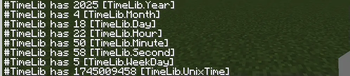
## How to use TimeLib automatically keeps track of the date & time for you. For that to work, you first need to configure the settings to your personal taste. To access the settings, click the message that appears in chat after reloading, or manually run `/function timelib:util/settings`. ### → Settings - `Command Block Offset`: This is required to offset the time difference between the UTC timezone and your system time. If daylight savings change, this setting needs to be adjusted to ensure that the date calculation works properly. - Example: UTC (7pm), System clock (8pm) → Use 1h - `Timezone Offset`: Use this to change the displayed time. - Example: 8pm + 1h offset → 9pm ### → Get the real life date & time The values for Year, Month, Day, Week Day, Hour, Minute, Second & the Unix Timestamp are all stored inside the player `#TimeLib`, with each value having its own scoreboard objective: - `TimeLib. Year, TimeLib. Month, TimeLib. Day, TimeLib. WeekDay, TimeLib. Hour, TimeLib. Minute, TimeLib. Second & TimeLib. UnixTime`
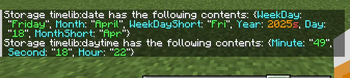
Additionally, string versions (with leading 0s) of the date and daytime are stored in the `timelib:date` and `timelib:daytime` storages.
### → Events - `#timelib:date_changed`: Function tag that
📊 Mod Details
- Game
- Minecraft Data Packs
- Author
- SilicatYT
- Version
- 2.3.1
- Downloads
- 4,832
- Endorsements
- 26
- Category
- datapack
- Created
- 11/22/2023
- Updated
- 7/28/2025
- Game Versions
- 1.21.5, 1.21.6, 1.21.7, 1.21.8
- Tags
- library, utility
🔧 How to Install Minecraft Data Packs Mods
Download from Modrinth. Use Prism Launcher or drop into your mods folder.
📖 Full step-by-step install guide for Minecraft Data Packs →
Visit the official mod page for specific installation instructions for this mod.
🎮 Need cheat codes or console commands? Check ur gaming wiki for Minecraft Data Packs commands, item IDs, and more.
❓ Frequently Asked Questions
Which Minecraft Data Packs versions does TimeLib support?
The author lists 1.21.5, 1.21.6, 1.21.7, 1.21.8. Other versions may work but are untested by the author.
What is the latest version of TimeLib?
Version 2.3.1, published 2025-07-28 with 4,832 downloads recorded at the source.
Keep browsing — more Minecraft Data Packs mods await