The Grinding Table
🟡 Updated this year🖼️ Gallery (5 images)

🔍 Analysis
- 👍 0.6% endorsement rate
- 🏆 #1679 of 1805 datapack mods in this game by downloads
📋 About This Mod
!(https://cdn.modrinth.com/data/cached_images/8ae3ff7f8e8b6285ac0fab9cc89278814e118484.png)
## About the Datapack
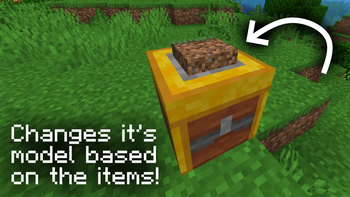
The Grinding Table is a datapack that adds the Grinding Table, a utility block perfect for things like item management, general crafting and more.
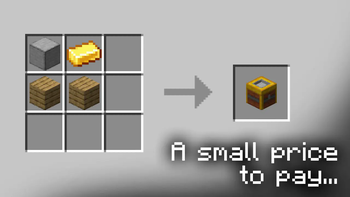
Crafted from just 2 Planks, 1 Gold Ingot and 1 Smooth Stone, The Grinding Table has a sleek and easy to use GUI, foolproof of any mistakes the player may make while grinding.
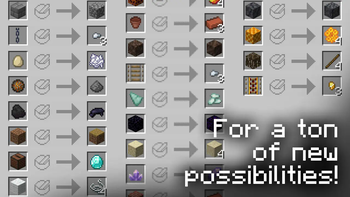
Full list of Grinding Table recipes
- Wool and Wool Carpet recycling to String
- Gravel to Flint
- Nether Wart Block to Nether Warts
- Amethyst Buds and Blocks to Amethyst Shards
- Soul Sand to Soul Soil
- Magma Block to Magma Cream
- Coal to Black Dye
- Fire Charge to Gunpowder
- Sandstone to Sand
- Blue Ice to Packed Ice
- Packed Ice to Ice
- Mangrove Roots to Sticks
- Rails to Nuggets
- Stone Blocks to Cobblestone
- Polished Andesite, Granite and Diorite to normal variants
- Bricks (Block) to Bricks (Item)
- Nether Bricks Blocks to Nether Bricks (Item)
- Mud Bricks to Packed Mud
- Packed Mud to Mud
- Sandstone Blocks to Sandstone
- Dirt to Dirt Path
- Dirt Path to Farmland
- Coarse Dirt to Dirt
- Smooth Basalt to Basalt
- Tinted Glass to Glass
- Prismarine Shard to Prismarine Crystals
- Deepslate Blocks to Cobbled Deepslate
- Tuff Blocks to Tuff
- Resin Blocks to Resin
- Prismarine Blocks to Prismarine
- End Stone Bricks to End Stone
- Blackstone Blocks to Blackstone
- Purpur Blocks to Popped Chorus Fruit
- Quartz Blocks to Quartz
- Iron Chain to Iron Nuggets
- Rabbit Foot to Rabbit Hide
- Jukebox to Diamond
- Flower Pot to Bricks
- Honeycomb Block to Honeycomb
- Poisonous Potato to Bone Meal
- Obsidian to Crying Obsidian
- Eggs to Bone Meal
- Ladders to Sticks
Q: How can I disable the "Loaded succesfully!" message? > A: Add the (https://modrinth.com/datapack/no-hfd-popups) datapack to your datapack/mod folder.
Q: The pack doesn't work! / I don't see the "datapack loaded succesfully!" message! > A: You're on a Minecraft version that doesn't support the pack. Check the (https://modrinth.com/datapack/the-grinding-table/versions) for compatible Minecraft versions.
Q: The Grinding Table works, but has missing textures! > A: You don't have the resourcepack installed. You can find it in the (https://modrinth.com/datapack/the-grinding-table/versions).
Q: How do I make my own recipes / edit the existing ones?
> A:
> Method 1: (Easier)
>
> Unzip the Datapack and go in the folders \data\hfd-tgt\function. There you will find a file called "base_recipes.mcfunction". To add a new recipe, copy the template found at the top of the file, paste it on a new line at the end, and replace the necessary values. If you want to edit an existing recipe, find it in the file and customize it to your liking.
>
>
> Method 2: (Safer and More Compatible)
>
> Download the (https://drive.google.com/drive/folders/1DDd9X-vVuwaDxbbYtS8FAJ5TEw8uOO1o?usp=sharing) and unzip it. In the example datapack, change the path "example" to anything of your choosing. (Make sure to also change it in the function tag file.). If you're playing on 1. 21. 9 or above, edit the pack.mcmeta file to work on those versions. When creating a world, place your datapack above TGT, or else it won't work. If your world is already created, disable your datapack with the /datapack command, and then run the command:
> ```
> /datapack enable after
> ```
> When changing / adding recipes to the recipes.mcfunction file, follow the same steps as in method 1.
>
>
>
Q: The Grinding Table functions, but none of the recipes work! > A: You have a corrupted base_recipes.mcfunction file. Check the Minecraft log located in \.minecraft\logs\latest.log for more info.
Q: The Grinding Table works, but none of the custom recipes work! > A: You have a corrupted custom recipes datapack. Ditto.
## Additional Info
You can find additional content for this datapack in my public (https://modrinth.com/collection/ktNoiHHo) collection.
If you wish to uninstall the pack after use you can use the /function hfd-tgt:uninstall command to help with the process. Note that this command won't remove Grinding Tables that are unloaded and / or stored in a block.
Using this pack in a video or modpack is fine as long as proper credit is given.
If you wish to contact me you can do so via Gmail (happyfiedyt@gmail.com), Discord (@happyfied), or the (https://forms.gle/WRtN3YQVyJuZWpuN7).
Bugs wanted.
📊 Mod Details
- Game
- Minecraft Data Packs
- Author
- happyfied
- Version
- 1.2.4
- Downloads
- 3,917
- Endorsements
- 25
- Category
- datapack
- Created
- 2/22/2025
- Updated
- 12/13/2025
- Game Versions
- 1.21.11
- Tags
- game-mechanics, storage, technology
🔧 How to Install Minecraft Data Packs Mods
Download from Modrinth. Use Prism Launcher or drop into your mods folder.
📖 Full step-by-step install guide for Minecraft Data Packs →
Visit the official mod page for specific installation instructions for this mod.
🎮 Need cheat codes or console commands? Check ur gaming wiki for Minecraft Data Packs commands, item IDs, and more.
❓ Frequently Asked Questions
Which Minecraft Data Packs versions does The Grinding Table support?
The author lists 1.21.11. Other versions may work but are untested by the author.
What is the latest version of The Grinding Table?
Version 1.2.4, published 2025-12-13 with 3,917 downloads recorded at the source.
Keep browsing — more Minecraft Data Packs mods await