TaTe's Extra Trims
🟡 Updated this year🖼️ Gallery (6 images)


🔍 Analysis
- 👍 0.4% endorsement rate
- 🏆 #1495 of 1805 datapack mods in this game by downloads
📋 About This Mod
!(https://cdn.modrinth.com/data/cached_images/23cffaf26c14819d89eee46064386e4d01717841.jpeg)
# IMPORTANT - I (AverageTaTeMan) only share my content on (https://www.planetminecraft.com/member/averagetateman/), (https://modrinth.com/user/AverageTaTeMan), and (https://www.curseforge.com/members/averagetateman/projects) - If you see this project on any other site, IT IS NOT ME AND SHOULD NOT BE TRUSTED!
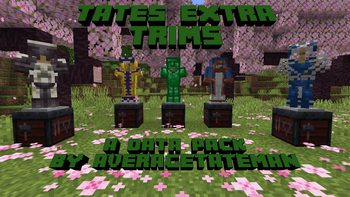
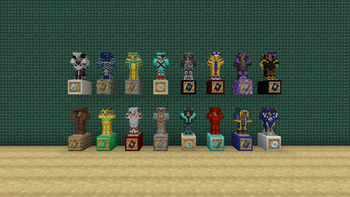
This pack adds an additional 18 Armor Trim patterns representing areas of the games that are unrepresented in the existing Armor Trim set. These new Trims can be obtained using various items (listed below) in place of what would be the Smithing Template in the Smithing Table. There are also 50 new Armor Trim materials to further customize the Armor's color, which can be obtained by putting the item through the Stonecutter first. It also adds functionality to remove Armor Trims from Armor by dropping it on a Grindstone and replace the Trim material by dropping the Armor with the new material on top of a Smithing Table.
List of Trims and Their Items:
Patterns: - Fool (Full Trim) - Diamond Block - Wanderer (Wandering Trader) - Lead - Freeze (Igloo) - Powder Snow Bucket - Bone (Fossil) - Bone Block - Wart (Witch Hut) - Nether Wart - Oasis (Desert Well) - Water Bucket - Worker (Village) - Emerald - Champion (Hero of the Village) - Totem of Undying - Flood (Ocean Ruins) - Fishing Rod - Plunder (Buried Treasure) - Heart of The Sea - Shell (Armadillo) - Armadillo Scute - Creep (Creeper) - TNT - Cage (Dungeon) - Chain - Miner (Mineshaft) - Iron Pickaxe - Triumvirate (Wither) - Nether Star - Gateway (Ruined Portal) - Crying Obsidian - Crystal (Geode) - Block of Amethyst - Dragon (Ender Dragon) - Dragon Head
!(https://cdn.modrinth.com/data/cached_images/816424fb97edd0e3ba66779f40d842f7a91f401e.png)
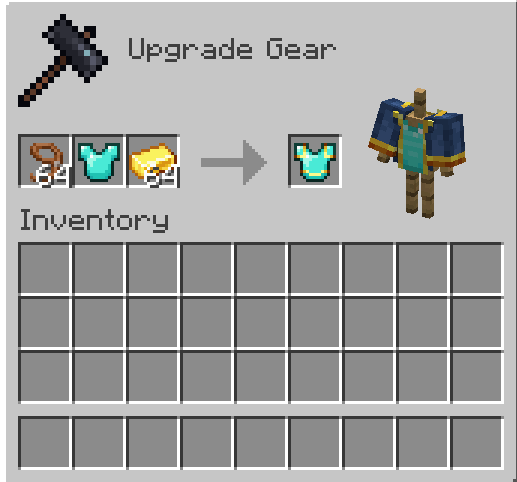
Example of Applying the Wanderer Trim
Materials: - Armadillo Scute - Blaze Rod - Bone - Breeze Rod - Brick - Cake - Charcoal - Popped Chorus Fruit - Clay Ball - Coal - Cookie - Heavy Core - Creeper Head - Dragon's Breath - Echo Shard - End Crystal - Eye of Ender - Ender Pearl - Bottle o' Enchanting - Rotten Flesh - Glistering Melon Slice - Glowstone Dust - Gunpowder - Heart of the Sea - Honeycomb - Leather - Magma Cream - Melon Slice - Phantom Membrane - Nautilus Shell - Nether Brick - Netherite Scrap - Ominous Bottle - Prismarine Crystals - Pumpkin Pie - Rabbit Hide - Name Tag (Rainbow) - Raw Copper - Raw Gold - Raw Iron - Shulker Shell - Slime Ball - Sniffer Egg - Powder Snow Bucket - Fermented Spider Eye - Nether Star - Sugar - Sulfur Spike - TNT - Name Tag (Toast) - Turtle Scute
!(https://cdn.modrinth.com/data/cached_images/46484f3dc9cbc29caecc70d492b1c0af992fe486_0.webp) !(https://cdn.modrinth.com/data/cached_images/453dfee5efcf098a131036463d013161c38c7807.png)
To try a pack that replaces the existing Armor Trims with these new designs, (https://modrinth.com/resourcepack/tates-alternate-trims)
Installation Instructions to Get the Data AND Resource Packs: 1) Click "Download". !(https://cdn.modrinth.com/data/cached_images/18c3c0408f91049e4b2e843f84ad4f4fe815e4a9.png)
2) Click "Select game version". !(https://cdn.modrinth.com/data/cached_images/808b08785b5384cc1937341e692a412d3429df2e.png)
3) Select a Game Version. !(https://cdn.modrinth.com/data/cached_images/14225be43a4e36166f20947ceee59fc87413797b.png)
4) Click the download icon for both the data and resource pack files, as shown below. !(https://cdn.modrinth.com/data/cached_images/85d3c66b4d6a7211dab61017cea445be0dfa2d78.png)
5) Unzip the files (optional, but recommended as that's how I use/test them).
6) Add the resource pack to your Selected Packs (ideally at the top) in your Resource Packs menu.
7) Add the data pack to either your Selected Packs in the Data Packs menu (if adding at world creation) OR put it in your world's 'datapacks' folder (if adding afterwards. Recommended to either not have world open at the time or to close and reopen it afterwards).
8) You may get a prompt about experimental settings not being supported when opening the world. This can safely be ignored, but it's also never a bad idea to make a backup if it's a world you care about.
📊 Mod Details
- Game
- Minecraft Data Packs
- Author
- AverageTaTeMan
- Version
- 1.8
- Downloads
- 4,781
- Endorsements
- 21
- Category
- datapack
- Created
- 7/6/2024
- Updated
- 6/16/2026
- Game Versions
- 26.2
- Tags
- equipment, game-mechanics, utility
🔧 How to Install Minecraft Data Packs Mods
Download from Modrinth. Use Prism Launcher or drop into your mods folder.
📖 Full step-by-step install guide for Minecraft Data Packs →
Visit the official mod page for specific installation instructions for this mod.
🎮 Need cheat codes or console commands? Check ur gaming wiki for Minecraft Data Packs commands, item IDs, and more.
❓ Frequently Asked Questions
Which Minecraft Data Packs versions does TaTe's Extra Trims support?
The author lists 26.2. Other versions may work but are untested by the author.
What is the latest version of TaTe's Extra Trims?
Version 1.8, published 2026-06-16 with 4,781 downloads recorded at the source.
Keep browsing — more Minecraft Data Packs mods await