Statistic Books
🟡 Updated this year🖼️ Gallery (2 images)
🔍 Analysis
- 👍 0.2% endorsement rate
- 🏆 #765 of 1805 datapack mods in this game by downloads
📋 About This Mod
# Statistic-Books-MC A Datapack that tracks all statistics in scores and allows to display highscores in books. Development of this datapack happens (https://github.com/Plagiatus/Statistic-Books-MC/). You can find versions earlier than 1.4 (for MC 1.20) on there. Run `/trigger sb.help` to get a setting-sensitive in-game overview of how it works for players. Admins/OPs and more informed players should read on. ## Table of contents - (#what-it-does) - (#limitations) - (#how-to-get-a-book) - (#how-to-know-the-scoreboard-name) - (#secret-mode) - (#settings) - (#autooptin) - (#allowsecret) - (#refreshtype) - (#other-modifications) - (#text) - (#combining-scoreboards) - (#administrative-work) ## What it does This datapack allows you to track any and all statistics or other scoreboard objectives in a book in a lectern. It sorts it by highest and thus shows whoever has the best score. NOTE: All statistics are tracked through scoreboards. Because of this they cannot start tracking before they are created. So remember to create your scoreboards early. This pack comes with a built-in function that sets up all possible objectives for you, see (#how-to-know-the-scoreboard-name). ### Limitations Because under the hood it has to use scoreboard objectives, and scoreboard objectives only start tracking numbers when they are created and don't retroactively include the already happened things, the pack only starts tracking the statistics from the point they is added, not the point of world creation. It is thus **recommended to add the pack and its scoreboards at world creation** or immediately afterwards. **If you want to add it later to a world, you can use my (https://plagiatus.github.io/Statistic-Books-MC/generator/stats_to_scoreboard) tool to bring the new scoreboard objectives up to sync with your existing stats.** Because the way scoreboards work, only online players can be queried for their scores. To be able to also include offline players, this pack caches all players tracked scores **every 5 minutes**. This has various implications: - Scores aren't updated live, but at max every 5 minutes. - Players who aren't online for at least 5 minutes might not have their scores recorded. - Only players who were online (for 5+ minutes) after a books creation can be included in the book. **Only books placed in lecterns will be updated!** ### How to get a book To get a book that works in the system, you take a writable book, put the name of the objective you want to track as the only text in the book on the first page (no spaces or newlines), sign the book and name it "MCStats". The book gets converted _automatically when first put into a lectern_. You know it worked when the books content is replaced by the statistics (or empty at first, it takes up to 5 minutes to fill). For the book to actually receive updates about the tracked statistics, **it needs to be placed inside a lectern** and, depending on the settings, be loaded when a refresh occurs. #### How to know the scoreboard name You can track **any scoreboard objective**, not just the built-in ones but ones you create yourself as well. The pack comes with a function that creates all statistic type scoreboards the game has to offer - just shy of 8000 of them. **If you want to add that, run `/function sb:setup_objectives` right after loading the datapack!** To find out what statistics are available, consult the wiki: https://minecraft.wiki/w/Statistics Resource locations in the game are named in the form `A.B:C.D`. Since `A` and `C` are both always `minecraft` for vanilla things, I chose to omit them and only include the other two. The convention for named objectives of this datapack is `sb.<B>.<D>`. Here are some examples: | Vanilla | Statistics Book Datapack | |-|-| | `minecraft.custom:minecraft.walk_one_cm` | `sb.custom.walk_one_cm` | |`minecraft.mined:minecraft.stone` | `sb.mined.stone` | |`minecraft.killed:minecraft.zombie` | `sb.killed.zombie` | ### Secret Mode If enabled in the settings, players can enable **secret mode** for any book inside a lectern by standing on the lectern and running `/trigger sb.secret`. This will cycle through the different modes: **Default**: Everything is shown. **Secret Names**: Names are hidden, scores are visible. **Secret Scores**: Names are visible, scores are hidden. ## Settings There are various settings you can use to adjust the datapacks behavior to your liking. All of these are stored in the `sb.settings` objective and can only be changed by an OP of lvl 2 or above through a scoreboard command. /scoreboard players set <settingName> sb.settings <value> You can show all current settings b
# Statistic-Books-MC A Datapack that tracks all statistics in scores and allows to display highscores in books.
Development of this datapack happens (https://github.com/Plagiatus/Statistic-Books-MC/). You can find versions earlier than 1. 4 (for MC 1. 20) on there.
Run `/trigger sb.help` to get a setting-sensitive in-game overview of how it works for players. Admins/OPs and more informed players should read on.
## Table of contents - (#what-it-does) - (#limitations) - (#how-to-get-a-book) - (#how-to-know-the-scoreboard-name) - (#secret-mode) - (#settings) - [`autoOptIn`](#autooptin) - [`allowSecret`](#allowsecret) - [`refreshType`](#refreshtype) - (#other-modifications) - (#text) - (#combining-scoreboards) - (#administrative-work)
## What it does
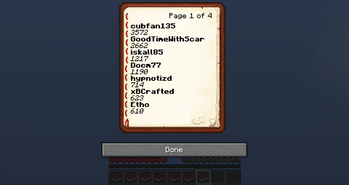
This datapack allows you to track any and all statistics or other scoreboard objectives in a book in a lectern. It sorts it by highest and thus shows whoever has the best score.
### Limitations
Because under the hood it has to use scoreboard objectives, and scoreboard objectives only start tracking numbers when they are created and don't retroactively include the already happened things, the pack only starts tracking the statistics from the point they is added, not the point of world creation. It is thus recommended to add the pack and its scoreboards at world creation or immediately afterwards. If you want to add it later to a world, you can use my (https://plagiatus.github.io/Statistic-Books-MC/generator/stats_to_scoreboard) tool to bring the new scoreboard objectives up to sync with your existing stats.
Because the way scoreboards work, only online players can be queried for their scores. To be able to also include offline players, this pack caches all players tracked scores every 5 minutes. This has various implications:
- Scores aren't updated live, but at max every 5 minutes.
- Players who aren't online for at least 5 minutes might not have their scores recorded.
- Only players who were online (for 5+ minutes) after a books creation can be included in the book.
Only books placed in lecterns will be updated!
### How to get a book
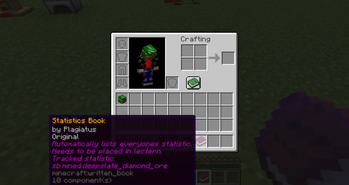
To get a book that works in the system, you take a writable book, put the name of the objective you want to track as the only text in the book on the first page (no spaces or newlines), sign the book and name it "MCStats". The book gets converted _automatically when first put into a lectern_. You know it worked when the books content is replaced by the statistics (or empty at first, it takes up to 5 minutes to fill).
For the book to actually receive updates about the tracked statistics, it needs to be placed inside a lectern and, depending on the settings, be loaded when a refresh occurs.
#### How to know the scoreboard name
You can track any scoreboard objective, not just the built-in ones but ones you create yourself as well. The pack comes with a function that creates all statistic type scoreboards the game has to offer - just shy of 8000 of them. If you want to add that, run `/function sb:setup_objectives` right after loading the datapack!
To find out what statistics are available, consult the wiki: https://minecraft.wiki/w/Statistics
Resource locations in the game are named in the form `A. B:C. D`. Since `A` and `C` are both always `minecraft` for vanilla things, I chose to omit them and only include the other two. The convention for named objectives of this datapack is `sb..
Here are some examples:
| Vanilla | Statistics Book Datapack | |-|-| | `minecraft.custom:minecraft.walk_one_cm` | `sb.custom.walk_one_cm` | |`minecraft.mined:minecraft.stone` | `sb.mined.stone` | |`minecraft.killed:minecraft.zombie` | `sb.killed.zombie` |
### Secret Mode
If enabled in the settings, players can enable secret mode for any book inside a lectern by standing on the lectern and running `/trigger sb.secret`. This will cycle through the different modes:
- Default
- Everything is shown.
- Secret Names
- Names are hidden, scores are visible.
- Secret Scores
- Names are visible, scores are hidden.
## Settings
There are various settings you can use to adjust the datapacks behavior to your liking. All of these are stored in the `sb.settings` objective and can only be changed by an OP of lvl 2 or above through a scoreboard command.
/scoreboard players set
You can show all current settings b
📊 Mod Details
- Game
- Minecraft Data Packs
- Author
- Plagiatus
- Version
- 1.6.3
- Downloads
- 15,909
- Endorsements
- 25
- Category
- datapack
- Created
- 8/10/2024
- Updated
- 10/17/2025
- Game Versions
- 1.21.9, 1.21.10
- Tags
- utility
🔧 How to Install Minecraft Data Packs Mods
Download from Modrinth. Use Prism Launcher or drop into your mods folder.
📖 Full step-by-step install guide for Minecraft Data Packs →
Visit the official mod page for specific installation instructions for this mod.
🎮 Need cheat codes or console commands? Check ur gaming wiki for Minecraft Data Packs commands, item IDs, and more.
❓ Frequently Asked Questions
Which Minecraft Data Packs versions does Statistic Books support?
The author lists 1.21.9, 1.21.10. Other versions may work but are untested by the author.
What is the latest version of Statistic Books?
Version 1.6.3, published 2025-10-17 with 15,909 downloads recorded at the source.
Keep browsing — more Minecraft Data Packs mods await