🖼️ Gallery (4 images)


🔍 Analysis
- 👍 0.1% endorsement rate
- 🏆 #144 of 1071 adventure mods in this game by downloads
📋 About This Mod
<div align="center"> !(https://cdn.jsdelivr.net/gh/jodeks-datapacks/Assets@main/titles/sleep.png) </div> <div align="center"> (https://cdn.jsdelivr.net/gh/jodeks-datapacks/Assets@main/badges/Discord.png)](https://discord.gg/z2n3qTzQY6) (https://cdn.jsdelivr.net/gh/jodeks-datapacks/Assets@main/badges/YouTube.png)](https://www.youtube.com/@jodek) (https://cdn.jsdelivr.net/gh/jodeks-datapacks/Assets@main/badges/GH_Issues.png)](https://github.com/jodeks-datapacks/sleep/issues) ( https://cdn.jsdelivr.net/gh/jodeks-datapacks/Assets@main/badges/Kofi.png)](https://ko-fi.com/jodek) (https://cdn.jsdelivr.net/gh/jodeks-datapacks/Assets@main/badges/GH_Sponsor.png)](https://github.com/sponsors/Jodekq) </div> <div align="center"> !(https://github.com/jodeks-datapacks/Assets/blob/main/gifs/sleep-skip-time-warp-night-to-day.gif?raw=true) </div> ## Features **1.** Sleeping players are displayed over the hotbar **2.** Change how many players have to sleep to skip the night in the config --> Default = 1 **3.** Configure a lot of sleep related things with the config **4.** With my (https://modrinth.com/datapack/sleep-anytime-you-want) datapack/mod, you can sleep during any time of the day **5.** Compatible with my (https://modrinth.com/datapack/afk-announcer) datapack/mod so players that are afk do not need to sleep to skip the night (you can change that with the config) ## Showcase !(https://cdn.modrinth.com/data/cached_images/aeb01f99d34880e1fa6cf637c6e06f233a0cbcf1.png) !(https://cdn.modrinth.com/data/cached_images/a175cc59a3b9ef91fb5e13b2ea8f17dd345f3a1b.png) ## Config Run: ``` /trigger sleep.config ``` <sub>For the tick accelerate setting you have to set `function-permission-level` to `3`</sub> ## Config for 1.20.1: ### Sleep Notifications Control when you receive notifications about sleep: ``` /trigger sleep_notification set <value> ``` Where `<value>` can be: - `0` = Disabled (default) - `1` = Chat notification - `2` = Sound notification - `3` = Chat + sound notification ### Required Players for Sleep Set how many players need to sleep to activate the night skip: ``` /scoreboard players set &amount_to_sleep sleep.config <value> ``` Where `<value>` is the number of players required (default = 1) ### Sleep Mode Choose between night skip and time warp modes: ``` /scoreboard players set &time_control sleep.config <value> ``` Where `<value>` can be: - `0` = Night skip (default) - `1` = Time warp ### Night Duration Control how long a night should take: ``` /scoreboard players set &time_until_skip sleep.config <value> ``` Where `<value>` can be: - `1` = 2 seconds - `2` = 5 seconds (default) - `3` = 10 seconds ### Uninstallation To remove the datapack completely: ``` /function sleep:uninstall ``` ## Guides <picture> <source media="(prefers-color-scheme: light)" srcset="https://raw.githubusercontent.com/Mqxx/GitHub-Markdown/main/blockquotes/badge/light-theme/tip.svg"> <img alt="Tip" src="https://raw.githubusercontent.com/Mqxx/GitHub-Markdown/main/blockquotes/badge/dark-theme/tip.svg"> </picture><br> If something doesn't work, feel free to join the (https://discord.gg/z2n3qTzQY6) <details> <summary>How to Install a Datapack in Singleplayer</summary> <details> <summary>At the Creation of a World</summary> ### How to install a datapack in singleplayer 1. **Open Minecraft** Launch the game. 2. **Create a New World** Navigate to "More" and click on **"Data Packs"**. !(https://cdn.modrinth.com/data/cached_images/2dfe3c65a3471adb0ed85e36936ebcfc28dcaf95_0.webp) 3. **Add the Datapack** Drag the datapack (a `.zip` file or directory) into the Minecraft window. - A confirmation screen will appear. Click **"Yes"**. 4. **Activate the Datapack** Move the datapack to the right-hand side of the screen by clicking the triangle on its icon (visible when hovering over it). !(https://cdn.modrinth.com/data/cached_images/7997495b82957b1f318b28f8de321508d6d43f19_0.webp) 5. **Complete World Creation** - Click **"Done"** at the bottom of the screen. - Continue creating your world and click **"Create New World"**. --- ### ⚠️ IMPORTANT ⚠️ The datapack only works if cheats are enabled. You can verify the datapack is active by typing: `/datapack list enabled` This command should list an entry named `[file/<your datapack file/directo
[!(https://cdn.jsdelivr.net/gh/jodeks-datapacks/Assets@main/badges/Discord.png)](https://discord.gg/z2n3qTzQY6) [!(https://cdn.jsdelivr.net/gh/jodeks-datapacks/Assets@main/badges/YouTube.png)](https://www.youtube.com/@jodek) [!(https://cdn.jsdelivr.net/gh/jodeks-datapacks/Assets@main/badges/GH_Issues.png)](https://github.com/jodeks-datapacks/sleep/issues) [!( https://cdn.jsdelivr.net/gh/jodeks-datapacks/Assets@main/badges/Kofi.png)](https://ko-fi.com/jodek) [!(https://cdn.jsdelivr.net/gh/jodeks-datapacks/Assets@main/badges/GH_Sponsor.png)](https://github.com/sponsors/Jodekq)
## Features
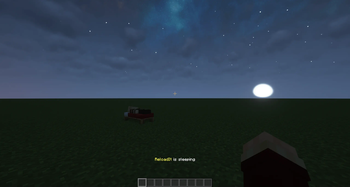
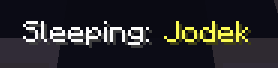
1. Sleeping players are displayed over the hotbar
2. Change how many players have to sleep to skip the night in the config --> Default = 1
3. Configure a lot of sleep related things with the config
4. With my (https://modrinth.com/datapack/sleep-anytime-you-want) datapack/mod, you can sleep during any time of the day
5. Compatible with my (https://modrinth.com/datapack/afk-announcer) datapack/mod so players that are afk do not need to sleep to skip the night (you can change that with the config)
## Showcase
!(https://cdn.modrinth.com/data/cached_images/aeb01f99d34880e1fa6cf637c6e06f233a0cbcf1.png)
!(https://cdn.modrinth.com/data/cached_images/a175cc59a3b9ef91fb5e13b2ea8f17dd345f3a1b.png)
``` /trigger sleep.config ``` For the tick accelerate setting you have to set `function-permission-level` to `3`
## Config for 1. 20. 1:
### Sleep Notifications Control when you receive notifications about sleep:
```
/trigger sleep_notification set
Where `
### Required Players for Sleep Set how many players need to sleep to activate the night skip:
```
/scoreboard players set &amount_to_sleep sleep.config
Where `
### Sleep Mode Choose between night skip and time warp modes:
```
/scoreboard players set &time_control sleep.config
Where `
### Night Duration Control how long a night should take:
```
/scoreboard players set &time_until_skip sleep.config
Where `
### Uninstallation To remove the datapack completely:
``` /function sleep:uninstall ```

If something doesn't work, feel free to join the (https://discord.gg/z2n3qTzQY6)
How to Install a Datapack in Singleplayer
At the Creation of a World
### How to install a datapack in singleplayer
1. Open Minecraft Launch the game.
2. Create a New World Navigate to "More" and click on "Data Packs".
!(https://cdn.modrinth.com/data/cached_images/2dfe3c65a3471adb0ed85e36936ebcfc28dcaf95_0.webp)
3. Add the Datapack Drag the datapack (a `.zip` file or directory) into the Minecraft window.
- A confirmation screen will appear. Click "Yes".
4. Activate the Datapack Move the datapack to the right-hand side of the screen by clicking the triangle on its icon (visible when hovering over it).
!(https://cdn.modrinth.com/data/cached_images/7997495b82957b1f318b28f8de321508d6d43f19_0.webp)
5. Complete World Creation - Click "Done" at the bottom of the screen. - Continue creating your world and click "Create New World".
### ⚠️ IMPORTANT ⚠️ The datapack only works if cheats are enabled.
You can verify the datapack is active by typing: `/datapack list enabled`
This command should list an entry named `[file/
📊 Mod Details
- Game
- Minecraft Data Packs
- Author
- Jodek
- Version
- v4.3.18
- Downloads
- 259,590
- Endorsements
- 220
- Category
- adventure
- Created
- 4/1/2024
- Updated
- 7/6/2026
- Game Versions
- 1.21.6, 1.21.7, 1.21.8, 1.21.9, 1.21.10
- Tags
- adventure, game-mechanics, social
🔧 How to Install Minecraft Data Packs Mods
Download from Modrinth. Use Prism Launcher or drop into your mods folder.
📖 Full step-by-step install guide for Minecraft Data Packs →
Visit the official mod page for specific installation instructions for this mod.
🎮 Need cheat codes or console commands? Check ur gaming wiki for Minecraft Data Packs commands, item IDs, and more.
❓ Frequently Asked Questions
Which Minecraft Data Packs versions does Sleep support?
The author lists 1.21.6, 1.21.7, 1.21.8, 1.21.9, 1.21.10, 1.21.11. Other versions may work but are untested by the author.
What is the latest version of Sleep?
Version v4.3.18, published 2026-07-06 with 259,590 downloads recorded at the source.
Keep browsing — more Minecraft Data Packs mods await