SimpleTPA
🟡 Updated this year🖼️ Gallery (2 images)

🔍 Analysis
- 👍 0.1% endorsement rate
- 🏆 #17 of 746 adventure mods in this game by downloads
📋 About This Mod
**SimpleTPA** A lightweight, vanilla-compatible datapack that adds player-to-player teleport requests (TPA) and a multi-home system to your Minecraft server. No mods, no client-side installation, just drop it in and reload. Built and tested on Minecraft 1.20.1. Works with modpacks like Better Minecraft (BMC4) since it only uses vanilla commands. Also great for single player — the multi-home system alone makes it worth installing on a solo world. **Features:** - Player teleport requests (TPA) - Send teleport requests to other players with a clickable in-chat menu. No name typing required. - Multiple incoming requests - Each player has 5 request slots and can accept or deny each one individually with clickable buttons. - Multi-home system - Each player gets 5 home slots. Set, teleport, and delete homes through a clean clickable menu. - Cross-dimension teleport - Homes work in the Overworld, Nether, and End. - Sensible defaults - 60s request timeout, 5s home cooldown, 3s send cooldown. - No OP required for players - Uses vanilla /trigger so any player can use it. **Commands** All commands use Minecraft's /trigger system, which works for non-OP players. **Player teleport** - /trigger tpa.menu - Open a clickable list of online players to request teleport to - /trigger tpa.requests - View all incoming requests with accept/deny buttons - /trigger tpa.cancel - Cancel your outgoing request **Homes** - /trigger tpa.home - Open the home teleport menu (click to teleport) - /trigger tpa.homes - View and manage homes (set/teleport/delete) - /trigger tpa.sethome set <1-5> - Set a home in slot N - /trigger tpa.delhome set <1-5> - Delete home N **Other** - /trigger tpa.help - Show all commands The easiest way to use the datapack is to type `/trigger tpa.help` and click the buttons. **Installation** 1. Stop your server. 2. Download `SimpleTPA.zip`. 3. Place it in your world's `datapacks` folder (e.g. `world/datapacks/`). 4. Extract the zip — you should have `world/datapacks/SimpleTPA/pack.mcmeta`. 5. Start the server. You'll see ` Datapack loaded!` in chat. Run `/datapack list` to confirm `` appears in the enabled list. **Known Constraints** - Vanilla dimensions only for homes - Overworld, Nether, and End. Modded dimensions (Aether, Twilight Forest, etc.) aren't supported as home destinations. - 5 home slots and 5 request slots per player - fixed limits. - Up to 20 players can appear in the TPA menu list. - Block precision for homes - you'll land in the center of the block you set home in (no sub-block accuracy). **Why a datapack?** Datapacks are server-side only and don't require players to install anything. You can add this to any vanilla 1.20.1 server, including modded servers running modpacks like BMC4, without breaking compatibility. Single player worlds support datapacks too — just drop it in your save's `datapacks` folder the same way. **License** MIT — free to use, modify, and redistribute. Credit appreciated but not required.
SimpleTPA
A lightweight, vanilla-compatible datapack that adds player-to-player teleport requests (TPA) and a multi-home system to your Minecraft server. No mods, no client-side installation, just drop it in and reload.
Built and tested on Minecraft 1. 20. 1. Works with modpacks like Better Minecraft (BMC4) since it only uses vanilla commands. Also great for single player — the multi-home system alone makes it worth installing on a solo world.
Features: - Player teleport requests (TPA) - Send teleport requests to other players with a clickable in-chat menu. No name typing required. - Multiple incoming requests - Each player has 5 request slots and can accept or deny each one individually with clickable buttons. - Multi-home system - Each player gets 5 home slots. Set, teleport, and delete homes through a clean clickable menu. - Cross-dimension teleport - Homes work in the Overworld, Nether, and End. - Sensible defaults - 60s request timeout, 5s home cooldown, 3s send cooldown. - No OP required for players - Uses vanilla /trigger so any player can use it.
Commands
All commands use Minecraft's /trigger system, which works for non-OP players.
Player teleport - /trigger tpa.menu - Open a clickable list of online players to request teleport to - /trigger tpa.requests - View all incoming requests with accept/deny buttons - /trigger tpa.cancel - Cancel your outgoing request
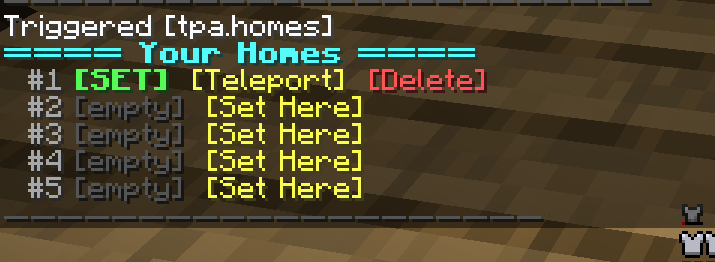
Homes - /trigger tpa.home - Open the home teleport menu (click to teleport) - /trigger tpa.homes - View and manage homes (set/teleport/delete) - /trigger tpa.sethome set <1-5> - Set a home in slot N - /trigger tpa.delhome set <1-5> - Delete home N
Other - /trigger tpa.help - Show all commands
The easiest way to use the datapack is to type `/trigger tpa.help` and click the buttons.
Installation
1. Stop your server. 2. Download `SimpleTPA.zip`. 3. Place it in your world's `datapacks` folder (e.g. `world/datapacks/`). 4. Extract the zip — you should have `world/datapacks/SimpleTPA/pack.mcmeta`. 5. Start the server. You'll see ` Datapack loaded!` in chat.
Run `/datapack list` to confirm `` appears in the enabled list.
Known Constraints
- Vanilla dimensions only for homes - Overworld, Nether, and End. Modded dimensions (Aether, Twilight Forest, etc.) aren't supported as home destinations.
- 5 home slots and 5 request slots per player - fixed limits.
- Up to 20 players can appear in the TPA menu list.
- Block precision for homes - you'll land in the center of the block you set home in (no sub-block accuracy).
Why a datapack?
Datapacks are server-side only and don't require players to install anything. You can add this to any vanilla 1. 20. 1 server, including modded servers running modpacks like BMC4, without breaking compatibility. Single player worlds support datapacks too — just drop it in your save's `datapacks` folder the same way.
License
MIT — free to use, modify, and redistribute. Credit appreciated but not required.
📊 Mod Details
- Game
- Minecraft Data Packs
- Author
- bosscjgioia
- Version
- 1.21
- Downloads
- 710
- Endorsements
- 1
- Category
- adventure
- Created
- 5/10/2026
- Updated
- 5/14/2026
- Game Versions
- 1.21, 1.21.1, 24w33a, 24w34a, 24w35a
- Tags
- adventure, utility
🔧 How to Install Minecraft Data Packs Mods
Download from Modrinth. Use Prism Launcher or drop into your mods folder.
📖 Full step-by-step install guide for Minecraft Data Packs →
Visit the official mod page for specific installation instructions for this mod.
🎮 Need cheat codes or console commands? Check ur gaming wiki for Minecraft Data Packs commands, item IDs, and more.
❓ Frequently Asked Questions
Which Minecraft Data Packs versions does SimpleTPA support?
The author lists 1.21, 1.21.1, 24w33a, 24w34a, 24w35a, 24w36a. Other versions may work but are untested by the author.
What is the latest version of SimpleTPA?
Version 1.21, published 2026-05-14 with 710 downloads recorded at the source.
Keep browsing — more Minecraft Data Packs mods await