Simple Chairs
🟡 Updated this year🖼️ Gallery (6 images)
🔍 Analysis
- 👍 1.1% endorsement rate — high engagement, a strong quality signal
- 🏆 #584 of 2025 datapack mods in this game by downloads
📋 About This Mod
<h3>Simple Chairs</h3> <p><h4>The datapack REQUIRES this <a href="https://wasdbuildteam.website/data-packs/wasd-resources/" data-type="page" data-id="1922">Resource Pack</a>. </p></h4> <hr class="wp-block-separator"/> The Simple Chairs datapack adds one thing. Chairs that you can sit on. The main concept behind this is that you can make chairs from most any material, and then place them into the world and sit on them. BUT, my main goal for this was to make it as optimized as possible. I was able to achieve functional chairs that require 0 ticking functions, meaning it should be perfectly optimized. To use the chairs, simply craft them using the recipes that display in the Recipe Guide. You can sit on the chairs by right-clicking the seat. You can decorate a chair by adding any carpet, snow layer, or pressure plate to it as a cushion. To do so, simply hold the item in your mainhand and right-click the seat. You can change the model of the chair by right-clicking it with an axe. There are a total of 10 styles to choose from! To remove the chair, left-click it and it will break and drop back into the world. <br><br> Learn more from these videos: <br><br> <center> <iframe width="560" height="315" src="https://www.youtube.com/embed/xkAG6emd-CU" frameborder="0" allow="accelerometer; autoplay; encrypted-media; gyroscope; picture-in-picture" allowfullscreen=""></iframe> </center> <center> <iframe width="560" height="315" src="https://www.youtube.com/embed/Y2WZxKDjq24" frameborder="0" allow="accelerometer; autoplay; encrypted-media; gyroscope; picture-in-picture" allowfullscreen=""></iframe> </center> <center> <iframe width="560" height="315" src="https://www.youtube.com/embed/JCK-yliMI3A" frameborder="0" allow="accelerometer; autoplay; encrypted-media; gyroscope; picture-in-picture" allowfullscreen=""></iframe> </center> <br><br> NOTES TO YOUTUBERS: You may use this datapack in whatever video you like, free of charge. My only request: YOU MUST CREDIT ME for my work. Simply link to this page in your video’s description, pinned comment, or both AND verbally mention during the intro of your video that the pack can be downloaded using the link. “Download in the description” would suffice. To install, follow the instructions contained in the “instructions.txt” file included in the download. If you are still having issues installing or want help knowing how to do something with the pack, ask for help on our discord. Fully Multiplayer compatible! <h3>Crafting Recipes Can be found In-Game. Press “L”)</h3>
Simple Chairs
The datapack REQUIRES this Resource Pack.
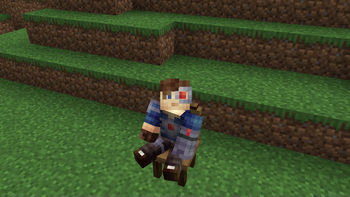
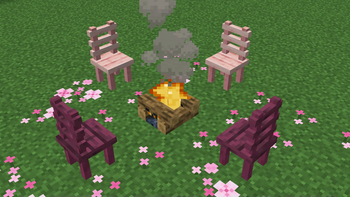
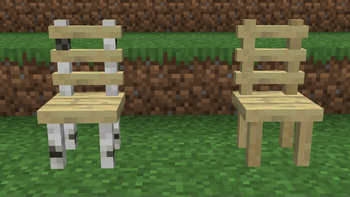
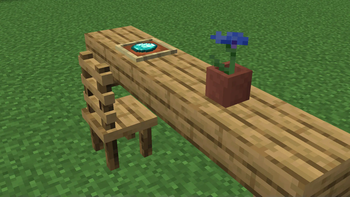
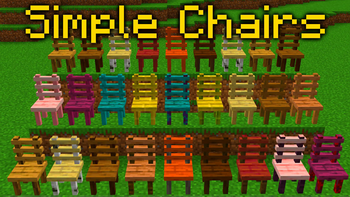
The Simple Chairs datapack adds one thing. Chairs that you can sit on. The main concept behind this is that you can make chairs from most any material, and then place them into the world and sit on them. BUT, my main goal for this was to make it as optimized as possible. I was able to achieve functional chairs that require 0 ticking functions, meaning it should be perfectly optimized.
To use the chairs, simply craft them using the recipes that display in the Recipe Guide.
You can sit on the chairs by right-clicking the seat.
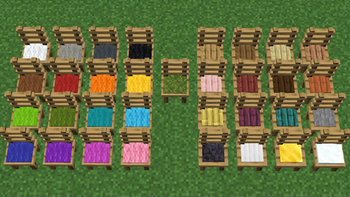
You can decorate a chair by adding any carpet, snow layer, or pressure plate to it as a cushion. To do so, simply hold the item in your mainhand and right-click the seat.
You can change the model of the chair by right-clicking it with an axe. There are a total of 10 styles to choose from!
To remove the chair, left-click it and it will break and drop back into the world.
Learn more from these videos:
NOTES TO YOUTUBERS:
You may use this datapack in whatever video you like, free of charge. My only request: YOU MUST CREDIT ME for my work. Simply link to this page in your video’s description, pinned comment, or both AND verbally mention during the intro of your video that the pack can be downloaded using the link. “Download in the description” would suffice.
To install, follow the instructions contained in the “instructions.txt” file included in the download. If you are still having issues installing or want help knowing how to do something with the pack, ask for help on our discord.
Fully Multiplayer compatible!
Crafting Recipes Can be found In-Game. Press “L”)
📊 Mod Details
- Game
- Minecraft Data Packs
- Author
- WASDBuildTeam
- Version
- 2.0.5
- Downloads
- 1,964
- Endorsements
- 22
- Category
- datapack
- Created
- 1/16/2024
- Updated
- 7/14/2026
- Game Versions
- 26.2
- Tags
- decoration, game-mechanics, utility
🔧 How to Install Minecraft Data Packs Mods
Download from Modrinth. Use Prism Launcher or drop into your mods folder.
📖 Full step-by-step install guide for Minecraft Data Packs →
Visit the official mod page for specific installation instructions for this mod.
🎮 Need cheat codes or console commands? Check ur gaming wiki for Minecraft Data Packs commands, item IDs, and more.
❓ Frequently Asked Questions
Which Minecraft Data Packs versions does Simple Chairs support?
The author lists 26.2. Other versions may work but are untested by the author.
What is the latest version of Simple Chairs?
Version 2.0.5, published 2026-07-14 with 1,964 downloads recorded at the source.
Keep browsing — more Minecraft Data Packs mods await