rituals
🟢 Updated this month🖼️ Gallery (2 images)
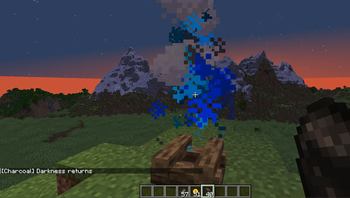
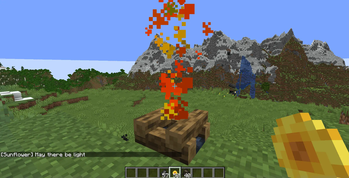
🔍 Analysis
- 👍 0.5% endorsement rate
📋 About This Mod
Introducing Rituals—a custom datapack/mod that brings mystical totems and ritual magic into your world. Craft totems, display items, and trigger powerful effects through immersive rituals.
!(https://img.shields.io/badge/Minecraft-1. 21. 10-db1f29?style=for-the-badge&logo=minecraft) !(https://img.shields.io/badge/Minecraft-1. 21. 11-ff5900?style=for-the-badge&logo=minecraft) !(https://img.shields.io/badge/Minecraft-26. 2-E7C00A?style=for-the-badge&logo=minecraft)
# Totem Rituals Datapack/Mod
> ✨ Thank you for 100 downloads 🥹 > 🎉 300 Downloads! Thank you! ~Oct. 27. 2025 > \(◎o◎)/ 420 Downloads achieved Nov. 6. 2025 > (●'◡'●) 550 Downloads on Nov. 18. 2025 > 🦦 672 Downloads a mere ten days later?! (Nov. 28. 2025) > 🐼 W E D I D I T! 1,000 Downloads (Dec. 25. 2025) > 👾 1,371 downloads (Jan. 30. 2026)
(https://modrinth.com/mod/compressy)
!(https://github.com/Underwood-Inc/rituals/raw/0. 0. 4/images/banner.png)
!(https://cdn.modrinth.com/data/cached_images/9e31a26ed46efc14577b8935c9b320bc68d5ac72.png)
Introducing Rituals—a datapack that brings mystical totems and ritual magic into your world. Craft totems, display items, and trigger powerful effects through immersive rituals. Designed for builders, modpack creators, and lore lovers alike. 🔮 Features • 8 Unique Rituals - From simple growth magic to complex multi-totem patterns • 6 Totem Tiers - Wood to Netherite with increasing power and range • Visual Pattern Guides - Redstone-powered particle markers for easy setup • Fire Sacrifice System - Immersive activation requiring catalyst offerings • Interactive Menu System - In-game totem browser and admin tools • Custom Textures & Animations - Beautiful visual effects and smooth item displays • Fully Configurable - Customize ranges, frequencies, and behavior • Debug & Kiwi Modes - Developer tools and easy mode for testing Built with care for the Minecraft community—open source, tweakable, and ready to enchant your next adventure.
## Installation
📦 Step-by-Step Installation Guide (Click to Expand)
This guide assumes you have no prior experience with Minecraft datapacks. A datapack is a special folder that adds new features to your Minecraft world.
### 1. Download the Datapack - If you received this as a ZIP file, you're ready to go - If you have the folder structure, compress it into a ZIP file first
### 2. Locate Your World Save Folder - Open Minecraft and note which world you want to add this to - Close Minecraft (important!) - Find your Minecraft saves folder: - Windows: Press `Win + R`, type `%appdata%\.minecraft\saves` and press Enter - Mac: Press `Cmd + Space`, type `~/Library/Application Support/minecraft/saves` and press Enter - Linux: Navigate to `~/.minecraft/saves`
### 3. Install the Datapack - Find the folder with your world's name - Open the `datapacks` folder inside (create it if it doesn't exist) - Place the datapack ZIP file (or folder) into this `datapacks` folder
### 4. Enable the Datapack - Launch Minecraft and open your world - You should see a message in chat: " Datapack loaded successfully!" - If you don't see the message, type `/reload` in the chat and press Enter
### 5. Get Started - Type `/function rituals:give/all` to receive all totem items - You're now ready to perform rituals!
> Note: servers with performance modifications that combine drops from more than 1. 5 blocks away will not be able to perform rituals that require catalysts dropped on the ground.
## Getting Started
### Quick Start Guide
This datapack adds a new item category called "Totems" which can be crafted and placed in your world. When you place totems with specific items displayed on them, you can activate powerful rituals. Single-totem mode is enabled by default!
Basic Workflow: 1. Craft totems (see (#crafting-recipes)) 2. Right-click on the ground to place a totem 3. Right-click a placed totem with an item to display it 4. Drop 4 catalyst items around the totem (N/S/E/W) 5. Light fire at the totem base - the ritual activates!
Note: Rituals now require a Fire Sacrifice to activate! See (#ritual-system) below.
## Available Rituals
### 🌟 Standard Single-Totem Rituals (6 Available)
These powerful rituals work with just 1 totem displaying the correct item. Perfect for beginners and small-scale magic!
#### 1. Growth Ritual 🌱 - Required Item: `Emerald` - Effect: Automatically bonemeals crops and plants in range - Frequency: Every 15 seconds (Tier 1) → Every 3 seconds (Tier 6) - Range: 2×2 to 7×7 horizontal area based on tier - Visual: Green happy villager particles - Perfect For: Farming automation, tree growth, crop acceleration
#### 2. Strength Ritual 💪 - Required Item: `Diamond` - Effect: Grants Strength and Resistance buffs to nearby players - Duration: 10-30 seconds based on tier - **Frequenc
📊 Mod Details
- Game
- Minecraft Data Packs
- Author
- strixun
- Version
- 26.2
- Downloads
- 3,400
- Endorsements
- 16
- Category
- bukkit
- Created
- 10/13/2025
- Updated
- 8/30/2026
- Game Versions
- 1.20, 1.20.1, 1.20.2
- Tags
- game-mechanics, magic, utility
🔧 How to Install Minecraft Data Packs Mods
Download from Modrinth. Use Prism Launcher or drop into your mods folder.
📖 Full step-by-step install guide for Minecraft Data Packs →
Visit the official mod page for specific installation instructions for this mod.
🎮 Need cheat codes or console commands? Check ur gaming wiki for Minecraft Data Packs commands, item IDs, and more.
❓ Frequently Asked Questions
Which Minecraft Data Packs versions does rituals support?
The author lists 1.20, 1.20.1, 1.20.2. Other versions may work but are untested by the author.
What is the latest version of rituals?
Version 26.2, published 2026-08-30 with 3,400 downloads recorded at the source.
Keep browsing — more Minecraft Data Packs mods await