Real Time Link
⚪ Last updated 2023🖼️ Gallery (2 images)
🔍 Analysis
- 👍 1.7% endorsement rate — high engagement, a strong quality signal
- 🏆 #175 of 2025 datapack mods in this game by downloads
📋 About This Mod
# Real Time Link This datapack links the time in your Minecraft world to your real-time (if on multiplayer, the time in the server's timezone), down to the nearest minute. It is relatively optimised, using the latest features in 1.19.4 to allow parsing strings. As opposed to other similar datapacks, this one minimises how often it does weird technical things, making it quite optimised, but there’s room for me to improve on it. You won't notice the time going by, as it updates super smoothly :D It also adds a new item - the Digital Clock, which shows the current time in HH:MM. ## IMPORTANT NOTES - **This datapack only works in versions 1.19.4 and above!** - **This datapack only works if command blocks are enabled.** - **The resource pack is optional - you only need to use it if you want to use the Digital Clock item** ## Digital Clock The Digital Clock shows your current time/the time of the server. It is accurate (to the time of the server) to within two seconds. You can craft it with the recipe shown, or use the function /function give:clock !(https://cdn.discordapp.com/attachments/907340044988211270/1099701715764261025/image.png) The digital clock requires the resource pack to use it, but it is not required for real-time linking or any other features. ## Time Zone Offset If your server that the datapack is installed on is hosted in a timezone which is, say, 4 hours behind your time zone, then you can offset the time. To do this, run `/scoreboard players set .TZ_OFFSET rtime offset`, where `offset` is a number from -11 to 14. If the server is 4 hours behind, you would want to offset the time to be 4 hours ahead of the server, so you would set it to `4`. - This only affects the real-time link, not the digital clock item Thanks! Want a Minecraft server, with a 25% discount? Click Here! (https://cdn.discordapp.com/attachments/875300299722616862/941009002345689108/c1ef09a5-1d76-47e9-bd3f-13f22d267b56.png)](https://bit.ly/BHSilabear)
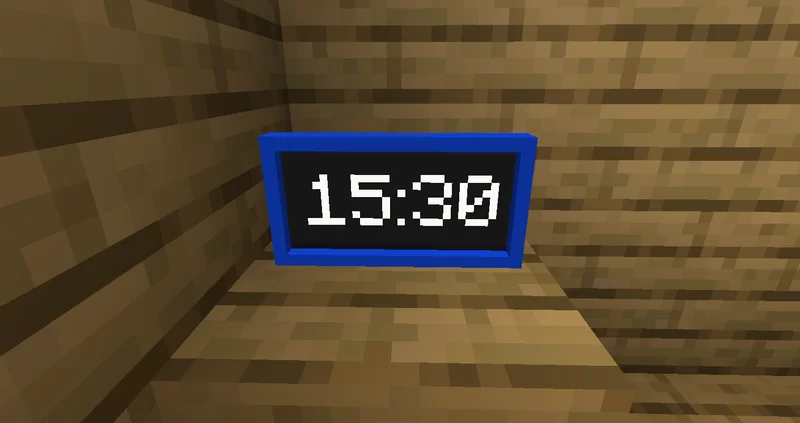
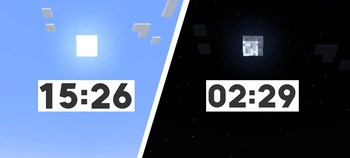
# Real Time Link This datapack links the time in your Minecraft world to your real-time (if on multiplayer, the time in the server's timezone), down to the nearest minute. It is relatively optimised, using the latest features in 1. 19. 4 to allow parsing strings.
As opposed to other similar datapacks, this one minimises how often it does weird technical things, making it quite optimised, but there’s room for me to improve on it. You won't notice the time going by, as it updates super smoothly :D
It also adds a new item - the Digital Clock, which shows the current time in HH:MM.
## IMPORTANT NOTES - This datapack only works in versions 1. 19. 4 and above! - This datapack only works if command blocks are enabled. - The resource pack is optional - you only need to use it if you want to use the Digital Clock item
## Digital Clock The Digital Clock shows your current time/the time of the server. It is accurate (to the time of the server) to within two seconds. You can craft it with the recipe shown, or use the function /function give:clock
!(https://cdn.discordapp.com/attachments/907340044988211270/1099701715764261025/image.png)
The digital clock requires the resource pack to use it, but it is not required for real-time linking or any other features.
## Time Zone Offset If your server that the datapack is installed on is hosted in a timezone which is, say, 4 hours behind your time zone, then you can offset the time. To do this, run `/scoreboard players set . TZ_OFFSET rtime offset`, where `offset` is a number from -11 to 14. If the server is 4 hours behind, you would want to offset the time to be 4 hours ahead of the server, so you would set it to `4`. - This only affects the real-time link, not the digital clock item
Want a Minecraft server, with a 25% discount? Click Here! [!(https://cdn.discordapp.com/attachments/875300299722616862/941009002345689108/c1ef09a5-1d76-47e9-bd3f-13f22d267b56.png)](https://bit.ly/BHSilabear)
📊 Mod Details
- Game
- Minecraft Data Packs
- Author
- Silabear
- Version
- 1.2
- Downloads
- 2,816
- Endorsements
- 47
- Category
- datapack
- Created
- 4/29/2023
- Updated
- 5/2/2023
- Game Versions
- 1.19.4
- Tags
- game-mechanics, social, utility
🔧 How to Install Minecraft Data Packs Mods
Download from Modrinth. Use Prism Launcher or drop into your mods folder.
📖 Full step-by-step install guide for Minecraft Data Packs →
Visit the official mod page for specific installation instructions for this mod.
🎮 Need cheat codes or console commands? Check ur gaming wiki for Minecraft Data Packs commands, item IDs, and more.
❓ Frequently Asked Questions
Which Minecraft Data Packs versions does Real Time Link support?
The author lists 1.19.4. Other versions may work but are untested by the author.
What is the latest version of Real Time Link?
Version 1.2, published 2023-05-02 with 2,816 downloads recorded at the source.
Keep browsing — more Minecraft Data Packs mods await