Printer Datapack
⚪ Last updated 2024🖼️ Gallery (7 images)
🔍 Analysis
- 🏆 #68 of 200 cursed mods in this game by downloads
📋 About This Mod
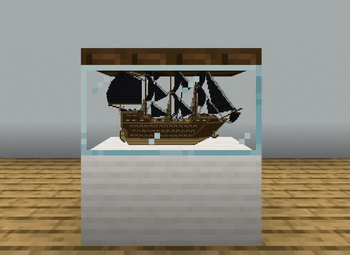
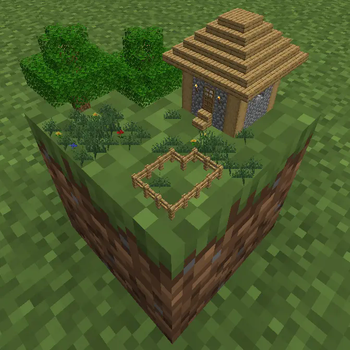
## About This Datapack adds a way to shrink down any build to a single block! Requires you to have OP commands. ## New This is a short list of all the new features. For more information, expand the tabs bellow. - Printing Selection (x16, x32 and x64) - Printing Location - Print Remover <details> <summary> Printing Selection </summary> Before you print, select whatever area you want. There are three sizes when selecting: **16x16x16, 32x32x32 and 64x64x64**. To select an area, place down the selection spawn eggs. They can be obtained using **/function give:print_X** with X being 16, 32 or 64. When placing the spawn egg you will grab the lowest x,y,z coordinates of your selection. Additionally, there will be a preview to see the area you selected. ### !(https://cdn.modrinth.com/data/2VwwWx2r/images/7e387efd2340dedac8f682bfdea4a40929dad509.png) !(https://cdn.modrinth.com/data/2VwwWx2r/images/15a7256849674e7decaee7696910db75e4aea7c4.png) </details> <details> <summary> Printing Location </summary> Can be obtained using **/function give:print_location**. Place down to select the spot where you would like to have your print. There will be a preview to see the area the print will be made. Left-Click the printing location to remove the location and to remove the selection. Right-Click the printing location to start printing. ### !(https://cdn.modrinth.com/data/2VwwWx2r/images/ca0f05de83a81d8674e1ae98551e28aa78e4aab6.png) !(https://cdn.modrinth.com/data/2VwwWx2r/images/676b141ee5c75eed9eb30f4ce5bb862aab1c43d3.png) </details> <details> <summary> Print Remover </summary> Can be obtained using **/function give:print_remover**. Place down to remove any print made on that block. !(https://cdn.modrinth.com/data/2VwwWx2r/images/3b38158cd9f7cada4249f59179e0ab34d6878d7b.png) </details> The prints are made out of **block displays**, which are entities. With small prints, such as 16x16x16, this won't produce any lag. However, large prints using the 64x64x64 printer may result in lag, and may take hours to complete. ## ⚠️ Bugs If you notice any bugs report them in the **** text channel in (https://discord.gg/eZEHeNbzUE) ## Download To download the datapack, you have two options to add it to your world: - **Creating a new world:** 1. Download the **Printer_Datapack.zip file** 2. Click **Create new world** in minecraft 3. Click **Data Packs** 4. Drag the **Printer_Datapack.zip file** into there, and make sure you put it on the 'selected' side (right side) - **Add to existing world:** 1. Download the **Printer_Datapack.zip file** 2. Select your world in the single player menu 3. Click **Edit** at the bottom of the screen 4. Click **Open World Folder** 5. Click on the **datapacks** folder 6. Drag the **Printer_Datapack.zip file** into there
## About This Datapack adds a way to shrink down any build to a single block! Requires you to have OP commands.
## New This is a short list of all the new features. For more information, expand the tabs bellow. - Printing Selection (x16, x32 and x64) - Printing Location - Print Remover
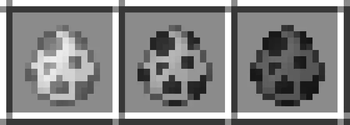
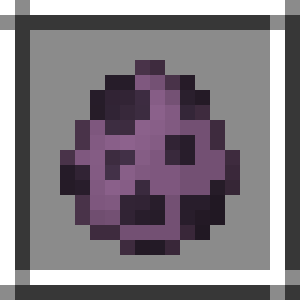
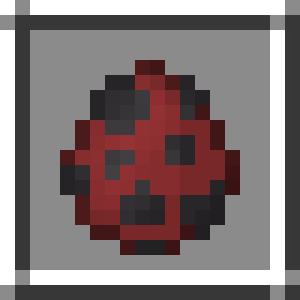
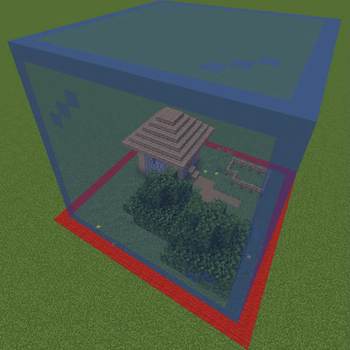
Before you print, select whatever area you want. There are three sizes when selecting: 16x16x16, 32x32x32 and 64x64x64. To select an area, place down the selection spawn eggs. They can be obtained using /function give:print_X with X being 16, 32 or 64. When placing the spawn egg you will grab the lowest x,y,z coordinates of your selection. Additionally, there will be a preview to see the area you selected. ### !(https://cdn.modrinth.com/data/2VwwWx2r/images/7e387efd2340dedac8f682bfdea4a40929dad509.png) !(https://cdn.modrinth.com/data/2VwwWx2r/images/15a7256849674e7decaee7696910db75e4aea7c4.png)
Printing Location
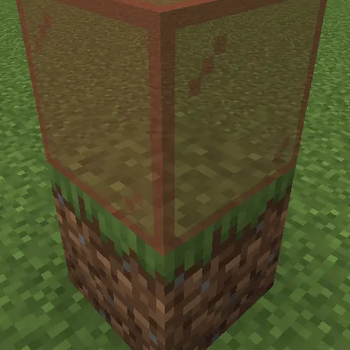
Can be obtained using /function give:print_location. Place down to select the spot where you would like to have your print. There will be a preview to see the area the print will be made. Left-Click the printing location to remove the location and to remove the selection. Right-Click the printing location to start printing. ### !(https://cdn.modrinth.com/data/2VwwWx2r/images/ca0f05de83a81d8674e1ae98551e28aa78e4aab6.png) !(https://cdn.modrinth.com/data/2VwwWx2r/images/676b141ee5c75eed9eb30f4ce5bb862aab1c43d3.png)
Can be obtained using /function give:print_remover. Place down to remove any print made on that block. !(https://cdn.modrinth.com/data/2VwwWx2r/images/3b38158cd9f7cada4249f59179e0ab34d6878d7b.png)
The prints are made out of block displays, which are entities. With small prints, such as 16x16x16, this won't produce any lag. However, large prints using the 64x64x64 printer may result in lag, and may take hours to complete.
## ⚠️ Bugs If you notice any bugs report them in the text channel in (https://discord.gg/eZEHeNbzUE)
## Download To download the datapack, you have two options to add it to your world: - Creating a new world: 1. Download the Printer_Datapack.zip file 2. Click Create new world in minecraft 3. Click Data Packs 4. Drag the Printer_Datapack.zip file into there, and make sure you put it on the 'selected' side (right side)
- Add to existing world:
- 1. Download the Printer_Datapack.zip file
- 2. Select your world in the single player menu
- 3. Click Edit at the bottom of the screen
- 4. Click Open World Folder
- 5. Click on the datapacks folder
- 6. Drag the Printer_Datapack.zip file into there
📊 Mod Details
- Game
- Minecraft Data Packs
- Author
- GoldenRobotII
- Version
- 1.0.1
- Downloads
- 451
- Endorsements
- 9
- Category
- cursed
- Created
- 2/25/2024
- Updated
- 5/11/2024
- Game Versions
- 1.20.5, 1.20.6
- Tags
- cursed, game-mechanics, utility
🔧 How to Install Minecraft Data Packs Mods
Download from Modrinth. Use Prism Launcher or drop into your mods folder.
📖 Full step-by-step install guide for Minecraft Data Packs →
Visit the official mod page for specific installation instructions for this mod.
🎮 Need cheat codes or console commands? Check ur gaming wiki for Minecraft Data Packs commands, item IDs, and more.
❓ Frequently Asked Questions
Which Minecraft Data Packs versions does Printer Datapack support?
The author lists 1.20.5, 1.20.6. Other versions may work but are untested by the author.
What is the latest version of Printer Datapack?
Version 1.0.1, published 2024-05-11 with 451 downloads recorded at the source.
Keep browsing — more Minecraft Data Packs mods await