Ouch!
🟡 Updated this year🖼️ Gallery (1 images)
🔍 Analysis
- 🏆 #727 of 1745 datapack mods in this game by downloads
📋 About This Mod
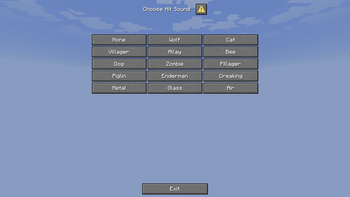
## Info This datapack allows players to choose a preset of sounds to play when they're hit, or die. It also provides an easy way to add your own sound presets, in addition to the default ones. This pack does _not_ disable the vanilla hit sound, it simply plays another sound in addition to it. You can use a resource pack to remove, or decrease the sound of, the vanilla hit sound. ### Default sound presets: - None - Wolf - Cat - Villager - Allay - Bee - Dog - Zombie - Pillager - Piglin - Enderman - Creaking - Metal - Glass - Air Note: unfortunately, you cannot change what subtitles are shown without using a resource pack to add custom sound effects. This means you may see inaccurate subtitles when using the pack. ## Adding your own sound presets Sound presets are defined by functions in the `hitsoundpicker:preset_registries` tag. By default, the only such function is `hitsoundpicker:register_default`. To add your own presets, you can create your own functions and add them to `hitsoundpicker:preset_registries`, or you can directly add the presets to `hitsoundpicker:register_default`. Inside a function, sound presets are defined by either calling `hitsoundpicker:api/register_preset` or `hitsoundpicker:api/register_preset_pitched`. Below are examples of calls to both. ### `register_preset`: ``` function hitsoundpicker:api/register_preset { \ "display": "Silverfish", \ "sound": "minecraft:entity.silverfish.hurt", \ "death_sound": "minecraft:entity.silverfish.death" \ } ``` ### `register_preset_pitched`: ``` function hitsoundpicker:api/register_preset_pitched { \ "display": "Wool", \ "sound": "minecraft:block.wool.break", \ "sound_pitch": 1.0, \ "death_sound": "minecraft:block.wool.break", \ "death_sound_pitch": 0.5 \ } ``` The arguments `display`, `sound`, and `death_sound` are the same across both functions: - `display` is what the preset will display as in the selection menu - `sound` is the sound that will play when the player takes regular damage - `death_sound` is the sound that will play when the player dies The arguments `sound_pitch` and `death_sound_pitch` are present only in `register_preset_pitched`: - `sound_pitch` is the speed at which `sound` will play - `death_sound_pitch` is the speed at which `death_sound` will play `register_preset` is a shorthand for calling `register_preset_pitched` with `sound_pitch` and `death_sound_pitch` both set to 1.0 Sound presets will show up in the menu in the order that the function calls to register them were made. Non-vanilla sounds will also work with the datapack, assuming that everyone has the necessary resource pack or mod to provide the sounds. ## Other Contact me on discord @parax342 with bugs or suggestions Thanks to the Minecraft Commands discord for helping with this project
## Info This datapack allows players to choose a preset of sounds to play when they're hit, or die. It also provides an easy way to add your own sound presets, in addition to the default ones.
This pack does _not_ disable the vanilla hit sound, it simply plays another sound in addition to it. You can use a resource pack to remove, or decrease the sound of, the vanilla hit sound.
### Default sound presets: - None - Wolf - Cat - Villager - Allay - Bee - Dog - Zombie - Pillager - Piglin - Enderman - Creaking - Metal - Glass - Air
## Adding your own sound presets Sound presets are defined by functions in the `hitsoundpicker:preset_registries` tag. By default, the only such function is `hitsoundpicker:register_default`. To add your own presets, you can create your own functions and add them to `hitsoundpicker:preset_registries`, or you can directly add the presets to `hitsoundpicker:register_default`.
Inside a function, sound presets are defined by either calling `hitsoundpicker:api/register_preset` or `hitsoundpicker:api/register_preset_pitched`. Below are examples of calls to both. ### `register_preset`: ``` function hitsoundpicker:api/register_preset { \ "display": "Silverfish", \ "sound": "minecraft:entity.silverfish.hurt", \ "death_sound": "minecraft:entity.silverfish.death" \ } ``` ### `register_preset_pitched`: ``` function hitsoundpicker:api/register_preset_pitched { \ "display": "Wool", \ "sound": "minecraft:block.wool.break", \ "sound_pitch": 1. 0, \ "death_sound": "minecraft:block.wool.break", \ "death_sound_pitch": 0. 5 \ } ``` The arguments `display`, `sound`, and `death_sound` are the same across both functions: - `display` is what the preset will display as in the selection menu - `sound` is the sound that will play when the player takes regular damage - `death_sound` is the sound that will play when the player dies
The arguments `sound_pitch` and `death_sound_pitch` are present only in `register_preset_pitched`: - `sound_pitch` is the speed at which `sound` will play - `death_sound_pitch` is the speed at which `death_sound` will play
`register_preset` is a shorthand for calling `register_preset_pitched` with `sound_pitch` and `death_sound_pitch` both set to 1. 0
Sound presets will show up in the menu in the order that the function calls to register them were made.
Non-vanilla sounds will also work with the datapack, assuming that everyone has the necessary resource pack or mod to provide the sounds.
## Other Contact me on discord @parax342 with bugs or suggestions
Thanks to the Minecraft Commands discord for helping with this project
📊 Mod Details
- Game
- Minecraft Data Packs
- Author
- Parax342
- Version
- 1.0
- Downloads
- 36
- Endorsements
- 0
- Category
- datapack
- Created
- 5/11/2026
- Updated
- 5/10/2026
- Game Versions
- 1.21.6, 1.21.7, 1.21.8, 1.21.9, 1.21.10
- Tags
- utility
🔧 How to Install Minecraft Data Packs Mods
Download from Modrinth. Use Prism Launcher or drop into your mods folder.
📖 Full step-by-step install guide for Minecraft Data Packs →
Visit the official mod page for specific installation instructions for this mod.
🎮 Need cheat codes or console commands? Check ur gaming wiki for Minecraft Data Packs commands, item IDs, and more.
❓ Frequently Asked Questions
Which Minecraft Data Packs versions does Ouch! support?
The author lists 1.21.6, 1.21.7, 1.21.8, 1.21.9, 1.21.10, 1.21.11. Other versions may work but are untested by the author.
What is the latest version of Ouch!?
Version 1.0, published 2026-05-10 with 36 downloads recorded at the source.
Keep browsing — more Minecraft Data Packs mods await