NotHunt - No Compass Manhunt!
🟡 Updated this year🖼️ Gallery (5 images)
🔍 Analysis
- 🏆 #755 of 2046 datapack mods in this game by downloads
📋 About This Mod
# NotHunt Datapack A comprehensive Minecraft manhunt datapack with extensive customization options, multiple game modes, and advanced tracking features. --- ## 📥 Installation 1. Download the datapack 2. Navigate to your Minecraft world's datapacks folder: - `.minecraft/saves//datapacks/` 3. Place the `NotHunt` folder into the datapacks directory 4. Load or reload your world ### Loading the Datapack If the world is already running, reload the datapack using: ``` /reload ``` You'll see a yellow message in chat: "NotHunt Loaded. Click to open settings menu and start another game!" --- ## ⚙️ Configuration & Settings ### Opening the Settings Menu Only operators (OPs) can configure the datapack. To open the settings menu: ``` /function nothunt:settings ``` This will display an interactive menu in chat where you can configure all game settings by clicking on options. --- ## 🎮 Game Settings Overview ### **Runners Objective** Choose what the runners must accomplish to win: - **Kill the Ender Dragon** *(Default)* - Classic manhunt where runners must defeat the Ender Dragon - **Get a Diamond** - Runners win when one player obtains a diamond - **Go to the Nether** - Runners win when one player enters the Nether - **Survivor** - Runners must survive for a set amount of time ### **Game Timer** Set a time limit for completing objectives (except Survivor mode): - **Disabled** - No time limit - **5, 10, 20, 30, 45, 60, 90, 120, or 180 minutes** If runners don't complete their objective within the time limit, hunters win. *Note: In Survivor mode, this setting determines how long runners must survive.* ### **Choose Runners Randomly** Automatically select runners at the start of the game: - **Disabled** - Manually choose runners - **1-20 runners** - Randomly select this many players to be runners ### **Glow Hunters When They're Close** - **Enabled**: Hunters glow (visible through walls) when within 15 blocks of a runner - **Disabled**: No glowing effect ### **Alert Runners When Hunters Are Close** - **Enabled**: Runners receive a chat alert when hunters are within 20 blocks - **Disabled**: No alerts ### **Hunters Boost** Give hunters a permanent effect throughout the game: - None - Fast Swimming (Dolphin's Grace) - Fire Resistance - Haste (faster mining) - Invisibility - Jump Boost - Night Vision - Water Breathing - Double Hearts (40 hearts instead of 20) - Speed Boost ### **Runners Boost** Give runners a permanent effect throughout the game (same options as Hunters Boost) ### **Hunters Countdown** Freeze hunters at the start to give runners a head start: - **Disabled** - Hunters can move immediately - **15 seconds, 30 seconds, 1 minute, 5 minutes, or 10 minutes** ### **Runners Lives** Number of times each runner can die before being eliminated: - **1-5 lives** --- ## 👥 Managing Players ### Adding Players to the Match #### **Automatic Selection** If "Choose Runners Randomly" is enabled in settings, runners will be selected automatically when the match starts. #### **Manual Selection** 1. After configuring settings, click **** in the settings menu 2. The game will enter preparation mode 3. Players can join as runners using the trigger command: ``` /trigger JoinRunners ``` 4. **Operators** can manually add players as runners: ``` /execute as <PlayerName> run trigger JoinRunners ``` Example: ``` /execute as Steve run trigger JoinRunners ``` 5. Once all runners are selected, start the match: ``` /function nothunt:preparation/start ``` ### Team Assignment - **Runners** - Players who must complete the objective - **Hunters** - All other players who joined the match (not selected as runners) - **Spectators** - Players who join after the match starts or were not added to the match ### Removing Players To remove a runner during preparation phase, they can use: ``` /execute as PlayerName run function nothunt:preparation/leaverunners ``` This toggles their runner status. --- ## 🧭 In-Game Compasses (Hunter Tracking) Hunters have access to a powerful tracking system to locate runners. ### **How to Use Tracking** Hunters can track specific runners using the compass system: 1. **Open tracking menu**: ``` /trigger Track ``` 2. **Select a runner** - Click on a runner's name in chat to track them 3. **Switch targets** - Use `/trigger Track` again to change which runner you're tracking ### **Toggle HUD** Runners can toggle their HUD on/off: ``` /trigger Hud ``` --- ## 🏁 Ending a Match ### **Manual End** Operators can manually end the match at any time: ``` /function nothunt:endmatch ``` ### **Automatic Win Conditions** The match ends automatically when: **Runners Win:** - All runners complete the objective (Kill Dragon/Get Diamond/Enter Nether) - Runners survive the timer in Survivor mode - In timed modes, if at least one runner is alive when time runs out (unless objective-specific) **Hunters Win:** - All runner
# NotHunt Datapack
A comprehensive Minecraft manhunt datapack with extensive customization options, multiple game modes, and advanced tracking features.
## 📥 Installation
1. Download the datapack 2. Navigate to your Minecraft world's datapacks folder: - `.minecraft/saves//datapacks/` 3. Place the `NotHunt` folder into the datapacks directory 4. Load or reload your world
### Loading the Datapack
If the world is already running, reload the datapack using: ``` /reload ```
You'll see a yellow message in chat: "NotHunt Loaded. Click to open settings menu and start another game!"
## ⚙️ Configuration & Settings
### Opening the Settings Menu
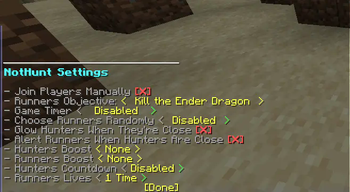
Only operators (OPs) can configure the datapack. To open the settings menu: ``` /function nothunt:settings ```
This will display an interactive menu in chat where you can configure all game settings by clicking on options.
## 🎮 Game Settings Overview
### Runners Objective Choose what the runners must accomplish to win:
- Kill the Ender Dragon (Default) - Classic manhunt where runners must defeat the Ender Dragon
- Get a Diamond - Runners win when one player obtains a diamond
- Go to the Nether - Runners win when one player enters the Nether
- Survivor - Runners must survive for a set amount of time
### Game Timer Set a time limit for completing objectives (except Survivor mode): - Disabled - No time limit - 5, 10, 20, 30, 45, 60, 90, 120, or 180 minutes
If runners don't complete their objective within the time limit, hunters win.
Note: In Survivor mode, this setting determines how long runners must survive.
### Choose Runners Randomly Automatically select runners at the start of the game: - Disabled - Manually choose runners - 1-20 runners - Randomly select this many players to be runners
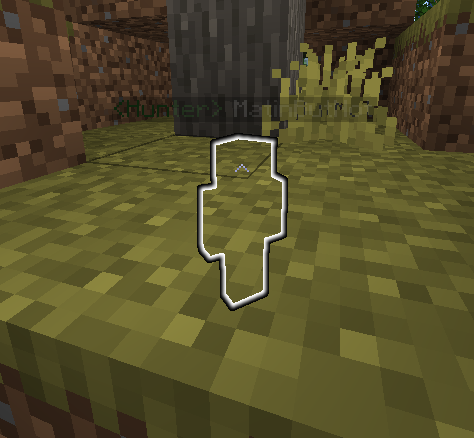
### Glow Hunters When They're Close - Enabled: Hunters glow (visible through walls) when within 15 blocks of a runner - Disabled: No glowing effect
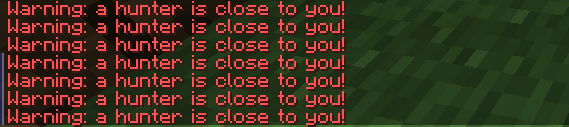
### Alert Runners When Hunters Are Close - Enabled: Runners receive a chat alert when hunters are within 20 blocks - Disabled: No alerts
### Hunters Boost Give hunters a permanent effect throughout the game: - None - Fast Swimming (Dolphin's Grace) - Fire Resistance - Haste (faster mining) - Invisibility - Jump Boost - Night Vision - Water Breathing - Double Hearts (40 hearts instead of 20) - Speed Boost
### Runners Boost Give runners a permanent effect throughout the game (same options as Hunters Boost)
### Hunters Countdown Freeze hunters at the start to give runners a head start: - Disabled - Hunters can move immediately - 15 seconds, 30 seconds, 1 minute, 5 minutes, or 10 minutes
### Runners Lives Number of times each runner can die before being eliminated: - 1-5 lives
## 👥 Managing Players
### Adding Players to the Match
#### Automatic Selection If "Choose Runners Randomly" is enabled in settings, runners will be selected automatically when the match starts.
#### Manual Selection
1. After configuring settings, click in the settings menu 2. The game will enter preparation mode 3. Players can join as runners using the trigger command: ``` /trigger JoinRunners ```
4. Operators can manually add players as runners:
```
/execute as
5. Once all runners are selected, start the match: ``` /function nothunt:preparation/start ```
### Team Assignment
- Runners - Players who must complete the objective
- Hunters - All other players who joined the match (not selected as runners)
- Spectators - Players who join after the match starts or were not added to the match
### Removing Players
To remove a runner during preparation phase, they can use: ``` /execute as PlayerName run function nothunt:preparation/leaverunners ``` This toggles their runner status.
## 🧭 In-Game Compasses (Hunter Tracking)
Hunters have access to a powerful tracking system to locate runners.
### How to Use Tracking
Hunters can track specific runners using the compass system:
1. Open tracking menu: ``` /trigger Track ```
2. Select a runner - Click on a runner's name in chat to track them
3. Switch targets - Use `/trigger Track` again to change which runner you're tracking
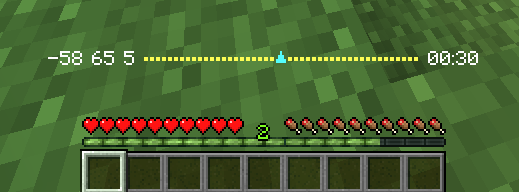
### Toggle HUD
Runners can toggle their HUD on/off: ``` /trigger Hud ```
## 🏁 Ending a Match
### Manual End
Operators can manually end the match at any time: ``` /function nothunt:endmatch ```
### Automatic Win Conditions
The match ends automatically when:
Runners Win: - All runners complete the objective (Kill Dragon/Get Diamond/Enter Nether) - Runners survive the timer in Survivor mode - In timed modes, if at least one runner is alive when time runs out (unless objective-specific)
Hunters Win: - All runner
📊 Mod Details
- Game
- Minecraft Data Packs
- Author
- xigg
- Version
- 4
- Downloads
- 446
- Endorsements
- 11
- Category
- datapack
- Created
- 6/12/2023
- Updated
- 11/29/2025
- Game Versions
- 1.21.4
- Tags
- minigame
🔧 How to Install Minecraft Data Packs Mods
Download from Modrinth. Use Prism Launcher or drop into your mods folder.
📖 Full step-by-step install guide for Minecraft Data Packs →
Visit the official mod page for specific installation instructions for this mod.
🎮 Need cheat codes or console commands? Check ur gaming wiki for Minecraft Data Packs commands, item IDs, and more.
❓ Frequently Asked Questions
Which Minecraft Data Packs versions does NotHunt - No Compass Manhunt! support?
The author lists 1.21.4. Other versions may work but are untested by the author.
What is the latest version of NotHunt - No Compass Manhunt!?
Version 4, published 2025-11-29 with 446 downloads recorded at the source.
Keep browsing — more Minecraft Data Packs mods await