Update 1.21 without trial chambers
⚪ Last updated 2024Preview
🔍 Analysis
- 👍 0.4% endorsement rate
- 🏆 #628 of 1805 datapack mods in this game by downloads
📋 About This Mod
# Update 1.21 without trial chambers Enables the Update 1.21 experimental features, but disables the trial chambers and breeze. Notably, in 1.20.5+ the new raid mechanics will also be enabled, with pillagers dropping ominous bottles instead of giving bad omen. <table> <thead> <th>Enabled</th> <th>Disabled</th> </thead> <tbody> <td> <img src="https://raw.githubusercontent.com/misode/no-trial-chambers/main/images/sprites/BlockSprite_crafter.png"> Crafter <br> <img src="https://raw.githubusercontent.com/misode/no-trial-chambers/main/images/sprites/BlockSprite_copper-bulb.png"> <img src="https://raw.githubusercontent.com/misode/no-trial-chambers/main/images/sprites/BlockSprite_lit-copper-bulb.png"> Copper bulb <br> <img src="https://raw.githubusercontent.com/misode/no-trial-chambers/main/images/sprites/BlockSprite_chiseled-copper.png"> <img src="https://raw.githubusercontent.com/misode/no-trial-chambers/main/images/sprites/BlockSprite_copper-grate.png"> Copper blocks <br> <img src="https://raw.githubusercontent.com/misode/no-trial-chambers/main/images/sprites/BlockSprite_chiseled-tuff.png"> <img src="https://raw.githubusercontent.com/misode/no-trial-chambers/main/images/sprites/BlockSprite_polished-tuff.png"> <img src="https://raw.githubusercontent.com/misode/no-trial-chambers/main/images/sprites/BlockSprite_tuff-bricks.png"> Tuff blocks <br> <img src="https://raw.githubusercontent.com/misode/no-trial-chambers/main/images/sprites/ItemSprite_ominous-bottle.png"> New raid mechanics </td> <td> <img src="https://raw.githubusercontent.com/misode/no-trial-chambers/main/images/sprites/EnvSprite_trial-chambers.png"> Trial chambers <br> <img src="https://raw.githubusercontent.com/misode/no-trial-chambers/main/images/sprites/BlockSprite_trial-spawner.png"> <img src="https://raw.githubusercontent.com/misode/no-trial-chambers/main/images/sprites/BlockSprite_vault.png"> Trial spawner and vault <br> <img src="https://raw.githubusercontent.com/misode/no-trial-chambers/main/images/sprites/BlockSprite_heavy-core.png"> Heavy core <br> <img src="https://raw.githubusercontent.com/misode/no-trial-chambers/main/images/sprites/EntitySprite_breeze.png"> Breeze <br> <img src="https://raw.githubusercontent.com/misode/no-trial-chambers/main/images/sprites/EntitySprite_bogged.png"> Bogged <br> <img src="https://raw.githubusercontent.com/misode/no-trial-chambers/main/images/sprites/ItemSprite_trial-key.png"> Trial key <br> <img src="https://raw.githubusercontent.com/misode/no-trial-chambers/main/images/sprites/ItemSprite_wind-charge.png"> Wind charge </td> </tbody> </table> ## Data pack instructions **After installation, DON'T enable the separate "update_1_21 (feature)" data pack!** <details><summary>Adding to a new singleplayer world</summary> 1. Open the "Data Packs" selection screen when creating a new world !(https://raw.githubusercontent.com/misode/no-trial-chambers/main/images/new_world_screen.png) 2. Drag the downloaded datapack zip file onto the game window 3. Move data pack to the "Selected" column and click "Done" !(https://raw.githubusercontent.com/misode/no-trial-chambers/main/images/select_data_packs.png) 4. Accept the "Experimental Features Warning" !(https://raw.githubusercontent.com/misode/no-trial-chambers/main/images/experimental_features_warning.png) 5. Change any other world settings and click "Create New World" !(https://raw.githubusercontent.com/misode/no-trial-chambers/main/images/create_new_world.png) </details> <details><summary>Adding to an existing singleplayer world</summary> 1. Select your world and click "Edit" !(https://raw.githubusercontent.com/misode/no-trial-chambers/main/images/edit_world.png) 2. Click "Open World Folder" !(https://raw.githubusercontent.com/misode/no-trial-chambers/main/images/open_world_folder.png) 3. Enable the "Update 1.21" feature flag `level.dat`. A simple way to do this is by installing the (https://marketplace.visualstudio.com/items?itemName=Misodee.vscode-nbt) extension for (https://code.visualstudio.com/) !(https://raw.githubusercontent.com/misode/no-trial-chambers/main/images/nbt_viewer_install.png) 4. Open the `level.dat` file in VSCode by dragging the file from the file explorer to the VSCode window 5. Inside `Data`, add a new list tag called `enabled_features` !(https://raw.githubusercontent.com/misode/no-trial-chambers/main/images/nbt_enabled_features.png) 6. Inside this list, add two new string tags with `minecraft:vanilla` and `minecraft:update_1_21`. Select the yellow string icon when adding the first tag. !(https://raw.githubusercontent.com/misode/no-trial-chambers/main/images/nbt_update_1_21.png) 7. Press `Ctrl + S` to save the file, make sure the world is not open in-game when editing the file! 8. In the world save folder, find the `datapacks` f
# Update 1. 21 without trial chambers Enables the Update 1. 21 experimental features, but disables the trial chambers and breeze. Notably, in 1. 20. 5+ the new raid mechanics will also be enabled, with pillagers dropping ominous bottles instead of giving bad omen.
| Enabled | Disabled |
 Crafter Crafter
|
 Trial chambers Trial chambers
|
|---|

 Copper bulb
 Copper blocks

 Tuff blocks
 New raid mechanics

 Trial spawner and vault
 Heavy core
 Breeze
 Bogged
 Trial key
 Wind charge
## Data pack instructions
After installation, DON'T enable the separate "update_1_21 (feature)" data pack!
Adding to a new singleplayer world
1. Open the "Data Packs" selection screen when creating a new world  2. Drag the downloaded datapack zip file onto the game window 3. Move data pack to the "Selected" column and click "Done" 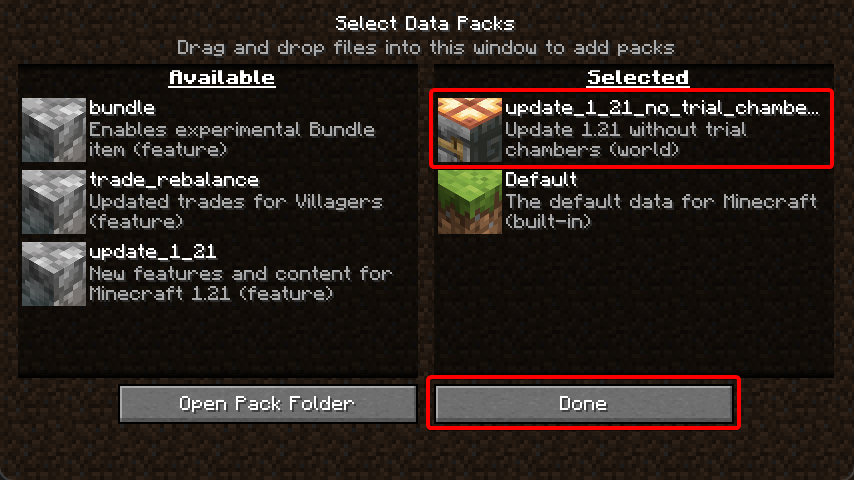 4. Accept the "Experimental Features Warning"  5. Change any other world settings and click "Create New World" 
Adding to an existing singleplayer world
1. Select your world and click "Edit" 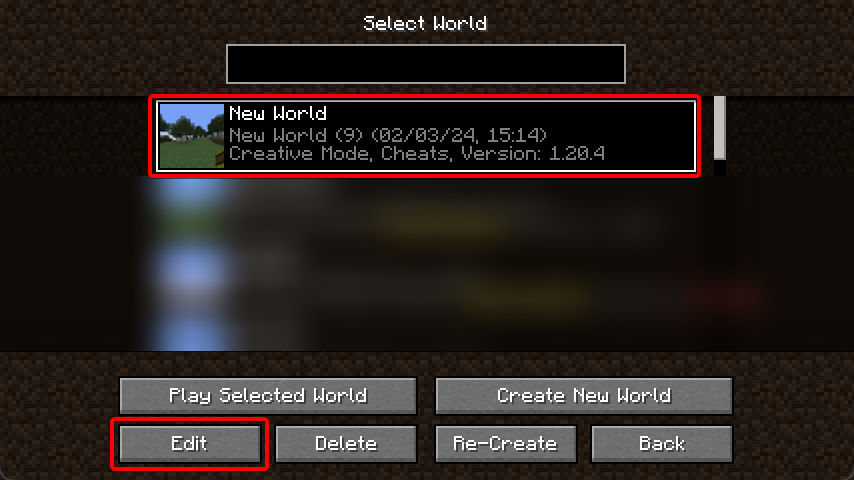 2. Click "Open World Folder" 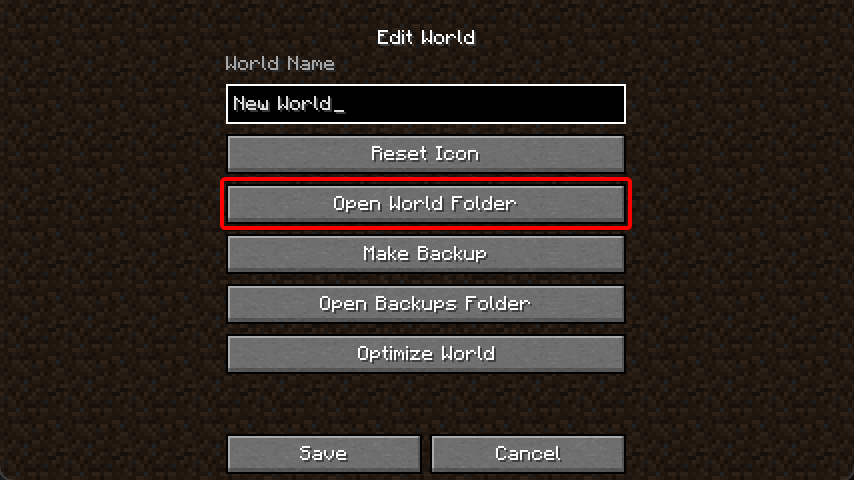 3. Enable the "Update 1. 21" feature flag `level.dat`. A simple way to do this is by installing the (https://marketplace.visualstudio.com/items?itemName=Misodee.vscode-nbt) extension for (https://code.visualstudio.com/) 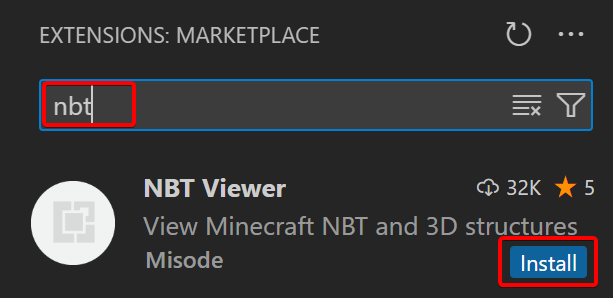 4. Open the `level.dat` file in VSCode by dragging the file from the file explorer to the VSCode window 5. Inside `Data`, add a new list tag called `enabled_features` 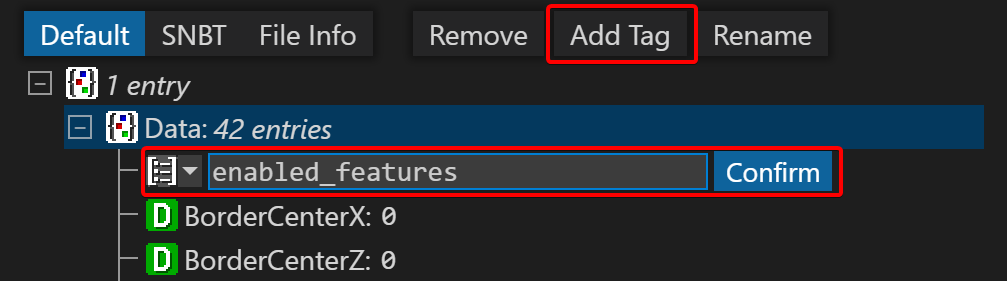 6. Inside this list, add two new string tags with `minecraft:vanilla` and `minecraft:update_1_21`. Select the yellow string icon when adding the first tag. 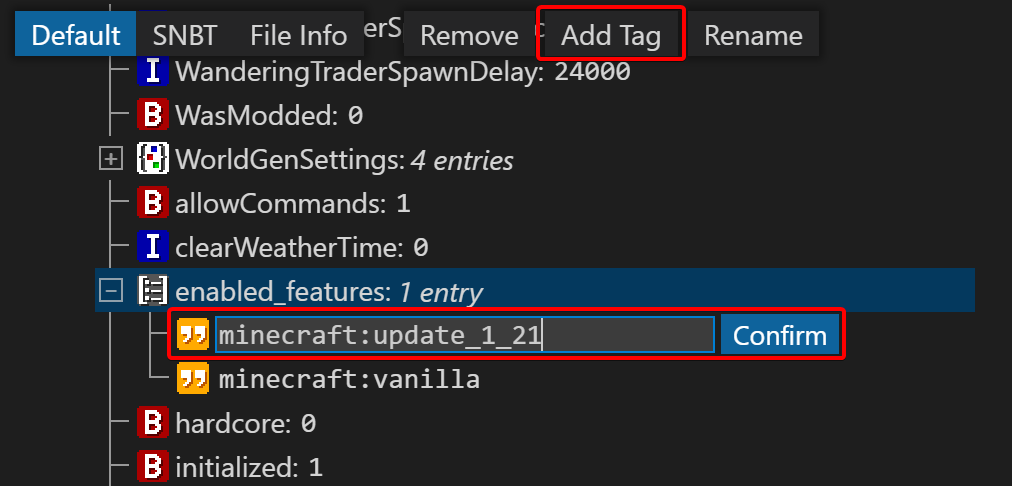 7. Press `Ctrl + S` to save the file, make sure the world is not open in-game when editing the file! 8. In the world save folder, find the `datapacks` f
📊 Mod Details
- Game
- Minecraft Data Packs
- Author
- Misode
- Version
- 1.3.1
- Downloads
- 21,985
- Endorsements
- 80
- Category
- datapack
- Created
- 1/19/2024
- Updated
- 5/2/2024
- Game Versions
- 1.20.5, 1.20.6
- Tags
- decoration, game-mechanics, technology
🔧 How to Install Minecraft Data Packs Mods
Download from Modrinth. Use Prism Launcher or drop into your mods folder.
📖 Full step-by-step install guide for Minecraft Data Packs →
Visit the official mod page for specific installation instructions for this mod.
🎮 Need cheat codes or console commands? Check ur gaming wiki for Minecraft Data Packs commands, item IDs, and more.
❓ Frequently Asked Questions
Which Minecraft Data Packs versions does Update 1.21 without trial chambers support?
The author lists 1.20.5, 1.20.6. Other versions may work but are untested by the author.
What is the latest version of Update 1.21 without trial chambers?
Version 1.3.1, published 2024-05-02 with 21,985 downloads recorded at the source.
Keep browsing — more Minecraft Data Packs mods await