No Lag
⚪ Last updated 2023🖼️ Gallery (4 images)
🔍 Analysis
- 👍 0.5% endorsement rate
- 🏆 #616 of 1805 datapack mods in this game by downloads
📋 About This Mod
# No-Lag !(https://img.shields.io/github/v/release/2mal3/No-Lag?style=flat-square) !(https://img.shields.io/badge/Minecraft-1.20-orange?style=flat-square) !(https://img.shields.io/github/downloads/2mal3/No-Lag/total?style=flat-square) This datapack improves and optimizes the performance of the Minecraft world to ensure a good gaming experience. To achieve this, this datapack uses over 6 efficient methods, more than similar datapacks that use only a few methods. These methods can be easily configured through the in-game GUI, which provides additional information and special actions. The datapack has been designed with performance in mind, so that it has almost no impact on the game performance itself. ## 📖 Features - 7 different lag reduction methods that actually work - Does not affect important entities - Simple in-game GUI with lots of settings - Additional information about the world - Does not create lag itself By default, all farm animals, bosses, decorative entities, pets, nearby entities and entities with names are not deleted. However, they will be frozen if they are too far away from the player, unless they are an end boss or have the name **ignore**. Additionally, all entities that are within 64 blocks of an armor stand named **ignore** will not be frozen. All settings and actions can be done through the in-game GUI. To open it, simply type the command `/function #nola:menu` in the chat (only works with command permissions). ## 📝 Methods to reduce lag - Entities that are too far away from a player are frozen - In certain intervals all unimportant entities are deleted - Multiple Xp Orbs are combined - Collision of farm animals are deactivated - Items despawn earlier - Les entities can stand together on one block - If too many entities of the same type are too close to each other, all other entities of the species will be deleted. ## Nice things others have said about the datapack - _"cool ty dude"_: zBestguy - _"Hi! I've been using this datapack for a couple of months on a aternos server (with paper), and it works perfectly well !"_: Expert MinerBenBepBob - _"dam it works fuking good, you saved me and my friends in our moded survival"_: SticksS\_ - _"Highly Recommended."_: Volt_Lightwave - _"You just saved my server. God bless you sir"_: armadilloman - _"Thank you so much, I thought this wasn't real because it was bad at first, but it changed me from 28 fps to 50+! tysm <3"_: jbombbay - _"i thought that this will be fake but when i got it in my world i got not 50fps i god 84 this is acctually working **DAMN!!!**"_: mr-pancace - _"all aternos servers need this!!!"_: Hoponopono - _"I immediatly noticed a difference! GREAT job!"_: Birdycrafter - _"dude your datapack is a godsend, thank you so much. my game was lagging like it was the end of the world before but now it runs pretty smoothly! thanks a bunch!"_: sushiyae - _"Best"_: User3132306G - _"Dude Thanks You, It Recuded The Lag So Much, Though It's Still Like 90 ms, But It's Good And Fine, Thank You."_: GOROITAX - _"Oh my thank you, this works so well!!!!!!"_: Moih - _"that's a cool datapack i've ever seen ngl"_: DavidMinecraftYEET ## Limitations The **ONLY** purpose of the datapack is to improve the (https://minecraft.fandom.com/wiki/Tick), **NOT** the (https://en.wikipedia.org/wiki/Frame_rate). There may be an FPS improvement in single player mode, but this is more because the computer has to spend less time on other calculations. If you are looking for real FPS improvement, I would recommend (https://fabricmc.net/)/(https://quiltmc.org/) with (https://modrinth.com/mod/sodium). If your server has performance problems, I would also advise you to try (https://papermc.io/) or (https://fabricmc.net/)/(https://quiltmc.org/) with (https://modrinth.com/mod/lithium) first, as these are much more powerful than this datapack. ## Notes - **ONLY** the latest version of the datapack for Fabric and Vanilla 1.20 is supported - bug reports and suggestions are **ONLY** accepted on (https://github.com/2mal3/No-Lag/issues) - datapack was created with (https://github.com/mc-build/mc-build). - should not create any lag by itself
!(https://img.shields.io/github/v/release/2mal3/No-Lag?style=flat-square) !(https://img.shields.io/badge/Minecraft-1. 20-orange?style=flat-square) !(https://img.shields.io/github/downloads/2mal3/No-Lag/total?style=flat-square)
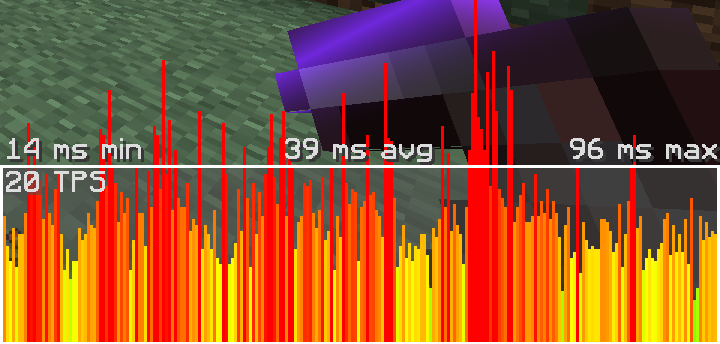
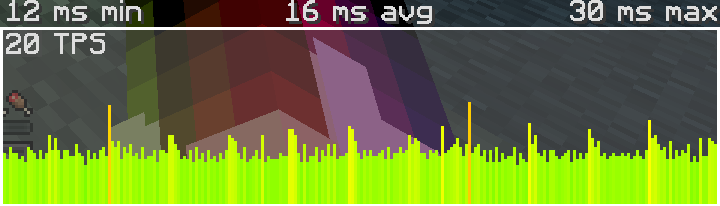
This datapack improves and optimizes the performance of the Minecraft world to ensure a good gaming experience. To achieve this, this datapack uses over 6 efficient methods, more than similar datapacks that use only a few methods. These methods can be easily configured through the in-game GUI, which provides additional information and special actions. The datapack has been designed with performance in mind, so that it has almost no impact on the game performance itself.
## 📖 Features
- 7 different lag reduction methods that actually work
- Does not affect important entities
- Simple in-game GUI with lots of settings
- Additional information about the world
- Does not create lag itself
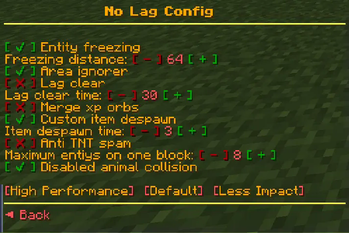
By default, all farm animals, bosses, decorative entities, pets, nearby entities and entities with names are not deleted. However, they will be frozen if they are too far away from the player, unless they are an end boss or have the name ignore. Additionally, all entities that are within 64 blocks of an armor stand named ignore will not be frozen.
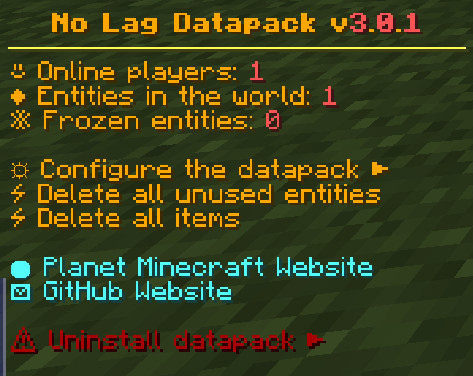
All settings and actions can be done through the in-game GUI. To open it, simply type the command `/function #nola:menu` in the chat (only works with command permissions).
## 📝 Methods to reduce lag
- Entities that are too far away from a player are frozen
- In certain intervals all unimportant entities are deleted
- Multiple Xp Orbs are combined
- Collision of farm animals are deactivated
- Items despawn earlier
- Les entities can stand together on one block
- If too many entities of the same type are too close to each other, all other entities of the species will be deleted.
## Nice things others have said about the datapack
- _"cool ty dude"_: zBestguy
- _"Hi! I've been using this datapack for a couple of months on a aternos server (with paper), and it works perfectly well !"_: Expert MinerBenBepBob
- _"dam it works fuking good, you saved me and my friends in our moded survival"_: SticksS\_
- _"Highly Recommended."_: Volt_Lightwave
- _"You just saved my server. God bless you sir"_: armadilloman
- _"Thank you so much, I thought this wasn't real because it was bad at first, but it changed me from 28 fps to 50+! tysm <3"_: jbombbay
- _"i thought that this will be fake but when i got it in my world i got not 50fps i god 84 this is acctually working DAMN!!!"_: mr-pancace
- _"all aternos servers need this!!!"_: Hoponopono
- _"I immediatly noticed a difference! GREAT job!"_: Birdycrafter
- _"dude your datapack is a godsend, thank you so much. my game was lagging like it was the end of the world before but now it runs pretty smoothly! thanks a bunch!"_: sushiyae
- _"Best"_: User3132306G
- _"Dude Thanks You, It Recuded The Lag So Much, Though It's Still Like 90 ms, But It's Good And Fine, Thank You."_: GOROITAX
- _"Oh my thank you, this works so well!!!!!!"_: Moih
- _"that's a cool datapack i've ever seen ngl"_: DavidMinecraftYEET
## Limitations
The ONLY purpose of the datapack is to improve the (https://minecraft.fandom.com/wiki/Tick), NOT the (https://en.wikipedia.org/wiki/Frame_rate). There may be an FPS improvement in single player mode, but this is more because the computer has to spend less time on other calculations. If you are looking for real FPS improvement, I would recommend (https://fabricmc.net/)/(https://quiltmc.org/) with (https://modrinth.com/mod/sodium). If your server has performance problems, I would also advise you to try (https://papermc.io/) or (https://fabricmc.net/)/(https://quiltmc.org/) with (https://modrinth.com/mod/lithium) first, as these are much more powerful than this datapack.
- ONLY the latest version of the datapack for Fabric and Vanilla 1. 20 is supported
- bug reports and suggestions are ONLY accepted on (https://github.com/2mal3/No-Lag/issues)
- datapack was created with (https://github.com/mc-build/mc-build).
- should not create any lag by itself
📊 Mod Details
- Game
- Minecraft Data Packs
- Author
- 2mal3
- Version
- v3.1.5
- Downloads
- 22,550
- Endorsements
- 108
- Category
- datapack
- Created
- 1/9/2023
- Updated
- 7/1/2023
- Game Versions
- 1.20.1
- Tags
- management, optimization, utility
🔧 How to Install Minecraft Data Packs Mods
Download from Modrinth. Use Prism Launcher or drop into your mods folder.
📖 Full step-by-step install guide for Minecraft Data Packs →
Visit the official mod page for specific installation instructions for this mod.
🎮 Need cheat codes or console commands? Check ur gaming wiki for Minecraft Data Packs commands, item IDs, and more.
❓ Frequently Asked Questions
Which Minecraft Data Packs versions does No Lag support?
The author lists 1.20.1. Other versions may work but are untested by the author.
What is the latest version of No Lag?
Version v3.1.5, published 2023-07-01 with 22,550 downloads recorded at the source.
Keep browsing — more Minecraft Data Packs mods await