Mailbox
🟡 Updated this year🖼️ Gallery (7 images)
🔍 Analysis
- 👍 0.2% endorsement rate
- 🏆 #460 of 2025 datapack mods in this game by downloads
📋 About This Mod
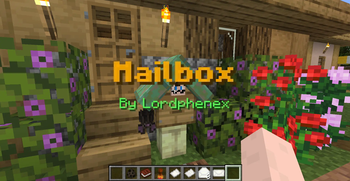
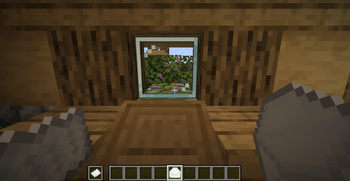
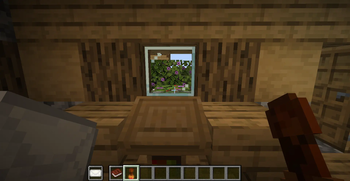
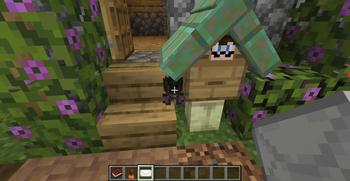
Send mail to your friend to easily communicate with them.<br> This datapack add 5 new items to allow you and your friends to exchange informations even if your are not connected at the same time : - The **Mailbox** : place this new block wherever you want in the world. You will receive your mails here. When installing your first mailbox, you will need to register yourself to the postal office by using a default stamp on the box.<br>The bat hanging from your mailbox will allow you to send mail across the server. However, bats can only transport mails that have been sealed by using a registered stamp.<br>Mailboxes can be customised by changing their stand and roof material (any fence/wall block and any slab) by right clicking their stand with the desired material in hand. To reset their default appearance, you can use shears<br><br> - The **Stamp** : craft this item with a stick, a copper ingot and some honeycomb. It will allow you to 1) register your mailbox ; 2) ensure to your friends that the mail is coming from you. This item cannot be used by other players once you register it (right click on your mailbox)<br> Right click with it while holding a filled envelope in your offhand to stamp it. Using a default stamp will result in an anonymous mail. Anonymous mail cannot be given to bats but can be put directly inside mailboxes<br><br> - The **Letter paper** : needed to write your letters. Use it like a default writable book<br><br> - The **Envelope** : needed to keep your letters safe when sending them across the server. Right click with the envelope while holding a letter in your offhand to put it inside the envelope<br><br> - The **Stamp book** : needed to choose to whom you will send the mail. Mails can also be put directly in your friends mailbox with no need of the stamp book
Send mail to your friend to easily communicate with them.
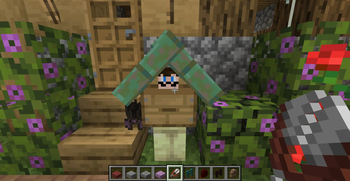
This datapack add 5 new items to allow you and your friends to exchange informations even if your are not connected at the same time : - The Mailbox : place this new block wherever you want in the world. You will receive your mails here. When installing your first mailbox, you will need to register yourself to the postal office by using a default stamp on the box. The bat hanging from your mailbox will allow you to send mail across the server. However, bats can only transport mails that have been sealed by using a registered stamp. Mailboxes can be customised by changing their stand and roof material (any fence/wall block and any slab) by right clicking their stand with the desired material in hand. To reset their default appearance, you can use shears
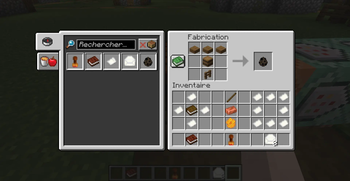
- The Stamp : craft this item with a stick, a copper ingot and some honeycomb. It will allow you to 1) register your mailbox ; 2) ensure to your friends that the mail is coming from you. This item cannot be used by other players once you register it (right click on your mailbox)
Right click with it while holding a filled envelope in your offhand to stamp it. Using a default stamp will result in an anonymous mail. Anonymous mail cannot be given to bats but can be put directly inside mailboxes
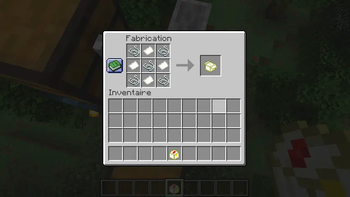
- The Letter paper : needed to write your letters. Use it like a default writable book
- The Envelope : needed to keep your letters safe when sending them across the server. Right click with the envelope while holding a letter in your offhand to put it inside the envelope
- The Stamp book : needed to choose to whom you will send the mail. Mails can also be put directly in your friends mailbox with no need of the stamp book
📊 Mod Details
- Game
- Minecraft Data Packs
- Author
- Lordphenex
- Version
- 1.20.6+_DP_V1.2.0
- Downloads
- 2,174
- Endorsements
- 4
- Category
- datapack
- Created
- 4/29/2026
- Updated
- 6/6/2026
- Game Versions
- 1.20.5, 1.20.6, 1.21, 1.21.1, 1.21.2
- Tags
- decoration, game-mechanics, management
🔧 How to Install Minecraft Data Packs Mods
Download from Modrinth. Use Prism Launcher or drop into your mods folder.
📖 Full step-by-step install guide for Minecraft Data Packs →
Visit the official mod page for specific installation instructions for this mod.
🎮 Need cheat codes or console commands? Check ur gaming wiki for Minecraft Data Packs commands, item IDs, and more.
❓ Frequently Asked Questions
Which Minecraft Data Packs versions does Mailbox support?
The author lists 1.20.5, 1.20.6, 1.21, 1.21.1, 1.21.2, 1.21.3. Other versions may work but are untested by the author.
What is the latest version of Mailbox?
Version 1.20.6+_DP_V1.2.0, published 2026-06-06 with 2,174 downloads recorded at the source.
Keep browsing — more Minecraft Data Packs mods await