LocalizedFishingTables
🟡 Updated this year🖼️ Gallery (8 images)
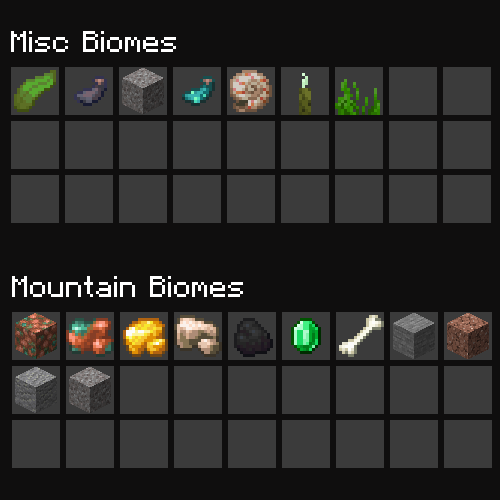
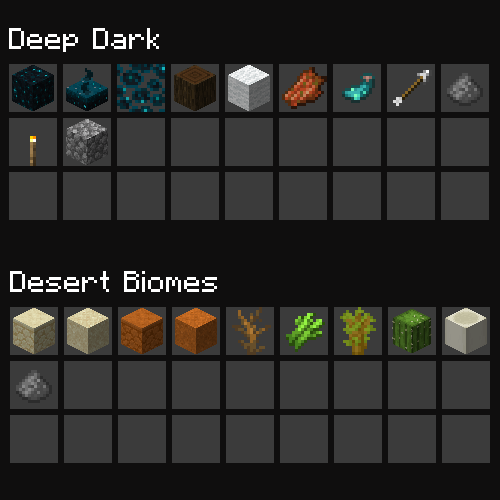
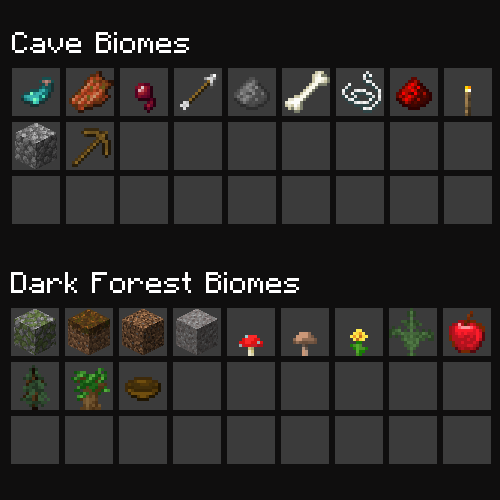
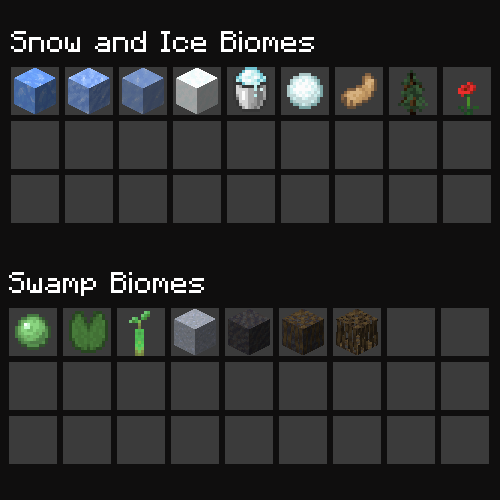
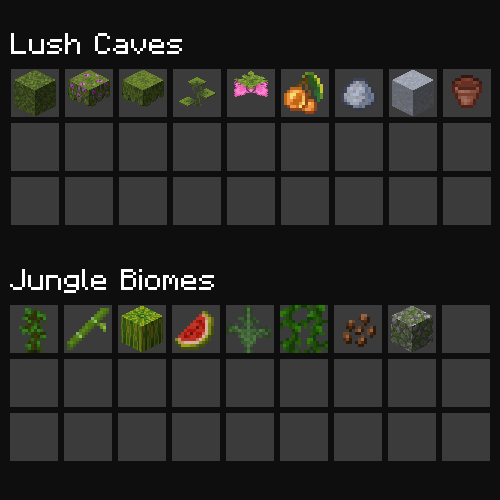
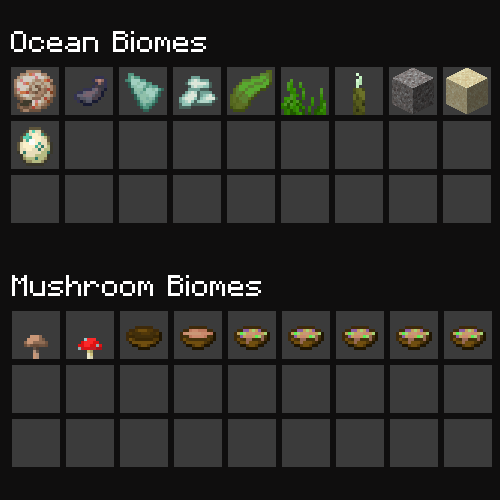
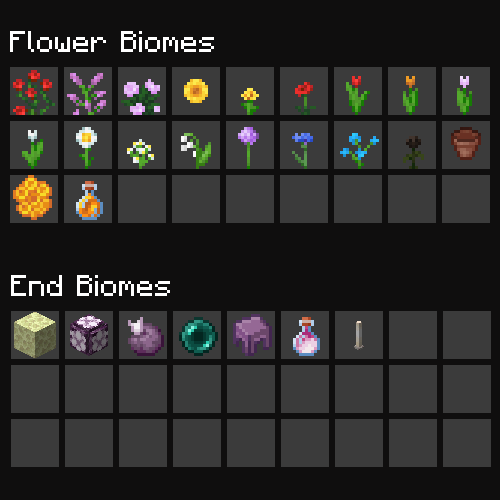
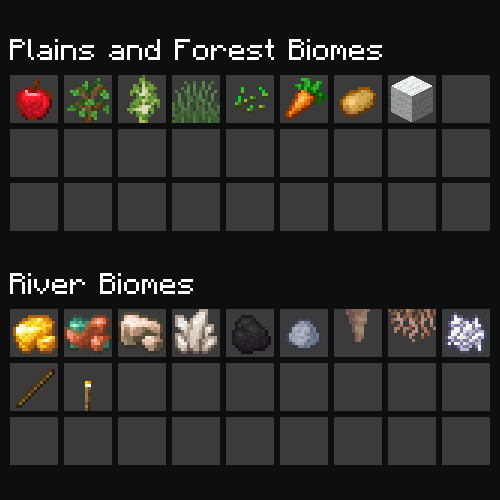
🔍 Analysis
- 👍 0.3% endorsement rate
- 🏆 #498 of 1805 datapack mods in this game by downloads
📋 About This Mod
# Biome-Specific Fishing Loot Tables This datapack adds biome-specific fishing loot tables to Minecraft, so that what can be fished up in different biomes is unique and more varied. ## Features - Biome-specific loot tables for the following biome groups: - cave_biomes - dark_forest_biomes - deep_dark - desert_biomes - end_biomes - flower_forests - jungle_biomes - lush_caves - misc_biomes - mountain_biomes - mushroom_biomes - ocean_biomes - plains_biomes - river_biomes - snow_biomes - swamp_biomes ## Note: You are still able to catch normal fishing drops as expected, this pack just adds additional drops for different biomes ## Datapack Installation - Download the datapack from the versions tab - Open your Minecraft world and click on "Edit" in the main menu. - Click on "Open World Folder" in the "Worlds" tab. - Open the "datapacks" folder and place the downloaded datapack zip file in this folder. - In-game, type the following command to enable the datapack: `/datapack enable "file/localized-fishing-tables"` > Note: > If you are using this on a multiplayer server, go to your main world, (usually 'world' if it was automatically generated) and put the datapack there, and complete the above steps. > This will enable it for all worlds. > Or, if you're using Fabric/Forge/Quilt for your multiplayer world, you can use the mod version instead ## Mod installation - Forge: Add mod file to mod folder - Fabric: Requires Fabric API - Quilt: Requires Quilted Fabric API ## Usage Once the datapack is installed and enabled, the loot tables will be automatically applied to the corresponding biomes. You can find the loot by fishing a while, or by using the /loot command. ### Configuration You can customize the loot tables by modifying the files in the `data/adhdmc/loot_tables/gameplay/fishing` folder. These files are written in the (https://minecraft.fandom.com/wiki/Loot_table) and can be edited using any text editor. ### License This datapack is licensed under the MIT License. See (https://github.com/Simplexity-Development/LocalizedFishingTables/blob/master/LICENSE) for more information.
# Biome-Specific Fishing Loot Tables
This datapack adds biome-specific fishing loot tables to Minecraft, so that what can be fished up in different biomes is unique and more varied.
## Features
- Biome-specific loot tables for the following biome groups:
- - cave_biomes
- - dark_forest_biomes
- - deep_dark
- - desert_biomes
- - end_biomes
- - flower_forests
- - jungle_biomes
- - lush_caves
- - misc_biomes
- - mountain_biomes
- - mushroom_biomes
- - ocean_biomes
- - plains_biomes
- - river_biomes
- - snow_biomes
- - swamp_biomes
## Note: You are still able to catch normal fishing drops as expected, this pack just adds additional drops for different biomes
## Datapack Installation - Download the datapack from the versions tab - Open your Minecraft world and click on "Edit" in the main menu. - Click on "Open World Folder" in the "Worlds" tab. - Open the "datapacks" folder and place the downloaded datapack zip file in this folder. - In-game, type the following command to enable the datapack: `/datapack enable "file/localized-fishing-tables"`
> Note: > If you are using this on a multiplayer server, go to your main world, (usually 'world' if it was automatically generated) and put the datapack there, and complete the above steps. > This will enable it for all worlds. > Or, if you're using Fabric/Forge/Quilt for your multiplayer world, you can use the mod version instead
## Mod installation - Forge: Add mod file to mod folder - Fabric: Requires Fabric API - Quilt: Requires Quilted Fabric API
Once the datapack is installed and enabled, the loot tables will be automatically applied to the corresponding biomes. You can find the loot by fishing a while, or by using the /loot command.
### Configuration
You can customize the loot tables by modifying the files in the `data/adhdmc/loot_tables/gameplay/fishing` folder. These files are written in the (https://minecraft.fandom.com/wiki/Loot_table) and can be edited using any text editor.
### License
This datapack is licensed under the MIT License. See (https://github.com/Simplexity-Development/LocalizedFishingTables/blob/master/LICENSE) for more information.
📊 Mod Details
- Game
- Minecraft Data Packs
- Author
- Rhythmic
- Version
- 3.1.0
- Downloads
- 34,904
- Endorsements
- 90
- Category
- datapack
- Created
- 1/15/2023
- Updated
- 7/2/2026
- Game Versions
- 1.21.9, 1.21.10, 1.21.11, 26.1, 26.1.1
- Tags
- food, game-mechanics, mobs
🔧 How to Install Minecraft Data Packs Mods
Download from Modrinth. Use Prism Launcher or drop into your mods folder.
📖 Full step-by-step install guide for Minecraft Data Packs →
Visit the official mod page for specific installation instructions for this mod.
🎮 Need cheat codes or console commands? Check ur gaming wiki for Minecraft Data Packs commands, item IDs, and more.
❓ Frequently Asked Questions
Which Minecraft Data Packs versions does LocalizedFishingTables support?
The author lists 1.21.9, 1.21.10, 1.21.11, 26.1, 26.1.1, 26.1.2. Other versions may work but are untested by the author.
What is the latest version of LocalizedFishingTables?
Version 3.1.0, published 2026-07-02 with 34,904 downloads recorded at the source.
Keep browsing — more Minecraft Data Packs mods await