Level = Attributes
🟠 Updated over a year ago🖼️ Gallery (3 images)

🔍 Analysis
- 👍 0.4% endorsement rate
- 🏆 #185 of 194 cursed mods in this game by downloads
📋 About This Mod
# Level = Attributes This datapack links each player's attributes to their current experience level. Each time you gain or lose an experience level, your player's attributes will increase or decrease by a certain amount. This datapack also works on multiplayer servers! ## Attributes Attributes are values which dictate certain properties of mobs, specifically players for this datapack. 18 attributes are utilised in this datapack: - `scale` - `max_health` - `max_absorption` - `knockback_resistance` - `movement_speed` - `attack_damage` - `armor` - `armor_toughness` - `step_height` - `attack_speed` - `luck` - `block_interaction_range` - `entity_interaction_range` - `gravity` - `safe_fall_distance` - `fall_damage_multiplier` - `block_break_speed` - `jump_strength` You can learn more about each attribute (https://minecraft.wiki/w/Attribute). ## Configuration To access the configuration scoreboard, run the command `/scoreboard objectives setdisplay sidebar level_attributes_config`. Here you can configure which attributes you want to enable/disable and set a custom max level. Do note that not all attributes are displayed on the scoreboard at once as there are too many attributes. !(https://cdn.modrinth.com/data/cached_images/ae449e9d0cd753f79b41199fa7a5c1eece4119e2.png) ### Enabling/disabling Attributes Enabling an attribute links it to your current xp level while disabling unlinks it. All attributes are enabled by default. Enabling: `/scoreboard players set <attribute_name> level_attributes_config 1`\ Disabling: `/scoreboard players set <attribute_name> level_attributes_config 0` ### Setting Custom Max Level `max_level` refers to the maximum xp level that each enabled attribute will scale towards. This means the higher the `max_level`, the slower each attribute increases towards its max value with each xp level gained. The default `max_level` is set to 1000. To customise it, run `/scoreboard players set max_level level_attributes_config <level>`. Valid values are integers between 10 and 1,000,000. Setting a value outside this range may break the datapack! ## Other Things To Note... - Run the command `/trigger level_attributes_list` to see the current values of all your player's attributes. - If you want to remove the datapack, run the command `/function level_attributes:uninstall` and then disable/delete the datapack --- This datapack was originally inspired by (https://modrinth.com/plugin/level-border) and the newly added attributes in Minecraft Snapshot (https://minecraft.wiki/w/Java_Edition_23w51a#General:~:text=it%20will%20unroll.-,General,-%5Bedit%20%7C).
# Level = Attributes This datapack links each player's attributes to their current experience level. Each time you gain or lose an experience level, your player's attributes will increase or decrease by a certain amount. This datapack also works on multiplayer servers!
## Attributes Attributes are values which dictate certain properties of mobs, specifically players for this datapack. 18 attributes are utilised in this datapack: - `scale` - `max_health` - `max_absorption` - `knockback_resistance` - `movement_speed` - `attack_damage` - `armor` - `armor_toughness` - `step_height` - `attack_speed` - `luck` - `block_interaction_range` - `entity_interaction_range` - `gravity` - `safe_fall_distance` - `fall_damage_multiplier` - `block_break_speed` - `jump_strength`
You can learn more about each attribute (https://minecraft.wiki/w/Attribute).
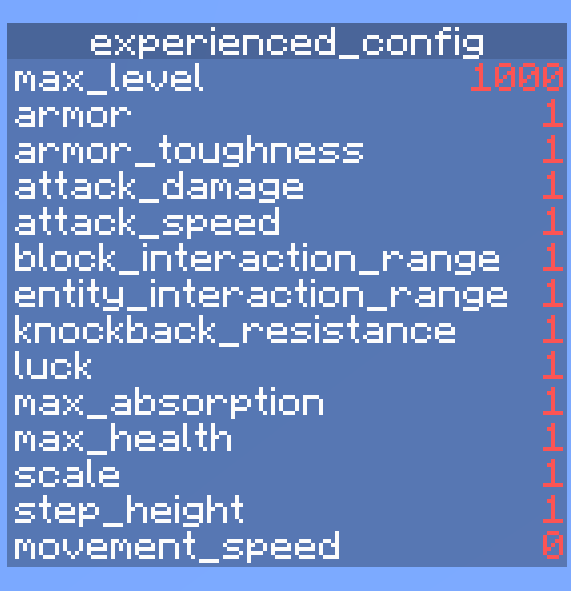
## Configuration To access the configuration scoreboard, run the command `/scoreboard objectives setdisplay sidebar level_attributes_config`. Here you can configure which attributes you want to enable/disable and set a custom max level. Do note that not all attributes are displayed on the scoreboard at once as there are too many attributes.
!(https://cdn.modrinth.com/data/cached_images/ae449e9d0cd753f79b41199fa7a5c1eece4119e2.png)
### Enabling/disabling Attributes Enabling an attribute links it to your current xp level while disabling unlinks it. All attributes are enabled by default.
Enabling: `/scoreboard players set
### Setting Custom Max Level
`max_level` refers to the maximum xp level that each enabled attribute will scale towards. This means the higher the `max_level`, the slower each attribute increases towards its max value with each xp level gained. The default `max_level` is set to 1000. To customise it, run `/scoreboard players set max_level level_attributes_config
## Other Things To Note... - Run the command `/trigger level_attributes_list` to see the current values of all your player's attributes. - If you want to remove the datapack, run the command `/function level_attributes:uninstall` and then disable/delete the datapack
- --
- This datapack was originally inspired by (https://modrinth.com/plugin/level-border) and the newly added attributes in Minecraft Snapshot (https://minecraft.wiki/w/Java_Edition_23w51a#General:~:text=it%20will%20unroll.-,General,-%5Bedit%20%7C).
📊 Mod Details
- Game
- Minecraft Data Packs
- Author
- Ninjaking312
- Version
- 1.0.2
- Downloads
- 784
- Endorsements
- 3
- Category
- cursed
- Created
- 1/1/2024
- Updated
- 10/23/2024
- Game Versions
- 1.21.2, 1.21.3, 1.21.4, 1.21.5, 1.21.6
- Tags
- cursed, game-mechanics
🔧 How to Install Minecraft Data Packs Mods
Download from Modrinth. Use Prism Launcher or drop into your mods folder.
📖 Full step-by-step install guide for Minecraft Data Packs →
Visit the official mod page for specific installation instructions for this mod.
🎮 Need cheat codes or console commands? Check ur gaming wiki for Minecraft Data Packs commands, item IDs, and more.
❓ Frequently Asked Questions
Which Minecraft Data Packs versions does Level = Attributes support?
The author lists 1.21.2, 1.21.3, 1.21.4, 1.21.5, 1.21.6, 1.21.7. Other versions may work but are untested by the author.
What is the latest version of Level = Attributes?
Version 1.0.2, published 2024-10-23 with 784 downloads recorded at the source.
Keep browsing — more Minecraft Data Packs mods await