Leaderboard api 1.21-1.21.10
🟡 Updated this year🖼️ Gallery (1 images)
🔍 Analysis
- 🏆 #1985 of 2046 datapack mods in this game by downloads
📋 About This Mod
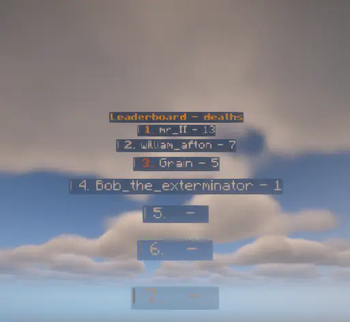
# PLS READ THIS <details> <summary>How to use</summary> <details> <summary>Commands</summary> do in game: ``` /function highscore:leaderboard/copy.example ``` to get access to all of the commands that you can do. </details> <details> <summary>Summoning</summary> Please note that you can summon multiple leaderboards in the worlds even with the same score name. However thier stats wont transfer from one to the other. As of right now, there are two summoning commands summon_10 (Always summon 10 slots to the leaderboard) summon (allows you to customize the amount of slots in the leaderboard) **example for summon_10:** ``` /function highscore:leaderboard/summon_10 {"score":"deaths",billboard:"center","toptolow":1,"format":"default"} ``` **example for summon:** ``` function highscore:leaderboard/summon {"score":"deaths",billboard:"center","toptolow":1,"format":"default","slots":5} ``` **the macros and what they do** 1. the format will control how the leaderboard will look (there are 2 options format1 (clean version) and default (a bit customized version) You can also add your own formats (see formats in order to learn how)) example: ,"format":"format1" 2. if you change the function to be "/function highscore:leaderboard/summon" then there is a another macro you gotta add "slots" and right after the amount of slots you want the leaderboard to have example: ,"slots":5 3. billboard, changes how the leaderboard faces the players see (https://minecraft.wiki/w/Display#Item_Displays/root_tag) but basically "center" means always faces the player, "horizontal" faces the player in the vertical plane, "vertical" faces the player in the horizontal plane, "fixed" always faces the same direction example: ,"billboard":"fixed" 4. score, this determines what score this leaderboard is gonna grab from the player so if it will be kills, for example, it will grab how much kills the player has in the "kills" scoreboard objective. for example: ,"score":"kills" 5. toptolow, this determines if the leaderboard sort this via highest (top of the leaderboard to low (lowest on the leaderboard) or low to highest (same thing as the other but oppesite) for example if you want to sort the scores via highest to low you gotta do: ,"toptolow":1 . and if you want it to sort via lowest to highest you gotta do: ,"toptolow":0 . </details> <details> <summary>Kill leaderboards</summary> there three commands to killing a leaderboard: 1 ``` /function highscore:leaderboard/kill.all ``` Kills all leaderboards in the world. 2 ``` /function highscore:leaderboard/kill.nearest ``` Kills the nearest leaderboard to you 3 ``` /function highscore:leaderboard/kill.score {"score":"deaths"} ``` Kills all leaderboards with the same score name </details> <details> <summary>adding player's to the leaderboard</summary> **- in order to add a player:** ``` /function highscore:add_player/start {"score":"deaths"} ``` You gotta run this function **as the player** and this will add the player to every single leaderboard that has the same "score" name (this also controls from what scoreboard objective it will grab from) so if its {"score":"deaths"} this will grab your scoreboard objective of "deaths" to leaderboard that have the same "score" name. **- in order to add fake players you can do:** ``` /execute at @s as @n at @s run function highscore:parts/orginize1/start {"name":"#nothing","score":"deaths","score_num":1} ``` the name will be the fake player's name so if you want to change the name to be brain you gotta change "name":"#nothing", to be "name":"brain", score controls the score it aint needed (i think) but just make things clearer for example: ,"score": "kills" for the leaderboard kills score num determines thier score, for example: ,"score_num": 1 *Please note that this will only add the score to the closest leadeboard if you want a certain leaderboard to run this then you gotta run the function below as it *also, if you want it to sort for lowest to highest then change the function name to ``` function highscore:parts/orginize2/start <macroes here> ``` **- in order to make players automaticlly add thier own score you gotta do:** you gotta run in your tick.mcfunction (or main.mcfunction or a repeating command block) as the players (@a) the next command: ``` execute unless score @s z.leaderboard.copy.<score name here> = @s <score name here> run function highscore:refresh_score/sync_init {"score":"<score name here>","score1":"z.leaderboard.<score name here>"} ``` this will refresh the player into every leaderboard with the same score name. and just replace <score name here> with your score's name. *please note that in the function "highscore:player_tick", 4th line, there is one for deaths (if you are struggling to get your own
# PLS READ THIS
How to use
Commands
do in game:
``` /function highscore:leaderboard/copy.example ```
to get access to all of the commands that you can do.
Summoning
Please note that you can summon multiple leaderboards in the worlds even with the same score name. However thier stats wont transfer from one to the other.
As of right now, there are two summoning commands
summon_10 (Always summon 10 slots to the leaderboard)
summon (allows you to customize the amount of slots in the leaderboard)
example for summon_10:
``` /function highscore:leaderboard/summon_10 {"score":"deaths",billboard:"center","toptolow":1,"format":"default"} ```
example for summon:
``` function highscore:leaderboard/summon {"score":"deaths",billboard:"center","toptolow":1,"format":"default","slots":5} ```
the macros and what they do 1. the format will control how the leaderboard will look (there are 2 options format1 (clean version) and default (a bit customized version) You can also add your own formats (see formats in order to learn how)) example: ,"format":"format1"
2. if you change the function to be "/function highscore:leaderboard/summon" then there is a another macro you gotta add "slots" and right after the amount of slots you want the leaderboard to have example: ,"slots":5
3. billboard, changes how the leaderboard faces the players see (https://minecraft.wiki/w/Display#Item_Displays/root_tag) but basically "center" means always faces the player, "horizontal" faces the player in the vertical plane, "vertical" faces the player in the horizontal plane, "fixed" always faces the same direction example: ,"billboard":"fixed"
4. score, this determines what score this leaderboard is gonna grab from the player so if it will be kills, for example, it will grab how much kills the player has in the "kills" scoreboard objective. for example: ,"score":"kills"
5. toptolow, this determines if the leaderboard sort this via highest (top of the leaderboard to low (lowest on the leaderboard) or low to highest (same thing as the other but oppesite)
for example if you want to sort the scores via highest to low you gotta do: ,"toptolow":1 .
and if you want it to sort via lowest to highest you gotta do: ,"toptolow":0 .
Kill leaderboards
there three commands to killing a leaderboard:
1 ``` /function highscore:leaderboard/kill.all ``` Kills all leaderboards in the world.
2 ``` /function highscore:leaderboard/kill.nearest ``` Kills the nearest leaderboard to you
3 ``` /function highscore:leaderboard/kill.score {"score":"deaths"} ``` Kills all leaderboards with the same score name
adding player's to the leaderboard
- in order to add a player:
``` /function highscore:add_player/start {"score":"deaths"} ```
You gotta run this function as the player and this will add the player to every single leaderboard that has the same "score" name (this also controls from what scoreboard objective it will grab from) so if its {"score":"deaths"} this will grab your scoreboard objective of "deaths" to leaderboard that have the same "score" name. - in order to add fake players you can do:
``` /execute at @s as @n at @s run function highscore:parts/orginize1/start {"name":"#nothing","score":"deaths","score_num":1} ``` the name will be the fake player's name so if you want to change the name to be brain you gotta change "name":"#nothing", to be "name":"brain", score controls the score it aint needed (i think) but just make things clearer for example: ,"score": "kills" for the leaderboard kills
score num determines thier score, for example: ,"score_num": 1
Please note that this will only add the score to the closest leadeboard if you want a certain leaderboard to run this then you gotta run the function below as it
also, if you want it to sort for lowest to highest then change the function name to
```
function highscore:parts/orginize2/start
- - in order to make players automaticlly add thier own score you gotta do:
- you gotta run in your tick.mcfunction (or main.mcfunction or a repeating command block) as the players (@a) the next command:
```
execute unless score @s z.leaderboard.copy.
this will refresh the player into every leaderboard with the same score name.
and just replace
*please note that in the function "highscore:player_tick", 4th line, there is one for deaths (if you are struggling to get your own
📊 Mod Details
- Game
- Minecraft Data Packs
- Author
- mr_II
- Version
- v1.12
- Downloads
- 222
- Endorsements
- 3
- Category
- datapack
- Created
- 10/9/2024
- Updated
- 10/17/2025
- Game Versions
- 1.21.5, 1.21.6, 1.21.7, 1.21.8, 1.21.9
🔧 How to Install Minecraft Data Packs Mods
Download from Modrinth. Use Prism Launcher or drop into your mods folder.
📖 Full step-by-step install guide for Minecraft Data Packs →
Visit the official mod page for specific installation instructions for this mod.
🎮 Need cheat codes or console commands? Check ur gaming wiki for Minecraft Data Packs commands, item IDs, and more.
❓ Frequently Asked Questions
Which Minecraft Data Packs versions does Leaderboard api 1.21-1.21.10 support?
The author lists 1.21.5, 1.21.6, 1.21.7, 1.21.8, 1.21.9, 1.21.10. Other versions may work but are untested by the author.
What is the latest version of Leaderboard api 1.21-1.21.10?
Version v1.12, published 2025-10-17 with 222 downloads recorded at the source.
Keep browsing — more Minecraft Data Packs mods await