Kinda Winter Mode - Vanilla Foliage
🟢 Updated this month🖼️ Gallery (8 images)
🔍 Analysis
- 🏆 #189 of 420 adventure mods in this game by downloads
📋 About This Mod
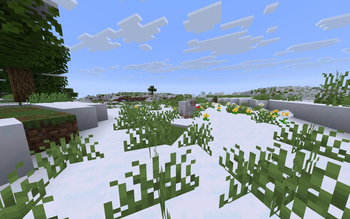
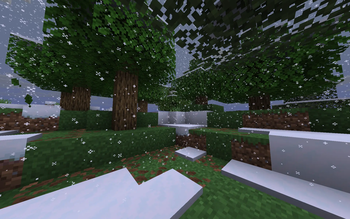
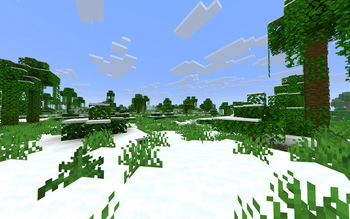
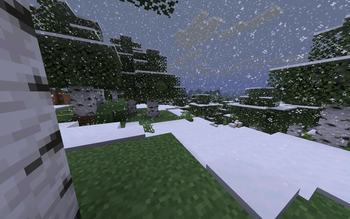
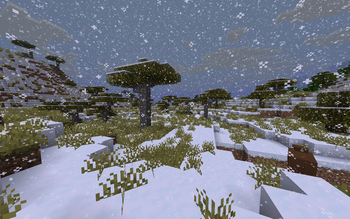
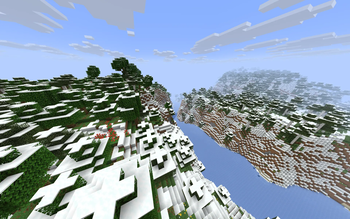
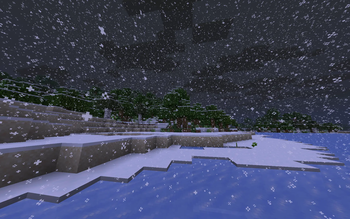
Vanilla terrain generation but with a lot of ice and snow, AND vibrant vanilla foliage!
!(https://cdn.modrinth.com/data/cached_images/b6de92e5dbe4bd0b3fdb634f8ce390e1fb9748bc.png)
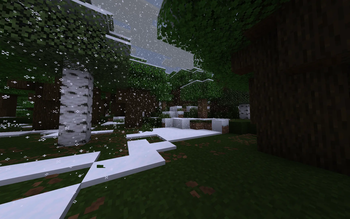
Kinda Winter Mode is a world generation datapack that transform your vanilla world into a snowy, icey and winter theme world by setting all non-cold biomes, oceans and caves' temperature to 0. 0. This version overrides the teal-ish hue based on biome temperature with the more vibrant vanilla foliage colour we all know and love.
Inspired by the short-lived Alpha version's Winter Mode, this time on modern Minecraft version! (26.*+)
## Features: - Snow everywhere! - Frozen surface water! - Moody atmosphere! - Colourful biome-based grass and foliage! - Absolutely no other gameplay changes (hopefully)
## Compatibility Compatible with any structures, world preset datapacks
Incompatible with datapacks or mods that overrides vanilla generation. Ex: (https://modrinth.com/datapack/geophilic)
## Recommended! - (https://modrinth.com/mod/better-snow-coverage) - (https://modrinth.com/mod/snow-under-trees-remastered) or (https://modrinth.com/mod/snow-under-trees)
## Loves the boring teal hue being everywhere? Check out (https://modrinth.com/datapack/kinda-winter-mode)!
DO NOT RUN THOSE DATAPACKS TOGETHER, for they both replace vanilla world generation
## Extra
- Want more snow pilling up your world?
Try ```/gamerule max_snow_accumulation_height
- Want eternal snowy weather?
Do ``` /weather rain ``` or ``` /weather thunder ``` Then Disable weather cycle using ``` /gamerule advance_weather false ```
- Don't want frozen ocean/lake/river?
Remove .json file of the corresponded biome in ```data\minecraft\worldgen\biome``` inside the datapack
- Adding/updating (and removing) the datapack to existing world/map
Notes: Remember to back up/make a copy of your world!
Open ```saves``` folder of your Minecraft instance, find your world, put the datapack in your ```datapacks``` folder. Afterwards, launch the game and enter your world, type ```/datapack enable
If you're tired of "winter mode", you can use ```/datapack disable``` and delete the datapack from the ```datapacks``` folder, then rejoin your world. (Disabling it should theoretically be safe, as my datapack only modify vanilla biomes temperature, precipitation and foliage colours. Disabling it would revert them to vanilla biome rules). But the snow on the ground won't melt naturally, so have fun cleaning them up! (or you can just use ```/fill``` command)
📊 Mod Details
- Game
- Minecraft Data Packs
- Author
- asapacey2
- Version
- 26.3-pre-1
- Downloads
- 38
- Endorsements
- 0
- Category
- adventure
- Created
- 8/1/2026
- Updated
- 9/5/2026
- Game Versions
- 26.3-snapshot-10
- Tags
- adventure, game-mechanics, worldgen
🔧 How to Install Minecraft Data Packs Mods
Download from Modrinth. Use Prism Launcher or drop into your mods folder.
📖 Full step-by-step install guide for Minecraft Data Packs →
Visit the official mod page for specific installation instructions for this mod.
🎮 Need cheat codes or console commands? Check ur gaming wiki for Minecraft Data Packs commands, item IDs, and more.
❓ Frequently Asked Questions
Which Minecraft Data Packs versions does Kinda Winter Mode - Vanilla Foliage support?
The author lists 26.3-snapshot-10. Other versions may work but are untested by the author.
What is the latest version of Kinda Winter Mode - Vanilla Foliage?
Version 26.3-pre-1, published 2026-09-05 with 38 downloads recorded at the source.
Keep browsing — more Minecraft Data Packs mods await